-
Written By Rohit Singh
-
Updated on August 13th, 2026
How to Import PST to Online Archive Office 365? [2026 Guide]
Fact-checked and reviewed in accordance with our
Editorial Policy
| “Hi, can anyone suggest an easy solution to me to import PST files into Online Archive Office 365 except for using the Import wizard within Outlook? This process is good but time-consuming and hectic for non-tech users. So, I want to find a possible solution for this migration without hampering my original data. If a solution prevails, kindly help!” – Camille Trans, Kenya |
PST emails contain a lot of crucial Outlook data. However, when they become oversized with continuous data storage, it becomes difficult to manage them. On the other hand, managing mailboxes is also a critical challenge for M365 admins in this technological era. With continuous changes and transitions, users often find themselves with a need to import PST to Online Archive for managing historical data more effectively. In this guide, find out a free way and the dedicated Cigati PST to Office 365 Migration Tool for reliable data import with no loss or downtime.
Why Do Users Import PST to Office 365 Archive Mailbox?
Whether an employee is offboarding, performing legacy migrations from Exchange, or handling projects, all of them contain historical archives in PSTs. Whereas an Online Archive is a mailbox within a user’s M365 account handling older or infrequently accessed emails for mailbox optimization. It offers several benefits that cannot be utilized with local PST files, such as:
- Cloud storage and automatic backups
- Central administration and legal support
- Secure access from different devices
- Better regulatory governance
- Improved performance with free primary space
- Centralized management with reduced local dependency
- Consolidated data within one space meeting standards
| Prerequisites for PST to Online Archive Migration Before you proceed with the migration using free or paid software, ensure the following: Assign appropriate licences for Online Archive users Provide Exchange Admin and Microsoft Purview permissions Repair any corrupted PST files if they exist Remove the duplicate entries and verify the data integrity Organize PSTs and ensure you have enough storage space |
Cost-Free Import PST to Online Archive Office 365
There are two manual methods for importing PST files to the Online mailbox within Office 365. You may need admin credentials for them and an active MS Outlook profile. To know more, go through the step-by-step guide as mentioned below.
Method 1: Transfer PST to Online Archive via Microsoft Import
Using Microsoft Purview, you get a built-in import feature to make the import. It is suitable if you are an ID admin moving emails for multiple users. The steps to follow here are:
- Sign in to the Microsoft Purview Portal and go to Data Lifecycle Management.
- Click Import and create a new PST Import Job.
- Download the Azure AzCopy utility and copy the SAS URL.
- Next, upload PST files with it and ship the encrypted drives.
- Further, prepare a CSV mapping file and link PSTs with target mailboxes.
- Validate the mapping and, later, start your PST Import Job.
- Monitor the status in the progress dashboard until it completes.
Note: Limit the size of the individual PST files to 20 GB before the import. It helps prevent timeouts and corruption.
| Pros: Native solution by MicrosoftHandles large enterprise data Can be used for large imports Secure uploads on the cloud | Cons: Multi-step process You need technical knowledge CSV mapping results in errorsLarge files take a long time |
Method 2: Import PST to Online Archive by Outlook
Individual users with smaller or a few PST files can follow this method with an active Microsoft Outlook profile. You do not need an IT intervention here. Steps are:
- Open Outlook and ensure your Online Archive mailbox is connected.
- Then, from File, proceed with the Open and Export and Import/Export wizard.
- Opt for Import from another program or file and click the Next button.
- Further, choose Outlook Data File (.pst) and browse for your PST.
- Select how you want to handle the duplicates and click Next.
- Afterward, pick the Online Archive mailbox for storing the data.
- Finally, tap Finish to start the process and transfer the files.
| Pros: Suited for a single user Handles small PSTs well Needs no external tool | Cons: Active Outlook is requiredNot for large multiple imports Cannot process damaged PSTs |
Risk-Free Upload PST to Online Archive Mailbox
Individual users, organizations, or enterprises who are not comfortable with the manual methods can opt for the Cigati PST to Office 365 Migration Tool. This software allows users to import hundreds, thousands, or even large PST archives in batches directly within Office 365 archive mailboxes. It also provides a reliable way to import PST to Exchange Online while preserving folder hierarchy, metadata, and email integrity. Also, it keeps the entire folder hierarchy, data fidelity, and metadata intact while using multiple custom filters for dedicated imports. With no dependency on MS Outlook, it proves to be a preferred user choice for import in a few simple clicks.
Steps to Import PST to Online Archive Office 365
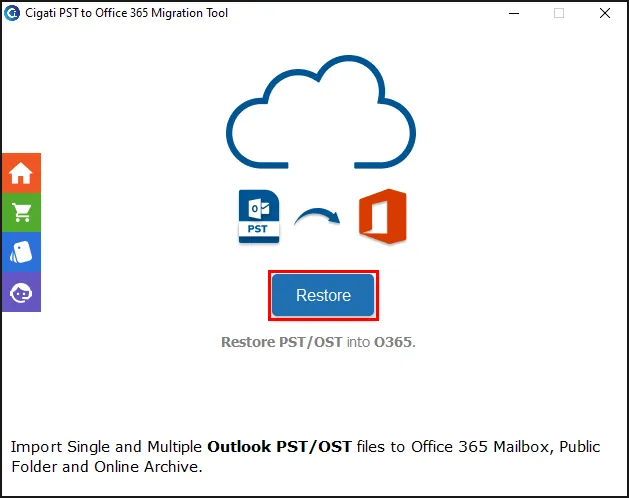
- Launch the PST to Office 365 Migrator Tool and click Restore >> Continue.
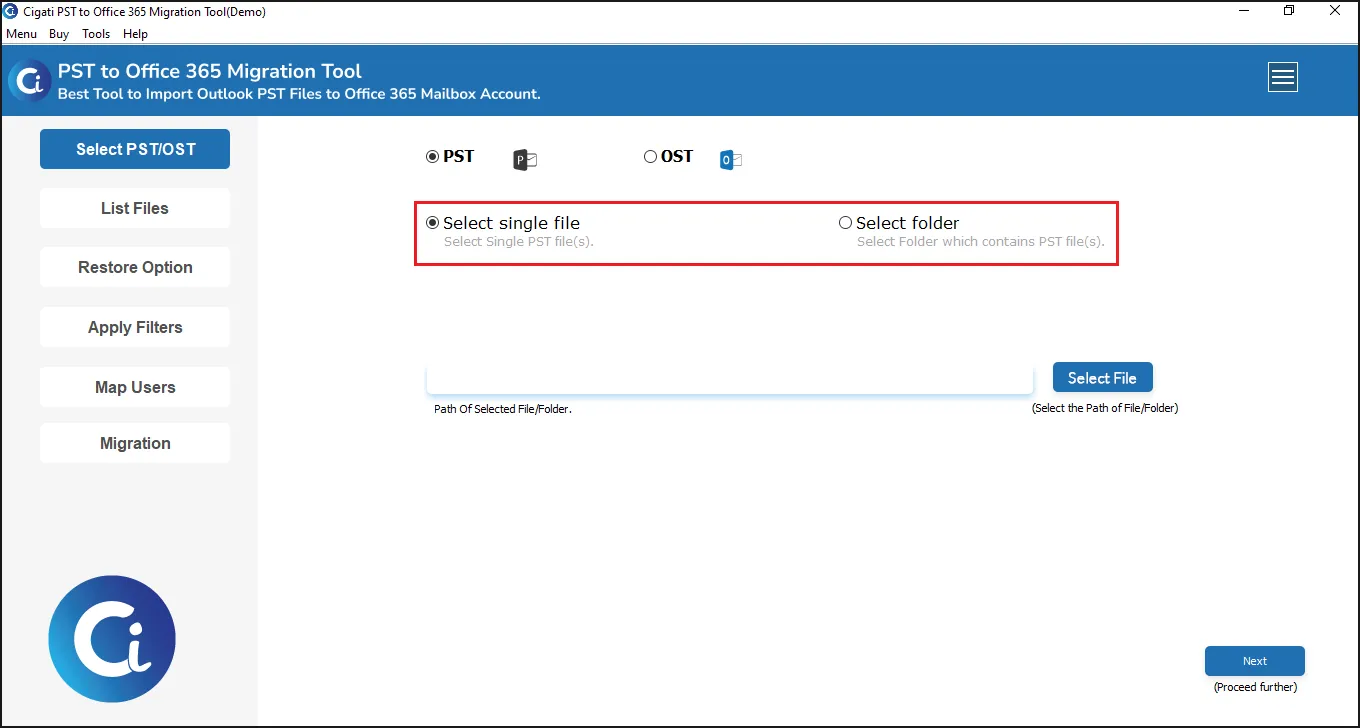
- Then, choose the PST, your file type, and open it. Click the Next button.
- Afterward, choose Office 365 and sign in with modern authentication.
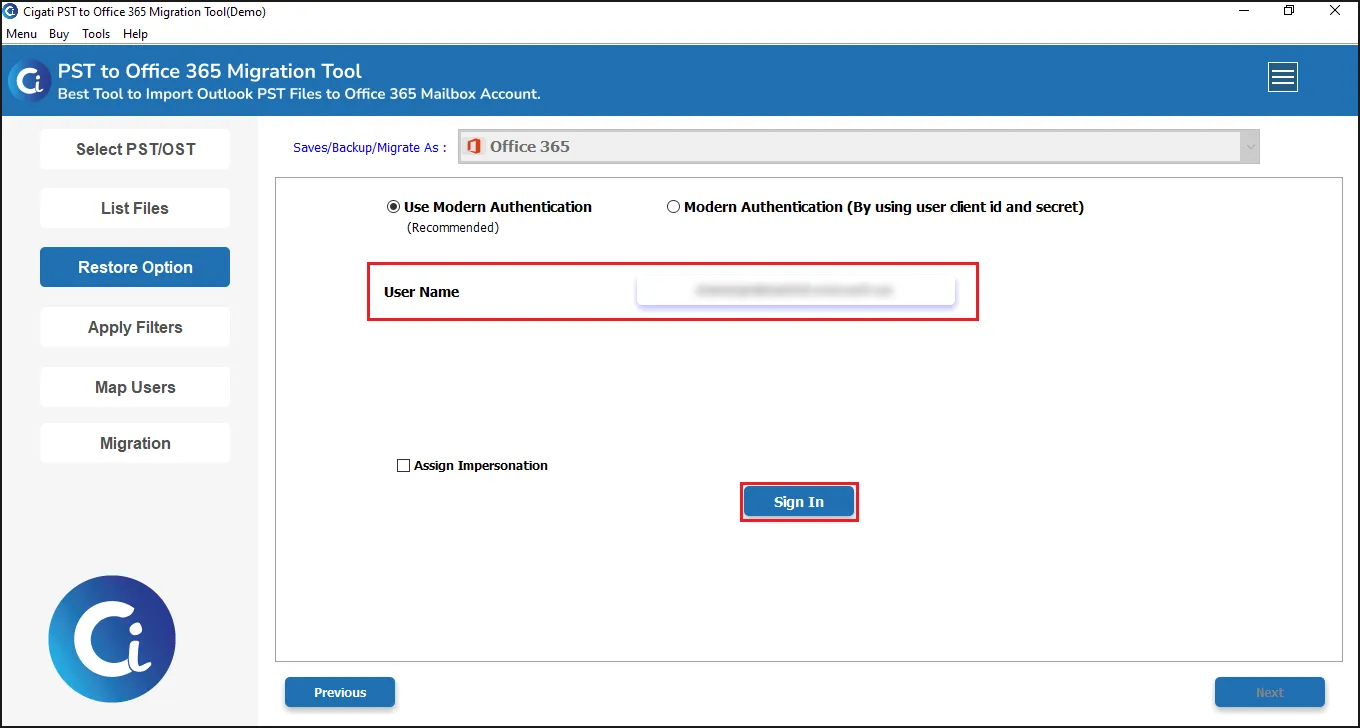
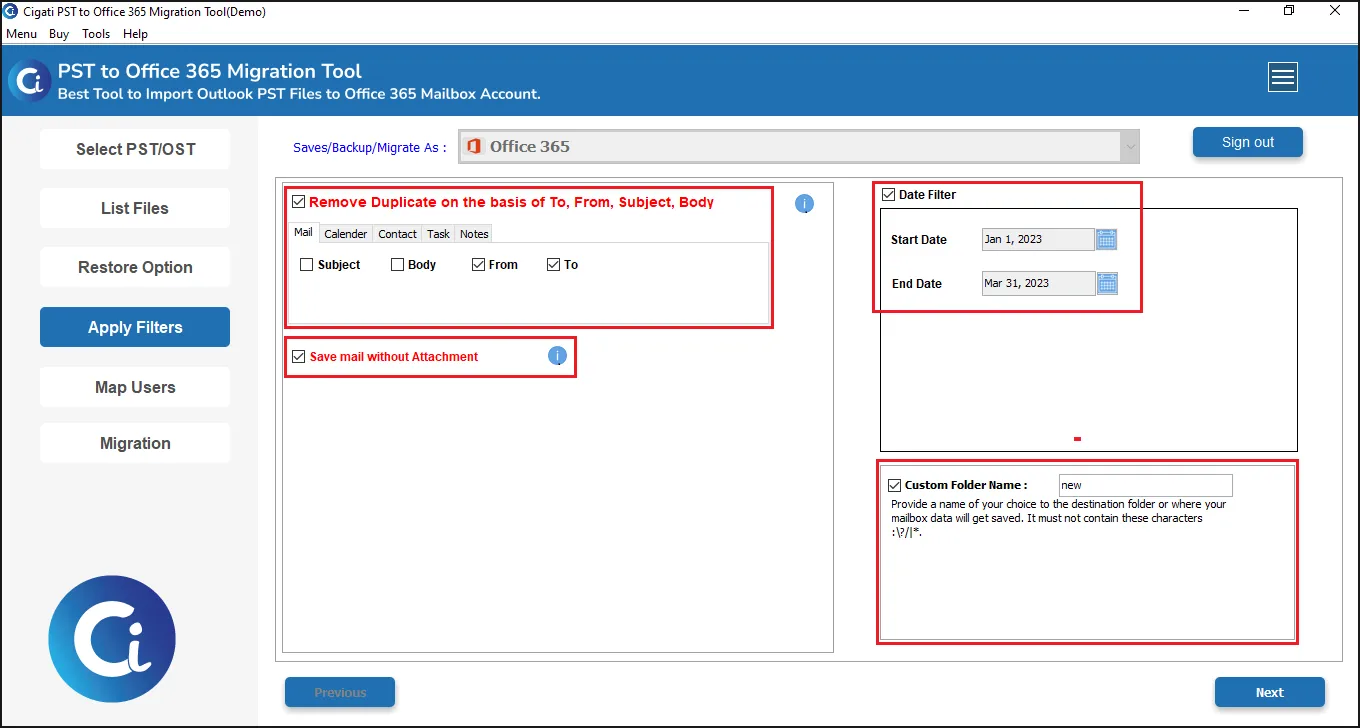
- Select the filters and how you want to manage files. Click Next.
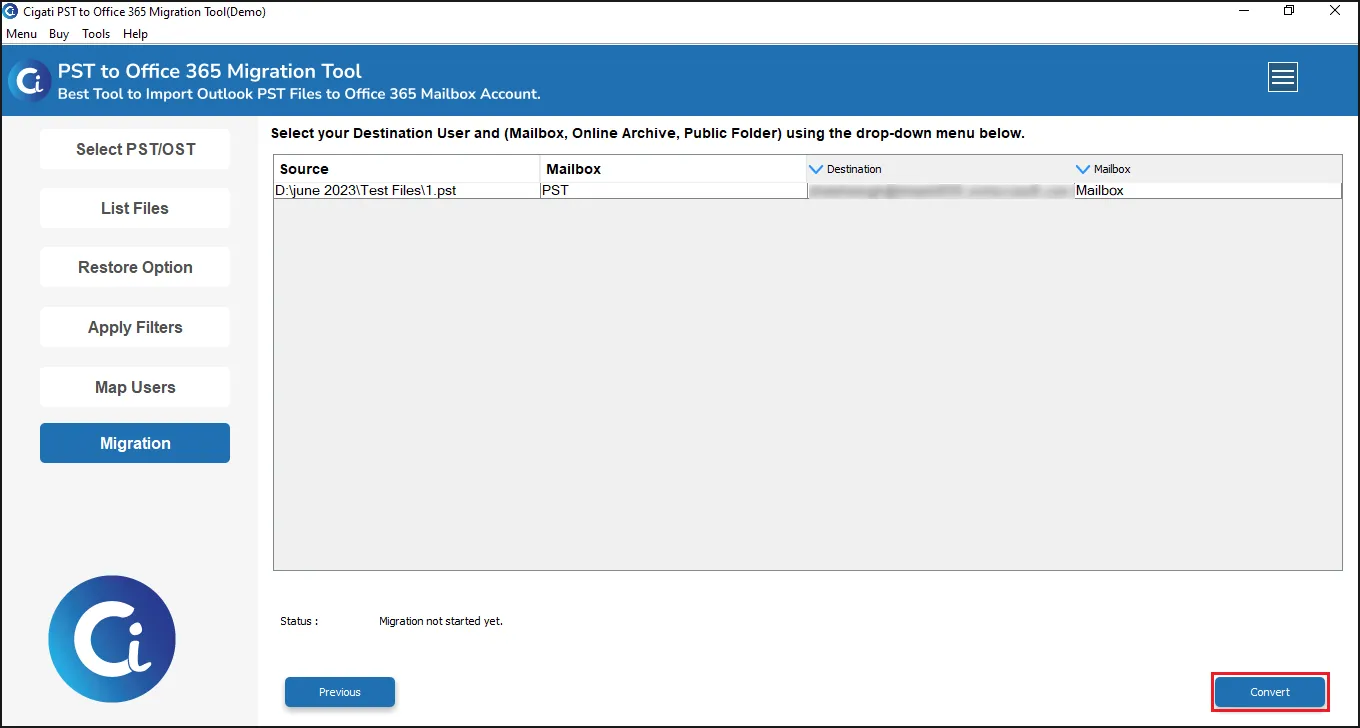
- Now, map the users, click Next, check the source and destination, and tap Convert.
Why Enterprises Trust Cigati PST to Microsoft 365 Migrator?
Enterprises believe this software to be a top-notch choice for every techie or non-techie because:
- Handles very large, voluminous datasets in GBs and TBs
- Reduces administrative effort for IT admins and users
- No Outlook dependency and safe authentication with no server uploads
- Read-only access to files and complete data preservation
- Direct automated mapping and advanced filtering
- Handles duplicates, attachments, and is quick
- Demo version for free import of 50 emails/folder
It is a structured and straightforward solution ensuring data and downtime are managed with no losses.
| Real World Scenario A large-sized financial services company had accumulated several PST files from 15 employee laptops and network drives. To avoid unmanaged 2500+ archived emails, the IT team created Online Archive mailboxes for each employee and moved PST data using Cigati PST to Office 365 Tool. This created a central repository for all archived emails and improved Outlook performance for users. Also, the team streamlined compliance audit processes and helped remove security risks related to PST files on local hard drives. |
Final Remarks
Effectively modernizing legacy email storage is possible when you import PST to Online Archive mailboxes with reliable solutions. Although you can manually import PST files using Microsoft Outlook. Also, if there are a large number of PST files to retrieve, you will most likely need to use Microsoft’s Import Open Services, but these methods aren’t suitable for sensitive and business-critical data. So, instead, opt for the Ciagti PST to Office 365 Migration Tool to facilitate transferring from a large user base at once without any data loss or hassle.
You May Also Read:
Frequently Asked Questions
Q1. How can I securely import PST files to Online Archive Office 365?
Ans. You have three primary options for importing .pst files into Online Archive. Use Microsoft’s PST Import Service or Outlook’s Import/Export Wizard; this can only be done on a per-mailbox basis. The last option is to use a professional PST to Office 365 Migration Tool for bulk importing files in a single go.
Q2. Can I import multiple PST files into an Online Archive Microsoft Office 365 mailbox simultaneously?
Ans. Yes, both Microsoft’s Import Service and Cigati PST to Microsoft 365 Migration Tool allow you to perform batch imports on multiple PST files and mailboxes.
Q3. Will the original folder structure of PST remain intact after the migration?
Ans. Yes, Microsoft Purview Portal and PST Migrator will retain the folder structure, along with email metadata, timestamps, and attachments.
Q4. Can I import large PSTs into an Online Archive Microsoft Office 365 mailbox?
Ans. Yes, you can import large files into Online Archive mailboxes as long as you have enough available archive storage space. Use the PST to Office 365 Migration Tool by Cigati to support importing large datasets.
Q5. How do I prevent duplicate emails from being imported?
Ans. When you transfer PST files into an Online Archive mailbox, you should choose PST to Microsoft 365 Migrator. It has a remove duplicate feature that allows you to skip similar PST files before the migration on a multiple basis.
About The Author:

Rohit Singh is a technology professional with 7+ years of experience specializing in email systems, Exchange Server, Office 365, MS Outlook, and data migration solutions. He creates clear, practical, and solution-oriented content to help users and IT professionals resolve complex technical challenges efficiently.
Related Post