-
Written By Rohit Singh
-
Updated on July 6th, 2026
Cost-Effective Office 365 Tenant to Tenant Migration Solution
Fact-checked and reviewed in accordance with our
Editorial Policy
| User Query: “We’re planning a cross-tenant migration after our company merger. We need to migrate mailboxes, OneDrive, and SharePoint without causing downtime or losing data. There are many migration solutions available, so it’s difficult to know which one is the right choice. We’re looking for a tool that’s easy to use, supports batch migration, and keeps the migration cost under control. Has anyone been through this process and can recommend a reliable solution?” |
An Office 365 Tenant to Tenant Migration can become expensive if you rely on manual methods or high-cost migration platforms. That’s why many businesses look for a solution that is simple, reliable, and budget-friendly. The Cigati Microsoft 365 Tenant to Tenant Migration Tool makes the process much easier by securely migrating mailboxes, OneDrive, and SharePoint. With flexible pricing, an easy interface, & enterprise-level features, Cigati offers a practical and cost-effective alternative to many expensive migration solutions.
Why O365 Tenant to Tenant Migration?
A Tenant to Tenant Migration is often required when businesses need to move users & Microsoft 365 data from one tenant to another. Whether it’s due to organizational changes or IT modernization, a secure migration helps maintain business continuity, reduce management complexity, & ensure that critical data is transferred without disruption.
- Company Mergers and Acquisitions: Combine multiple Microsoft 365 tenants into a single environment for easier collaboration.
- Business Restructuring: Move users and workloads when departments or business units are reorganized.
- Domain or Brand Changes: Migrate data to a new Microsoft 365 tenant after changing your company name or domain.
- Tenant Consolidation: Reduce IT overhead by managing all users and services from one tenant.
- License Optimization: Eliminate unused licenses and manage Microsoft 365 subscriptions more efficiently.
- Improved Security and Compliance: Apply consistent security policies and compliance settings across the organization.
- Seamless Data Transfer: Migrate Exchange Online mailboxes, OneDrive, SharePoint, Teams, calendars, contacts, Groups, and permissions while preserving data integrity.
- Minimal Downtime: Ensure employees can continue working with minimal interruption during the migration process.
Best Solution for Office 365 Tenant to Tenant Migration
For a smooth Office 365 cross-tenant Migration, businesses need a solution that is reliable and budget-friendly. The Cigati Cross-Tenant Migration Tool securely migrates mailboxes, OneDrive, SharePoint, Teams, and other Microsoft 365 data with minimal downtime. Its batch migration, incremental migration, smart filters, and automatic mailbox mapping help simplify the process while reducing costs, making it a practical alternative to many expensive migration solutions.
How to Perform M365 Tenant to Tenant Migration?
- Firstly, install and download the Microsoft 365 Tenant to Tenant Migration tool on your PC.
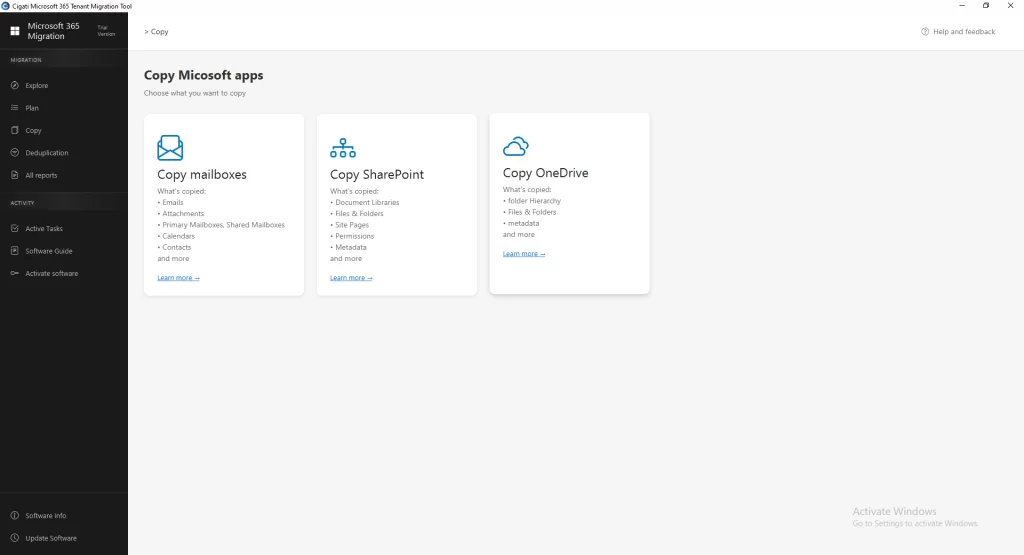
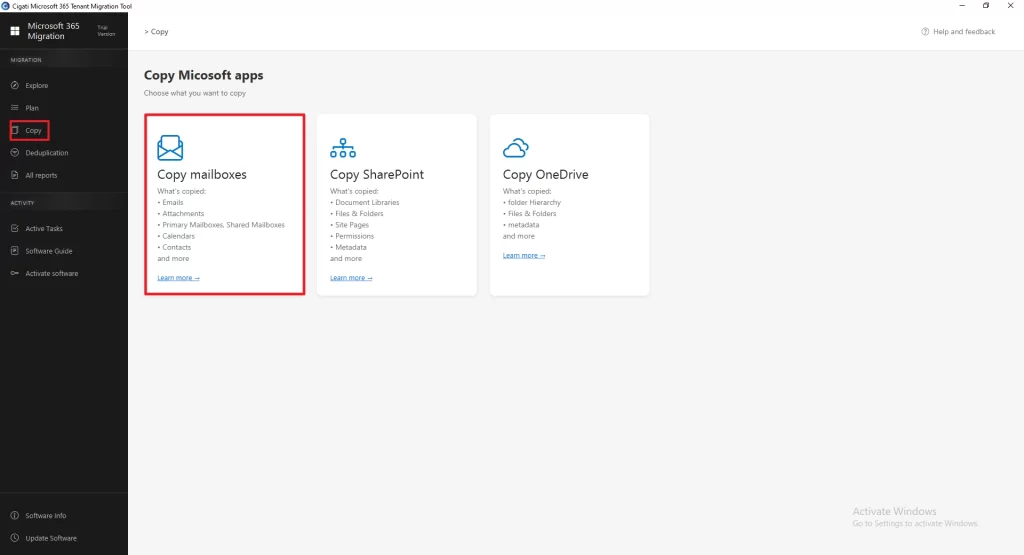
- Then, from the left panel go to copy and choose Copy Mailbox.
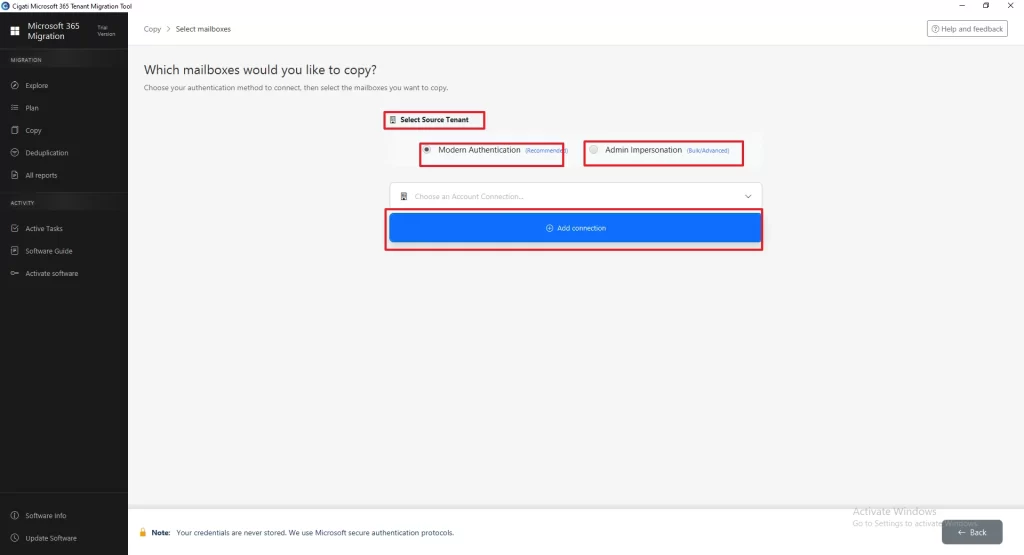
- After that, select the source tenant authentication method, choose Modern Authentication/ Admin Impersonation, add the source tenant credentials >> establish the connection.
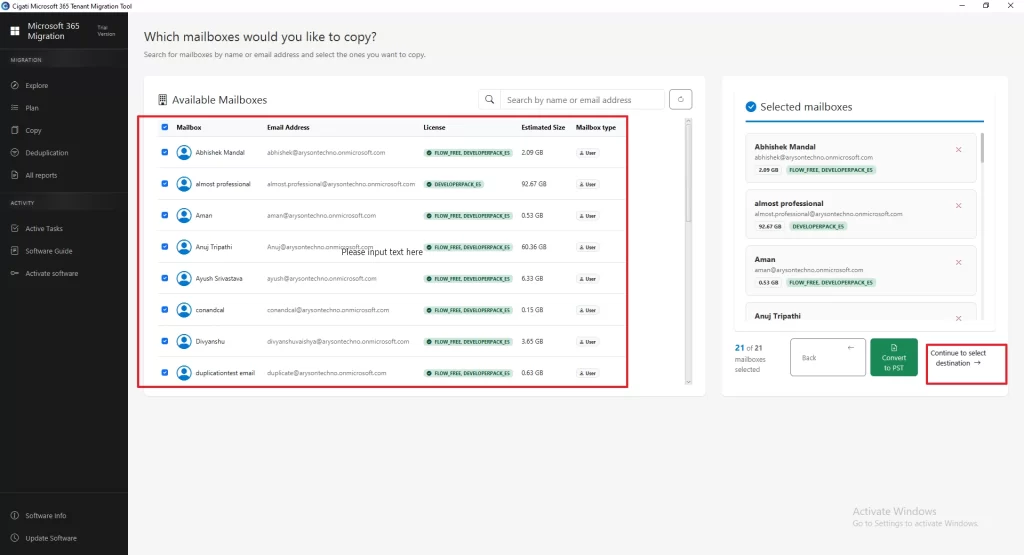
- Now, preview & select the mailboxes you want to migrate >> tap Continue to Select Destination.
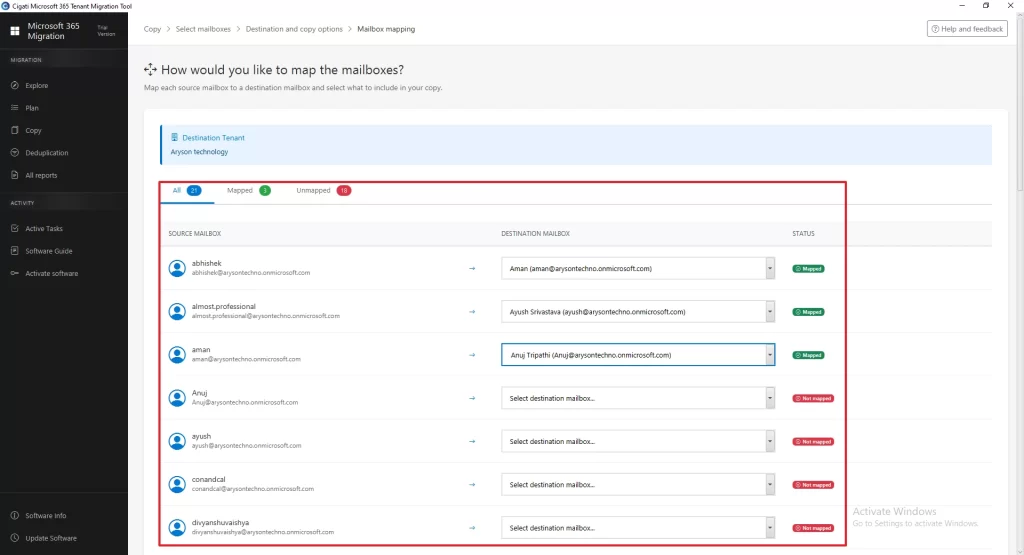
- Afterwards, review the source mailboxes and map each one to the appropriate destination mailbox.
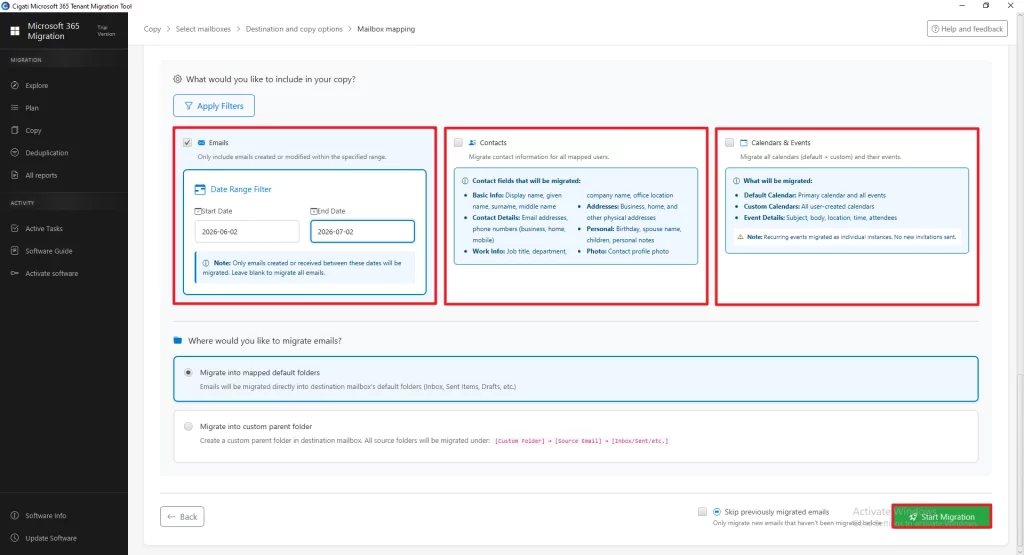
- Next, apply the required filters & features >> tap Start Migration.
Comparing the Most Office 365 Tenant to Tenant Migration Solutions
Picking an O365 Tenant Migration solution isn’t only about finding the lowest price. The real challenge is choosing a tool that can move your data safely without making the process more complicated than it needs to be. Some tools offer extra features, while others focus on keeping migration simple and straightforward. That’s why it’s worth taking a closer look at what each solution actually provides.
The comparison below to migrate Office 365 tenant to another tenant covers the key features so you can decide which one fits your migration needs and budget best.
| Feature | Cigati Office 365 Tenant to Tenant Migration | Cloudiway Tenant to Tenant Migration for Microsoft 365 | BitTitan MigrationWiz for Microsoft 365 Tenant Migration |
| Windows Desktop Application | ✔ | (Cloud-based) | (Cloud-based) |
| Simple Step-by-Step Wizard | ✔ | Requires more configuration | Requires more configuration |
| Beginner-Friendly Interface | ✔ | More suitable for IT administrators | More suitable for IT administrators |
| Batch Mailbox, SharePoint, & OneDrive Migration | ✔ | ✔ | ✔ |
| Automatic Mailbox Mapping | ✔ | ✔ | ✔ |
| Selective Data Migration | ✔ | ✔ | ✔ |
| Preserves Folder Hierarchy | ✔ | ✔ | ✔ |
| Detailed Migration Reports | ✔ | ✔ | ✔ |
| Pre-Migration Deduplication | ✔ | No built-in pre-migration deduplication | No built-in pre-migration deduplication |
| Demo Version Support | Mailbox Module: 500 emails per folder OneDrive & SharePoint: Up to 20 MB of data list items Contacts & Calendars: 100 items | Limited | Limited |
Time to Wrap Up
Choosing the right Office 365 Tenant to Tenant Migration solution can make a significant difference in both cost and efficiency. While several migration tools are available, it’s important to look beyond pricing and compare features, ease of use, and migration capabilities. The Cigati Tenant to Tenant Migration Tool offers a practical solution for migrating mailboxes, OneDrive, and SharePoint with features like batch migration, advanced filtering, automatic mailbox mapping, and detailed migration reports. Whether you’re migrating a few users or an entire organization, it helps simplify the process while minimizing downtime and administrative effort.
You May Also Read: BitTitan Alternatives for Tenant to Tenant Migration
Frequently Asked Questions
Q1. What data can be migrated during an Office 365 Tenant to Tenant Migration?
Ans. A Microsoft 365 Tenant to Tenant Migration typically includes Exchange Online mailboxes, OneDrive files, SharePoint sites, calendars, contacts, attachments, folder hierarchy, and metadata. The Cigati Office 365 Tenant to Tenant Migration Tool supports the migration of mailboxes, OneDrive, and SharePoint while preserving data integrity throughout the process.
Q2. Does the Office 365 Tenant to Tenant Migration Tool preserve folder hierarchy and metadata?
Ans. Yes. The tool maintains the original folder hierarchy, metadata, email properties, and document structure during migration. This ensures that users can access their data in the destination tenant without changes to its organization.
Q3. Can I migrate multiple Microsoft 365 mailboxes at the same time?
Ans. Yes. The Cigati Office 365 Tenant to Tenant Migration Tool supports batch migration, allowing administrators to migrate multiple mailboxes simultaneously. This helps save time and simplifies large-scale migration projects.
Q4. Can I migrate only selected mailboxes or specific data?
Ans. Yes. The software provides advanced filtering and selective migration options, allowing you to migrate only the required mailboxes or data. This reduces migration time and avoids transferring unnecessary information.
Q5. Why is mailbox mapping important in Office 365 Tenant to Tenant Migration?
Ans. Mailbox mapping connects each source mailbox with its corresponding destination mailbox before the migration begins. Proper mapping helps prevent data from being migrated to the wrong user account and ensures a smooth and accurate migration process. The Cigati tool supports both automatic and manual mailbox mapping for greater flexibility.
About The Author:

Rohit Singh is a technology professional with 7+ years of experience specializing in email systems, Exchange Server, Office 365, MS Outlook, and data migration solutions. He creates clear, practical, and solution-oriented content to help users and IT professionals resolve complex technical challenges efficiently.
Related Post