Cigati Gmail Backup Tool

Cigati Gmail Backup Software is an outstanding software, performing hassle-free Gmail email backup and migration. With minimal login and the capacity to handle large data set migration, it's the best choice for users. Protect crucial enterprise email data across multiple Gmail accounts. Simplify data backups and ensure smooth migration to Office 365, Google Workspace, or IMAP platforms with guaranteed data security.

Note: This tool only supports backing up Free Gmail accounts. To back up G Suite (Google Workspace) / Business accounts such as abc@companydomain.com, please use the Cigati G Suite Backup Tool.

(Average Rating 4.9 Based on 3224 Reviews)

OAuth 2.0 Authentication
No raw passwords stored or transmitted

Batch CSV Import
Back up hundreds of accounts in one job

24*7 Support
Dedicated enterprise technical assistance

Incremental Backup
Skip previously archived emails automatically

Benefits of

Cigati Gmail Email Backup Tool

  • Batch mode (CSV import) to back up multiple Gmail accounts at once.
  • Backup Gmail emails to PST, PDF, MBOX, EML, EMLX, MSG, and more formats.
  • Export Google contacts (.vcf) and calendars (.ics) alongside emails.
  • Directly migrate Gmail emails to a new account, G Suite, Office 365, or IMAP.
  • Remove duplicate emails based on Subject, sender, recipient, and Message Body criteria.
  • Multi-purpose software: backup Google Docs, Slides, Spreadsheets, etc.
  • Preserve inline images, attachments, hyperlinks, and formatting during migration.
  • Default Gmail Folders: Inbox, Important, Sent Mail, Spam, Bin, Drafts
  • Include all custom folders and labels created by the user for a complete Gmail backup.
  • Option to skip previously backed-up emails, avoiding duplicate emails.
  • Save attachments separately or exclude attachments to reduce backup size.
  • OAuth 2.0– secure Google authentication, no raw passwords required.
benefit-img

IT Essentials

Gmail Backup Tool: Enterprise IT Essentials

Multi-Account Batch Processing
Users can import a CSV file containing hundreds of Gmail accounts and execute backup jobs in parallel. The tool is ideal for enterprise IT admins managing large organizational mailboxes without per-account manual intervention.
Full-Folder & Label Fidelity
This reliable tool preserves all default Gmail folders, including Inbox, Sent, Drafts, Spam, Bin, as well as every custom folder and label created by the user. This maintains the exact mailbox hierarchy post-migration.
Post-Backup Server Cleanup
With this tool, users can trigger automatic deletion of emails from the Gmail server after a successful backup is confirmed. They can reclaim mailbox storage quota and enforce the data retention policies programmatically.
OAuth 2.0 Secure Authentication
The tool operates without accessing or persisting raw credentials. It supports app-password-based authentication for 2FA accounts and maintains full compatibility with Google's security policy requirements, along with GDPR and HIPAA requirements for data access control.

Gmail Backup Solution for Users Personal and Business Users

For Personal Google Account

To protect the critical data of your personal Gmail Account from unexpected data loss, use the Cigati Gmail Backup Tool - a reliable and easy-to-use solution.

  • example1@gmail.com
  • example2@gmail.com
  • example3@gmail.com
Backup for Personal Gmail Account

For Business & Educational Institutions

Safeguard multiple domain accounts and ensure compliance against data disaster. Secure your G Suite/Google Workspace data with the comprehensive Cigati G Suite Backup Tool.

  • example1@cigatisolutions.com
  • example2@cigatisolutions.com
  • example3@cigatisolutions.com
Backup for G Suite Account (Free Demo)

Significant Features

of Gmail Backup Software

Backup Gmail Emails Locally

Backup Gmail Emails Locally

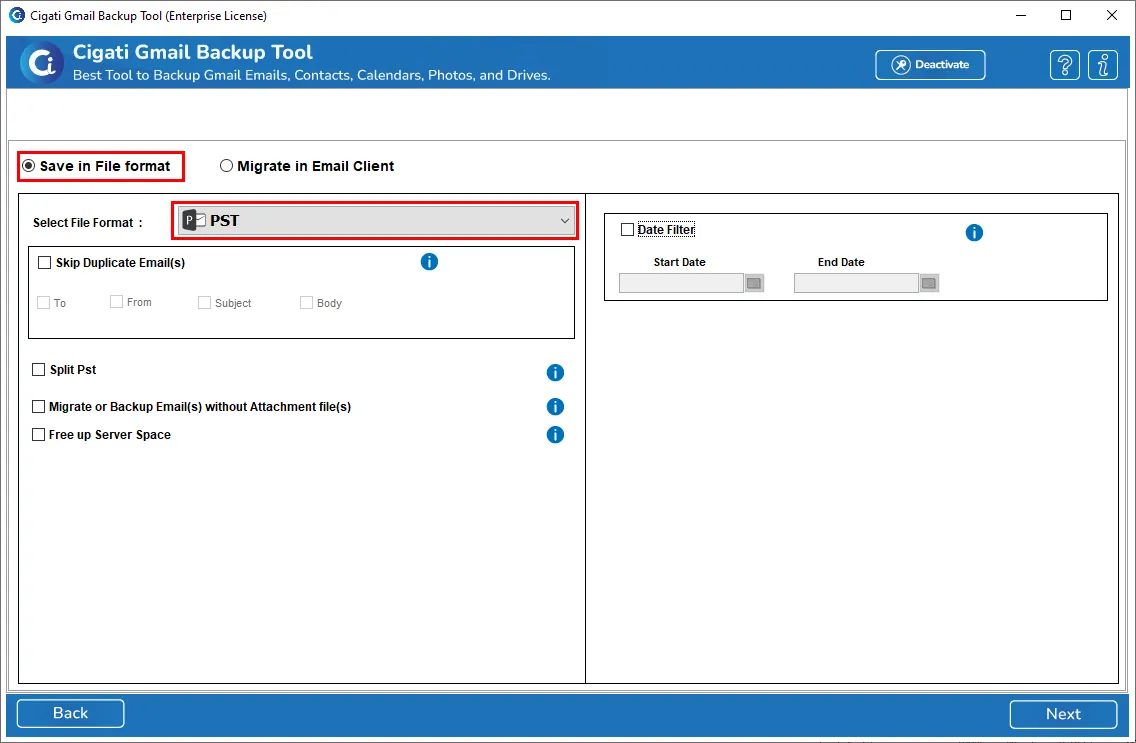
To keep emails easily accessible from your system, backup them using Cigati Gmail Backup Software. This offers users the ability to save data in multiple file formats, including PST, PDF, MBOX, MSG, EML, HTML, MHTML, CSV, and other formats. You can also backup Gmail emails into document and image formats to keep them secure and easily accessible.

Google Workspace Data Migration

Google Workspace Data Migration

This one-stop software lets you backup and migrate emails, including attachments and metadata. Moreover, you can choose to migrate data from Google Docs, Sheets, Slides, Contacts, Calendars, Notes, Tasks, and data from other applications at once. However, the provided filters apply only to mailbox emails and not other Google Workspace components.

Migrate Data to Other Email Clients

Migrate Data to Other Email Clients

Cigati Gmail Mail Backup Software allows migrating Google data to Gmail, Yahoo Mail, Office 365, Zoho Mail, GoDaddy Email, HostGator, Yandex Mail, IMAP, AOL, Amazon Workmail, and other email clients. Whether you have a large mailbox or a few emails, this software supports all with minimal requirements. Unlike manual migration, the process gets easier and handy for all types of users.

Filter Emails and Backup Selectively

Filter Emails and Backup Selectively

If you have a cluttered mailbox with lots of unnecessary and duplicate emails, Cigati Software lets you filter before backup. With the Date Range filter, you can migrate emails selectively and reduce clutter. Specify dates to select emails that you want to migrate, avoiding unnecessary data. This not only saves your inbox space but also makes it easy for you to search for the needed emails and attachments.

Transfer Gmail Emails Without Duplicates

Transfer Gmail Emails Without Duplicates

Having duplicate emails in your mailbox can be full of chaos and confusion. Use the built-in ‘Remove Duplicate Emails’ option to backup emails without similar emails. There are some pre-defined criteria, like To, From, Subject, and Body, that you have to select and define on which basis duplicates have to be eliminated.

Split Resultant PST File

Split Resultant PST File

If you are planning to move Gmail emails to Outlook, backup Gmail emails to PST. Among various saving formats of Gmail Email Backup Tool, PST is a choice. If PST files get larger and difficult to manage, select the ‘Split Resultant PST file’ and backup the large PST into smaller PSTs and manage them securely.

Delete Emails From Server After Backup

Delete Emails From Server After Backup

You might wish to free up server space after creating a backup to make space for new emails. With the built-in feature “Free up Server space,” you will have a brand new free mailbox. Once backup is created, the software processes automatic deletion from the server. If you are not sure about deletion, make sure this feature remains unchecked.

Manage Email Attachments in PDF

Manage Email Attachments in PDF

Along with all emails and metadata, one important element of email is attachments that may be invoices, bills, or documents. To keep them safe, you can save attachments in a folder separately or save them as a PDF for easy access. Additionally, the Gmail Backup Tool lets you migrate or backup emails without attachments, keeping the backup precise.

Windows OS Compatibility

Windows OS Compatibility

No matter what Windows OS you work on, the Cigati Gmail Email Backup Software is widely compatible with all. It supports all Windows OS, including the latest Windows 11 and earlier versions. Moreover, the processing speed remains the same, and it performs as good as on the latest Windows OS.

Free Gmail Backup Tool

Free Gmail Backup Tool

How about getting a free software to evaluate performance before purchasing it? The Free Gmail Email Backup Tool is available for feature and performance testing. This will give you an estimated idea of how efficient the Cigati software is and how you can use its features for quick backup and migration.

Technical Specification

Software Prerequisites & Recommendations

Software Name: Cigati Gmail Backup Tool
Version Support: Windows 11 and its below version
Size: 242 MB
Version: 25.08
Last Updated: April 2026
Download Link: Download
box
processor-img

Processor:

Hard Disk:

Memory:

Operating System:

trial-img

Trial limitation:

The Trial version of Gmail Backup Tool lets you test all the enterprise features before investing a penny. Although it has certain limitations, like you can only migrate 50 emails per folder, it will meet all your migration expectations. Buy premium software depending on migration requirements and migrate large datasets at once without data loss.

faq-img

FAQ:

Comprasion Table

Table of Free Gmail Backup Tool and Paid Versions

Software Features Free Version Full Version
Backup Gmail emails to PST, PDF, MBOX, MSG, EML, EMLX, CSV, DOC, TXT, HTML, MHTML, DOCX, and image formats. Export 50 Emails per Folder
Save Google Contacts and Calendars in CSV, VCF, and ICS format. Only 15 items per folder
Migrate Gmail emails to another account, G Suite, Office 365, IMAP, iCloud, etc. Export 50 Emails per Folder
Supports migrating Google Workspace data: Google Docs, Sheets, Tasks, Contacts, Notes, and the rest. Only 15 items per folder
Select Gmail mailbox folders to migrate
Date range filter for selective backup
Avoid duplicate emails migration
Save attachments separately or migrate emails without attachments
Free up Server Space feature
Split resultant PST file
24*7 Tech Support & 100% Secure
Supports all Windows Versions
Download and Purchase Download Purchase

FAQ

Frequently Asked Questions

Follow the simple procedure discussed below to backup emails:

  • Download the Gmail Backup Tool and run it as an administrator.
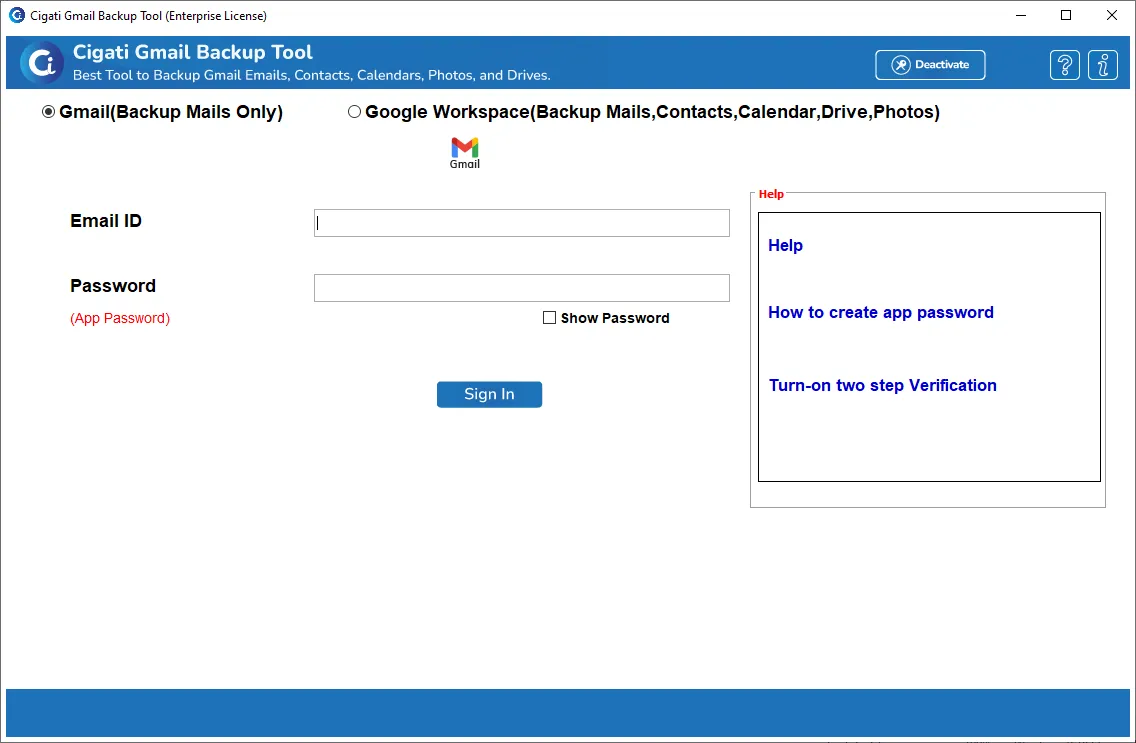
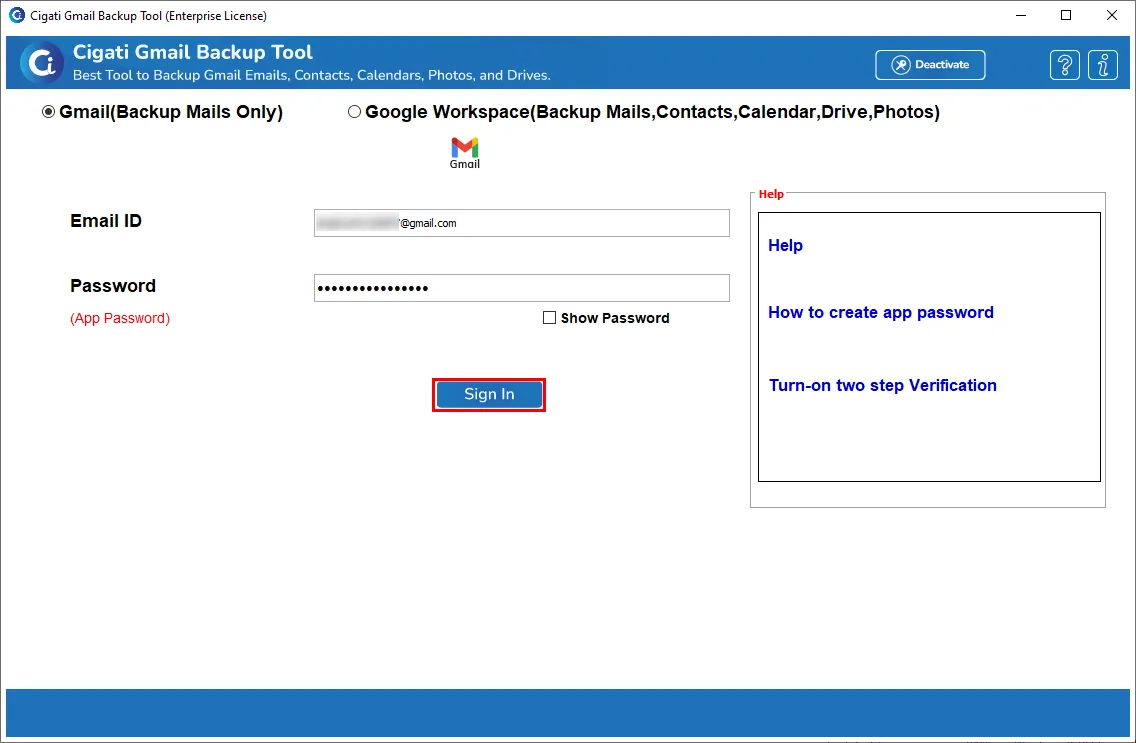
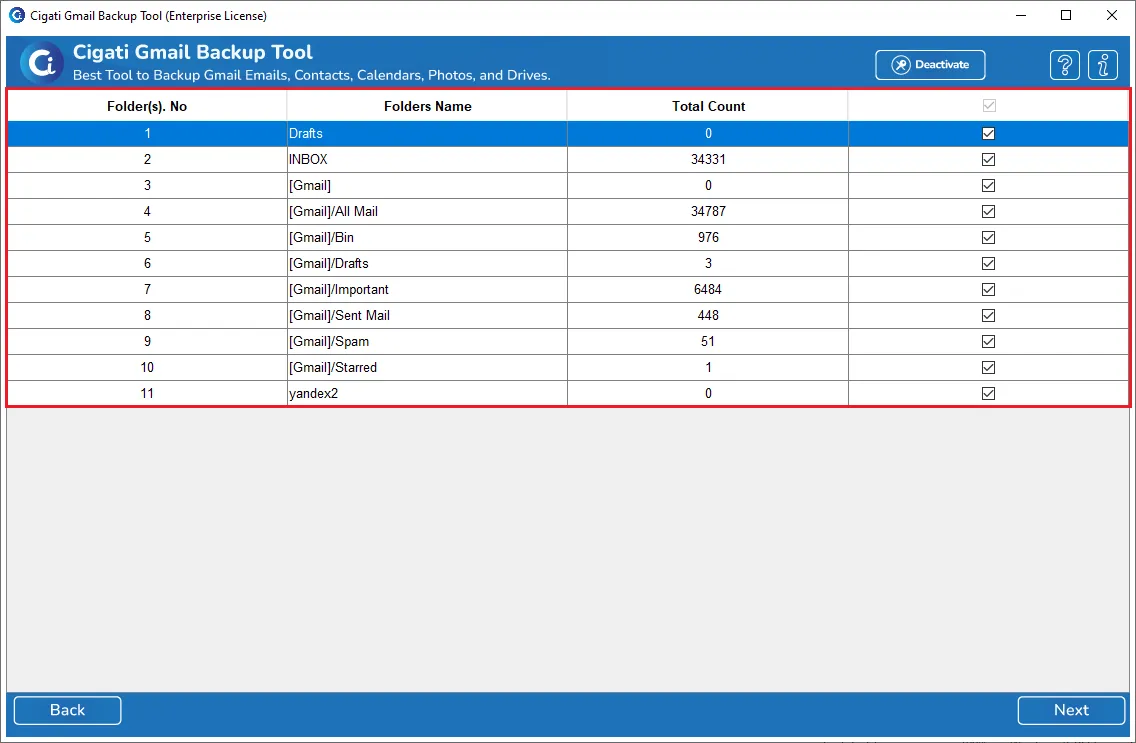
  • Log in to Gmail and choose folders to backup.
  • Choose a backup format, say PDF.
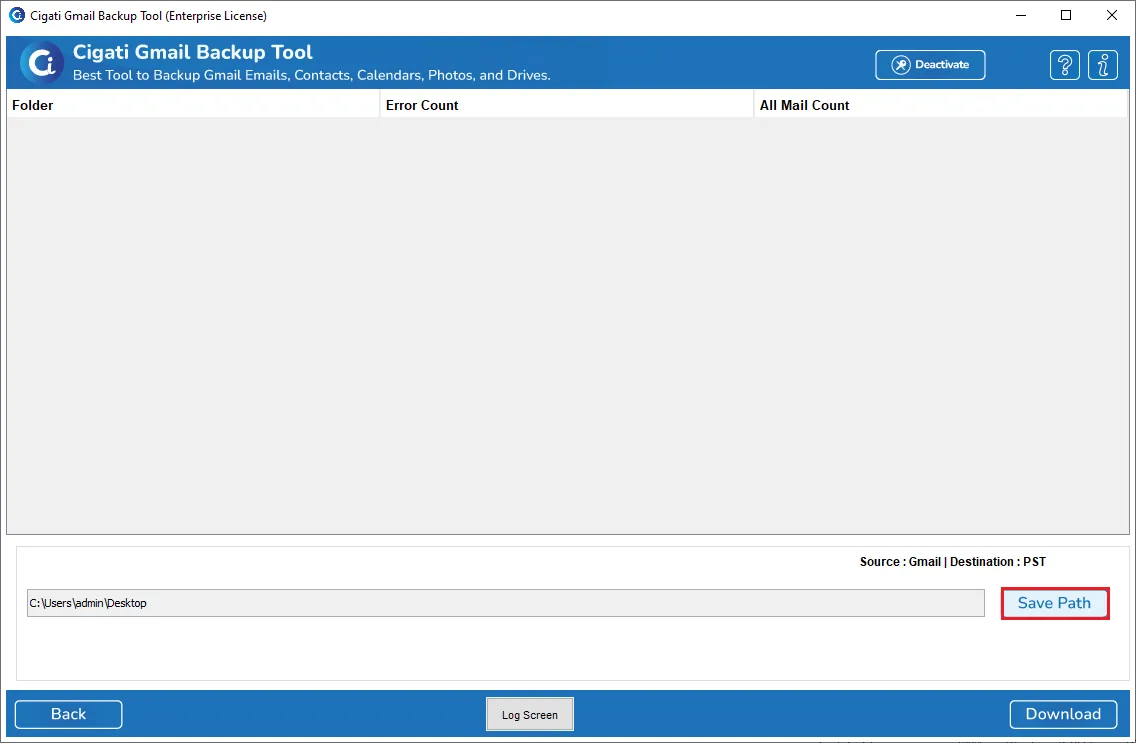
  • Set the saving path and click Next.
  • Apply required filters to backup selective emails.
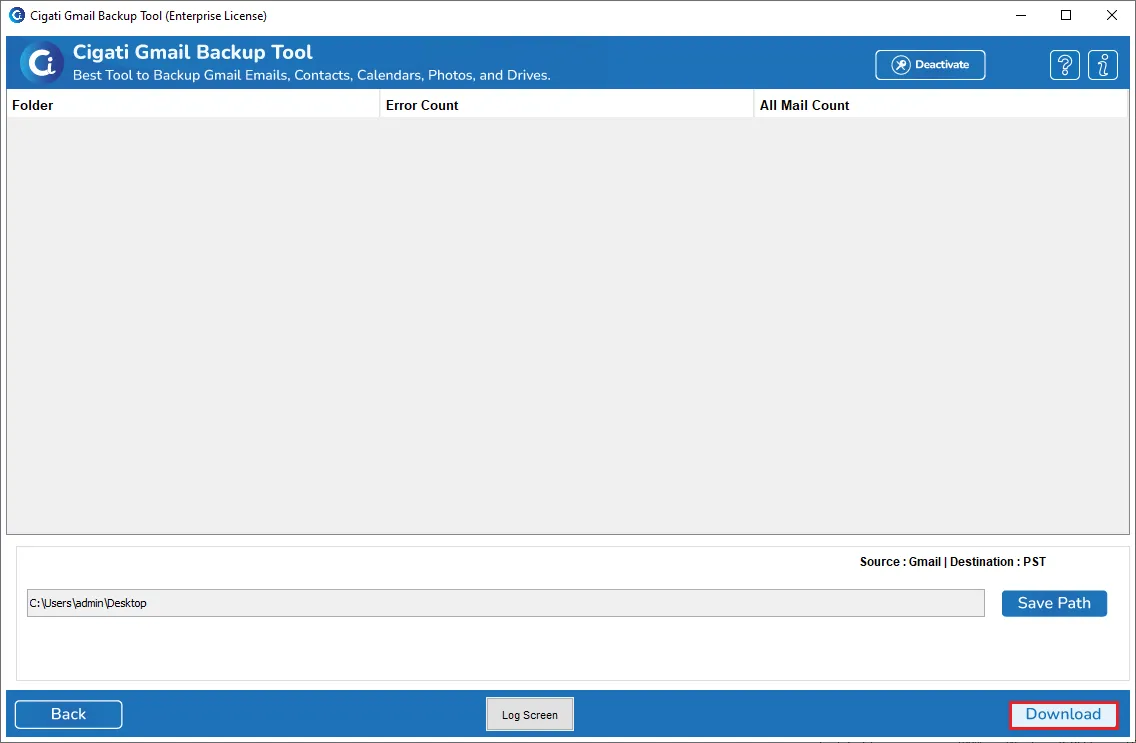
  • Click Start Process, and the backup begins.

Yes, you can backup Google Contacts in a VCF and Calendars in an ICS file format.

No, the Gmail Backup Software supports all Gmail and Google Workspace (G Suite) accounts. You can back up or migrate emails from any Gmail or domain-based Google account securely.

No, the Cigati Gmail Email Backup Tool allows you to back up multiple Gmail accounts without any restrictions through the G Suite admin account.

No, you will have to log in via your Gmail ID and App password. Therefore, logging in to Gmail on the Web is not essential.

With a simple login and a few steps, you can do so, as follows:

  • Run the software and log in to your Gmail account.
  • Select folders from the list and click Next.
  • Choose Office 365 from the Email Client section.
  • Enter Office 365 credentials and authenticate login.
  • Select optional filters for precise migration.
  • Click on Start Process and proceed with migration.

Yes, the Cigati Software allows users to backup emails into image format, like PNG, TIFF, GIF, and JPEG. Also, to share emails in document files, you have DOC, DOCX, TXT, and PDF as choices.

Free software is only for trial purposes and cannot migrate all your mailbox data. It migrates only 50 emails per folder for free. Purchase licensed software for complete benefits.

Gmail users must use an app password rather than their regular password, as required by Google for third-party access. https://www.cigatisolutions.com/gmail-backup-tool/turn-on-two-step-verification.html

Admin consent is required when the application needs access beyond a single user’s data, such as organization-wide or multi-user permissions. In such cases, only a Microsoft 365 administrator can approve the login for security purposes.

Yes. Modern Authentication requires user sign-in access to generate the authentication token. If sign-in is disabled, the tool cannot connect or access mailbox data. Please ensure user sign-in is enabled for all accounts before using Modern Authentication.

Client Review

A Glimpse into Client Experiences

Thousands of satisfied customers have chosen our software and praised its reliability and performance. They have shared positive stories about how the Email Address Extractor Software has helped them manage their data efficiently.

“I’ve been using the Cigati Gmail Backup Tool in my company for a long time, and it’s been a lifesaver. I easily saved all my Gmail emails to my laptop without any technical setup. The backup ran smoothly and finished faster than I expected.”

Olivia Carter | Brussels

“I needed to back up multiple mailboxes from the Google account for my small business, and Cigati Gmail Email Backup Software handled it perfectly. The thing I liked most is how organized it keeps everything. My folder structure remained the same after backup, and I could find emails easily. It’s reliable, simple, and does exactly what it promises.”

Ethan Roberts | USA

“I tried other tools before using Cigati Software, but this one stood out because of its clarity and performance. I am impressed by how I could choose specific dates to back up only the emails I needed. I even backed up emails without attachments to keep the files light. It saved me both time and storage. Thank you, team Cigati!”

Ava Thompson | Mexico

Related Blogs

Related guides & how-tos