Cigati OLM to PST Converter

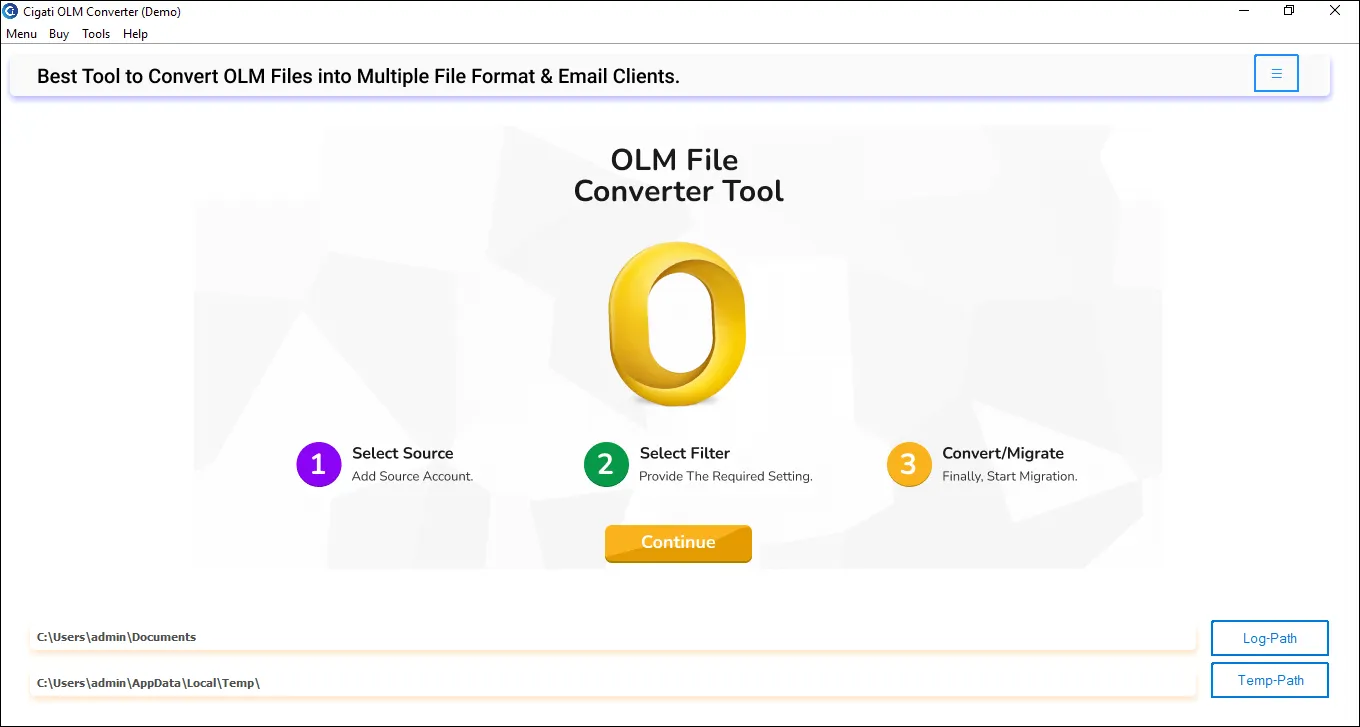
Cigati OLM File to PST Converter is a highly efficient utility to convert single or multiple Mac Outlook OLM files to PST. It lets users export emails, contacts, calendars, notes, journals, and other mailbox data without installing Outlook. With modern UI and a fast scanning feature, this software makes conversion simple, secure, and error-free.

(Average Rating 4.9 Based on 3456 Reviews)

Key Benefits of

Cigati OLM to PST Converter

  • Convert OLM to PST and open Mac Outlook data on Windows Outlook effortlessly.
  • Add OLM files in bulk; convert one or multiple OLM files of any size without data loss.
  • Built-in preview panel to view emails, attachments, properties, and folder hierarchy.
  • Offers a Preview in Browser option for a smooth reading experience and verification.
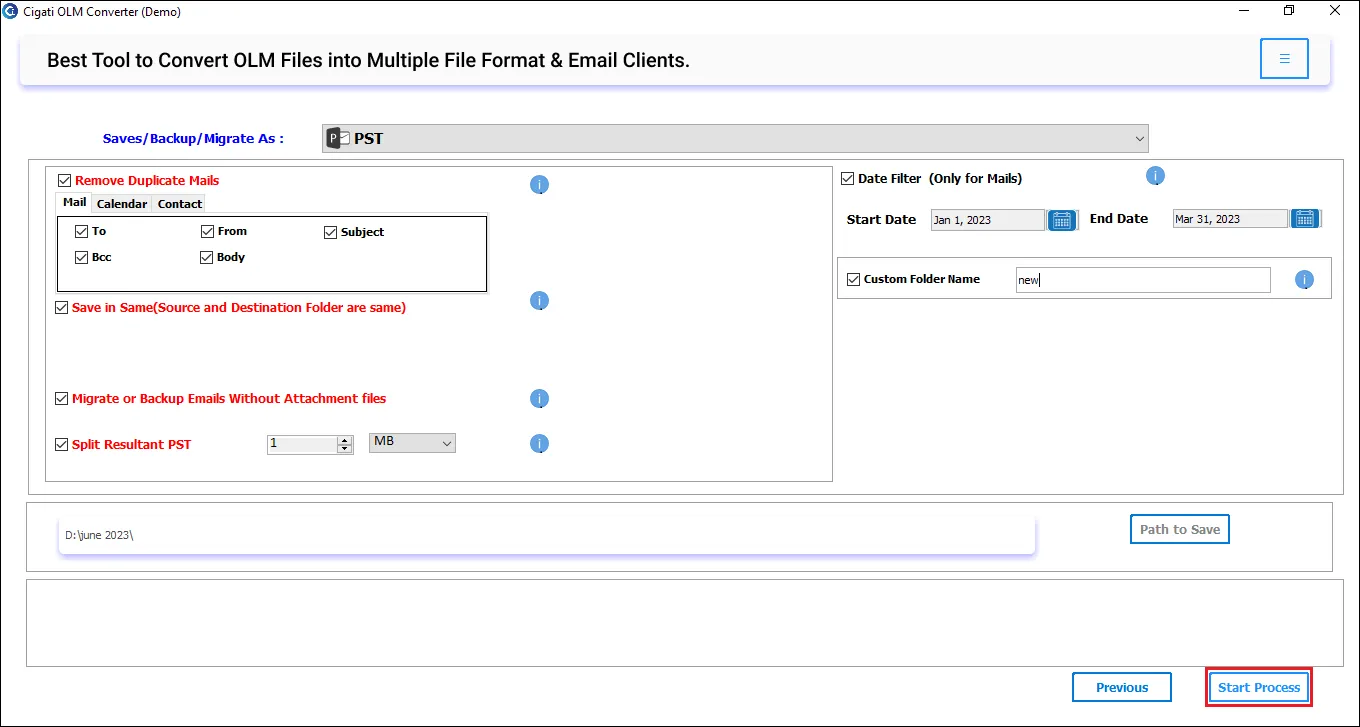
  • Break and save OLM emails into multiple smaller PSTs with the Split Resultant PST feature.
  • Maintains 100% originality of email formatting, metadata, folder structure, inline images, and attachments
  • Export OLM emails into PDF, MSG, MBOX, EML, EMLX, DOC, HTML, CSV, and many formats.
  • Migrate OLM files to Office 365, Gmail, Yahoo Mail, iCloud, Thunderbird, and other IMAP-based accounts.
  • OLM to PST Conversion does not require Outlook installation; its a standalone software.
  • Perform a selective conversion from a specific time period using the Date Range Filter.
  • The Remove Duplicate Emails feature eliminates duplicate OLM emails, reducing unnecessary clutter.
  • Filter to backup or migrate emails with or without attachments for better data management.
  • Supports conversion of OLM files generated from all older and newer versions of Mac Outlook.
  • The free OLM to PST Converter is for testing and exports only up to 50 emails per folder.
  • This software is fully compatible with all Windows OS versions and available for Mac as well.
benefit-img

Best Features of

Cigati OLM File to PST Converter Software

Convert OLM Files

Convert OLM Files to PST in Bulk

The Cigati OLM to PST Converter enables effortless batch conversion of multiple OLM files simultaneously. Whether you are migrating complete Mac Outlook data or exporting selective folders, the tool processes everything smoothly with 100% accuracy. Moreover, it supports large OLM files, and processing speed remains the same.

Open OLM Files on Windows

Open OLM Files on Windows Outlook

If you are migrating from Mac Outlook to Windows, it is a must to convert OLM to PST. OLM files cannot be accessed on Windows without conversion, so this software makes it easy for you without requiring additional installations. Convert OLM files to Windows-compatible PST and easily access them across all versions of Windows OS.

Advanced Email Preview & Browser Mode

Advanced Email Preview & Browser Mode

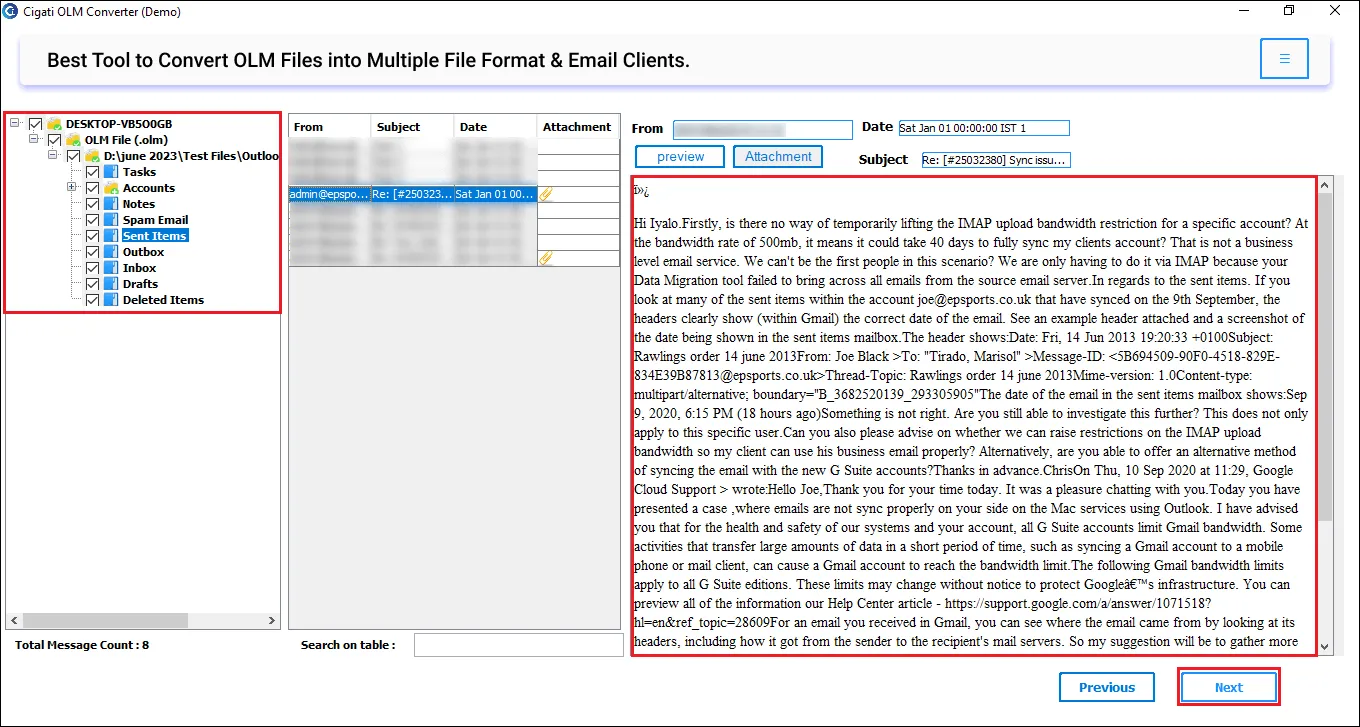
The tool includes a built-in preview panel to allow users to inspect OLM file emails and data before exporting. You can view OLM emails, attachments, properties, and metadata. The software also features a Preview in Browser mode, allowing you to read emails through your default web browser for clearer visibility.

Split OLM Files

Split OLM Files into Multiple PSTs

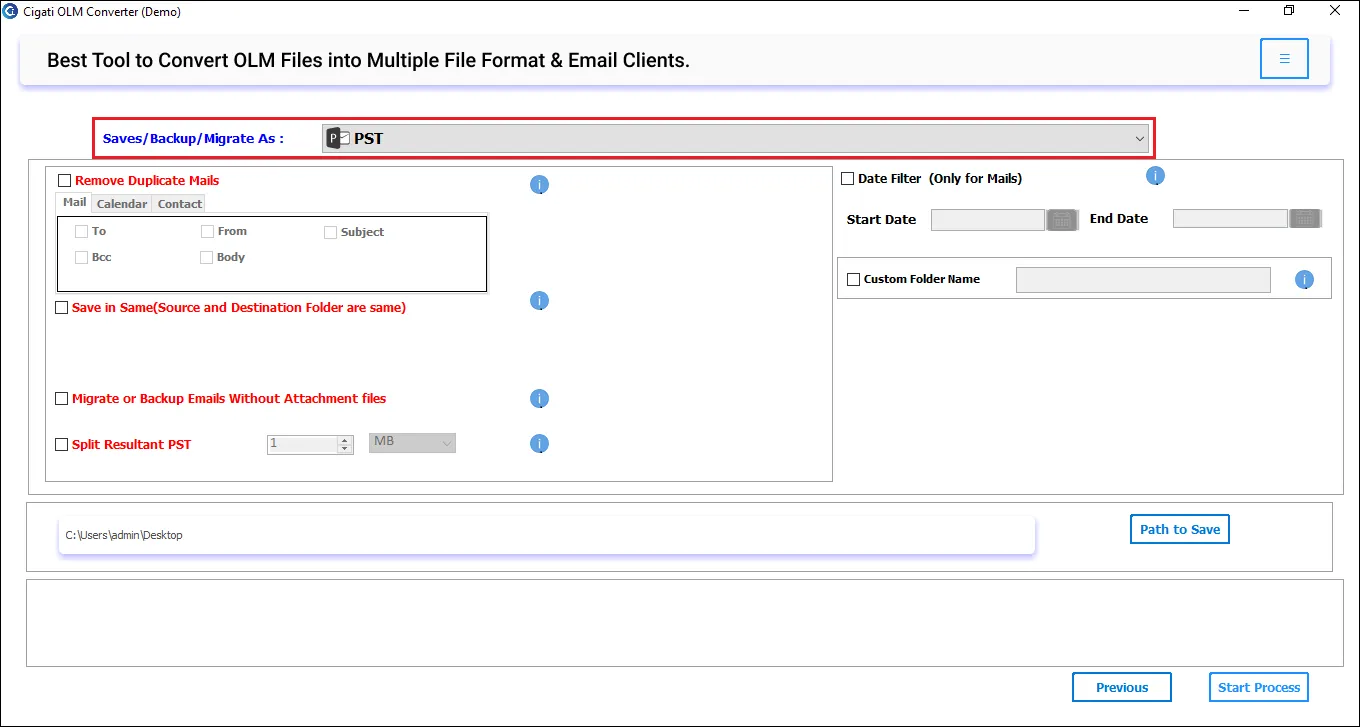
With Cigati OLM to PST Converter Software, you can convert and save OLM files into multiple smaller PSTs. An option to split large PST files into smaller parts is useful, preventing Outlook slowdown or PST file corruption issues. Additionally, it makes it easier for users to import PST in Outlook.

Advanced Filter to Convert

Advanced Filter to Convert Emails As Per Date Range

If your mailbox storage is full due to unimportant emails, this tool is a must-have. With the advanced Date Filter, users can convert only the required emails by applying a Start Date and an End Date. This feature helps focus on specific project-related emails or time-bound backups without exporting unnecessary data.

Remove Identical Emails Before Conversion

Remove Identical Emails Before Conversion

To avoid storage bloat and repeated messages, the software includes a powerful built-in Remove Duplicate Email feature. Select this feature for an in-depth scan and to remove duplicate OLM messages. Duplicates are filtered based on some pre-defined criteria, which are To, From, Subject, CC, Date, and Body fields, before migration.

Manage Duplicate Attachment

Manage Duplicate Attachment Files

You also have an option to backup or migrate emails without attachments. If you want to save space or migrate emails faster, choose the option to exclude attachments during conversion. Emails will be exported without large attachment files, making the process quicker and more efficient. To backup/migrate emails with attachments, make sure this option is not selected.

Export OLM to Other File Format

Export OLM to Other File Format

This all-in-one OLM to PST Exporter also allows you to convert Outlook for Mac OLM files into other formats. You can convert OLM to MBOX, EML, EMLX, MSG, PDF, HTML, TXT, CSV, DOC, and other widely used formats. Additionally, it supports direct migration of OLM to many popular email applications like Office 365, Gmail, Thunderbird, and IMAP-supported platforms.

Outlook Installation

Outlook Installation is Not Required

One of the biggest advantages of the Cigati Software is that it works completely independently of Microsoft Outlook. You do not need Outlook for Mac or Outlook for Windows installed on your system to open, scan, or convert OLM files. Best choice for those who switched devices or uninstalled Outlook.

Designed for Windows

Designed for Windows Users

The Cigati OLM File to PST Converter Software is highly compatible and supports all major Windows OS. Whether you are using Windows 11, 10, 8, 7, or earlier versions, this one software fits all. It runs smoothly without any additional configuration or technical complexities. Mac OLM to PST Converter Software is also available.

Technical Specification

Software Prerequisites & Recommendations

Software Name: Cigati OLM to PST Converter
Version Support: Windows 11 & below versions
Size: 241 MB
Version: 25.08
License: S/A/T/E
Download Link: Download
box
processor-img

Processor:

Hard Disk:

Memory:

Operating System:

trial-img

Trial limitation:

The Free OLM to PST Converter demo version includes all premium features like the licensed version, but is only for trial. However, it has certain conversion limits too. The trial version allows conversion of only 50 emails per folder. Upgrade to the full version for unlimited OLM file conversion and complete migration functionality.

faq-img

FAQ:

Comparison Table

Table for Free OLM File to PST Converter vs Full Version

Software Features Free Version Full Version
Convert OLM to PST without Outlook Convert 50 Emails per Folder All
Batch Conversion of OLM Files (Single or Multiple Files)
Preview OLM Emails, Attachments & Metadata
Advanced Email Preview in Browser
Supports All OLM File Sizes
Split Resultant PST File
Converts OLM to PDF, MBOX, EML, EMLX, DOC, CSV, and more Convert 50 Emails per Folder
Migrate OLM data to popular email clients Convert 50 Emails per Folder
Remove Duplicate Emails based on To, From, Subject, CC, and Body
Filter emails by date and migrate selectively
Backup/Migrate Emails Without Attachments
Custom Folder name feature
24*7 Tech Support & 100% Secure
Windows OS Compatibility
Download and Purchase Download Purchase

FAQ

Frequently Asked Questions

Follow the steps below, and the software will create a PST file without Outlook:

  • Download and install Cigati OLM to PST Converter. Run it as an administrator.
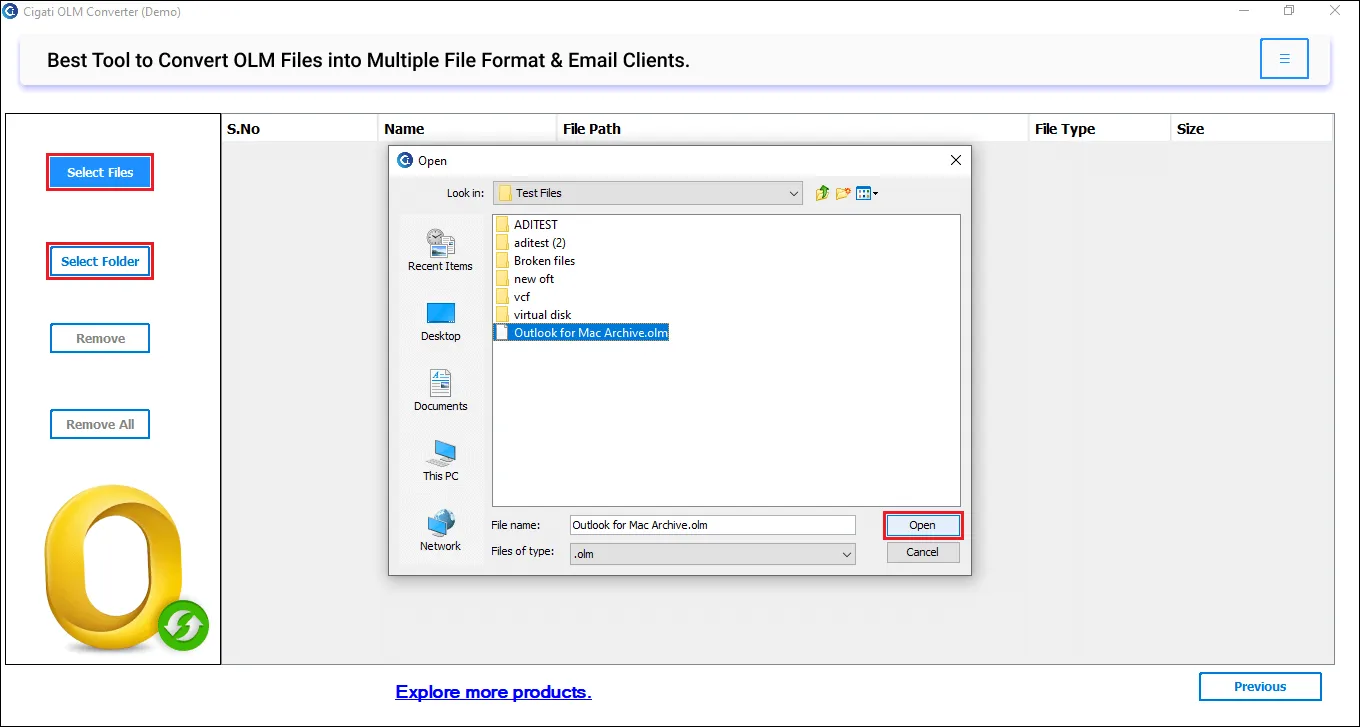
  • Click on Select File or Select Folder to add OLM files.
  • Further, tap Next and preview emails and attachments before conversion
  • Under saving options, choose PST as the export format.
  • Apply filters if required and set the destination path.
  • Finally, to save OLM as PST, click Convert.

The software has an advanced scanning process that repairs minor corruption and extracts maximum possible data for conversion. However, if your OLM files are heavily corrupt and inaccessible, you need to fix them before conversion.

No. The tool supports OLM files of all sizes, including large archives. Moreover, it supports adding multiple OLM files and converting them simultaneously without data loss.

Yes. The Cigati OLM File to PST Converter can process unlimited OLM files and does not affect software processing.

No. Without Outlook for Mac, OLM files cannot be accessed on any other platform. But Cigati Software makes it easier, as it does not require Outlook installation. Hence, you can open and convert OLM without Outlook just by using this software.

Of course. Cigati also offers software for Mac users. You just need to download Mac OLM to PST Converter (DMG file) – one that is designed for macOS.

If the Cigati OLM File to PST Converter for Mac is not running, it might be due to permission or security restrictions. You can fix the issue by following these steps:
  • Allow the app from the Security & Privacy settings
  • Ensure the DMG installation was not interrupted
  • Disable antivirus or real-time monitoring temporarily

If none of this works, reach out to our technical support team for better assistance.

Client Review

A Glimpse of Client Experiences!

Thousands of satisfied customers have chosen our software and praised its reliability and performance. They have shared positive stories about how the Cigati OLM to PST Converter has helped them manage their data efficiently.

Our team had several years of archived OLM files that needed to be moved to Outlook on Windows. Cigati OLM to PST Converter for Mac made the transition much easier than expected. The PST splitting option helped us avoid oversized files, and the overall process stayed stable throughout. Highly impressed!

Jason Alvarez

Brussels

I used Cigati Software mainly to move my OLM mailbox to Office 365 after switching systems. The sign-in process was straightforward, and all my folders appeared exactly as they should. No mismatched emails or duplicates, which saved me a lot of cleanup time. I really had a great experience, even though I am not tech-savvy.

Ryan Mitchell

USA

I often need to review old Mac Outlook data, and the Cigati OLM file to PST Converter made both viewing and converting my OLM files simple. It helped me save thousands of OLM files in Windows Outlook. I would like to appreciate the duplicate removal option that was genuinely helpful. It’s been reliable so far and is worth having for occasional conversions.

Maria Stevens

Mexico