Cigati Pegasus Mail Converter

The Cigati Pegasus Mail Converter is an enterprise-grade conversion engine that converts Pegasus Mail files to multiple formats. This tool is purpose-built for IT Administrators, Migration Specialists, and Technical Teams that demand migration in bulk. It provides advanced filters and ensures full folder structure integrity.

(Average Rating 4.7 Based on 2034 Reviews)

Zero Downtime Deployment

Offline Processing

Batch-Scalable Engine

Data-Integrity Guarantees

Benefits of

The Best Pegasus Mail Converter

  • Efficiently import either an individual or add an entire Pegasus Mail folder with precision.
  • Easily export Pegasus email files with extensions: CNN, PMM, PMI, or files without extension.
  • Convert Pegasus files to industry-standard formats such as PST, PDF, HTML, MBOX, and more.
  • Bulk converts Pegasus Mail files to a desired format while keeping data fully preserved.
  • A date range filter for selective migration of emails, making the process faster.
  • Flexibility to choose whether to migrate emails with or without attachments.
  • Option to selectively migrate emails by filtering through the Sender or Subject details.
  • Migrate unread Pegasus emails with email sizes of: small (< 100KB), medium (100 KB - 1 MB), and large (> 1 MB).
  • Save Pegasus emails by filtering through keywords based on To, From, and Subject.
  • Date-based naming feature to assign names to converted files using the email date.
  • The custom folder name feature allows users to define names for resultant files.
benefit-img

IT Role

Built For Every Role

IT Administrator
Automate bulk conversions, folder structure preservation, and no downtime.

Migration Specialists
Date-based filters and targeted migrations across enterprises

Support Teams
Recover specific user mailboxes using read status, keyword, and sender filters

Business Users
Non-technical users can start migration with a simple-to-use interface.The folder structure is preserved.

Technical Teams/MVPs
Flexible output formats, ensuring compatibility across platforms.

IT Essentials

Pegasus Mail Converter: Enterprise IT Essentials

Zero Downtime Architecture
The Cigati Pegasus Converter Tool functions as a standalone offline tool that allows administrators full-scale migrations without server dependency or service interruption. It reduces complexity and risk during the migration process.
Lossless Metadata Preservation
The Cigati software preserves all the essential email properties. It includes timestamps, sender/recipient details, and attachment files. All of them remain intact across all 12 formats with zero hidden data loss.
Batch Optimized Processing Engine
With the Pegasus Email Converter Tool, users can bulk process thousands of Pegasus Mail files in a single operation with the “Add Pegasus Folder” option. This is ideal for complex enterprise migrations and for large IT consolidation initiatives.
Organized Output for Regulatory Validation
With a date-based file naming convention, preserved folder structures, and organized output paths, Pegasus Converter ensures that all the converted files are ready to be used by SMBs without any post-processing.

Exclusive Features

Best Pegasus Mail Converter Software

Pegasus Mail Converter

Easily Convert Pegasus Mail Files

The Cigati Pegasus Mail Converter is a software that exports Pegasus Mail data into formats such as PST, PDF, HTML, RTF, MBX, MBOX, MSG, EML, EMLX, CSV, MD, and DOCX. During the conversion, it ensures no data loss or structural degradation. It also exports files with extensions CNN, PMM, and files without extensions.

Batch Export

Batch Export Pegasus Mail Data

Using the Cigati Pegasus Email Converter, users can either add a single Pegasus Mail file or add a Pegasus Folder. The tool enables high-throughput migration in full throttle for enterprise environments with thousands of mailboxes across a distributed infrastructure.

Without Attachments

Convert Pegasus Mail with or without Attachments

With the help of the Pegasus Mail Converter, users can migrate their Pegasus emails with attachments or without attachments to reduce storage overhead on destination mail servers. Migrating without attachments is essential for SMBs and startups with constrained budgets.

Preview

Built-in Preview Feature to Verify Pegasus Mails

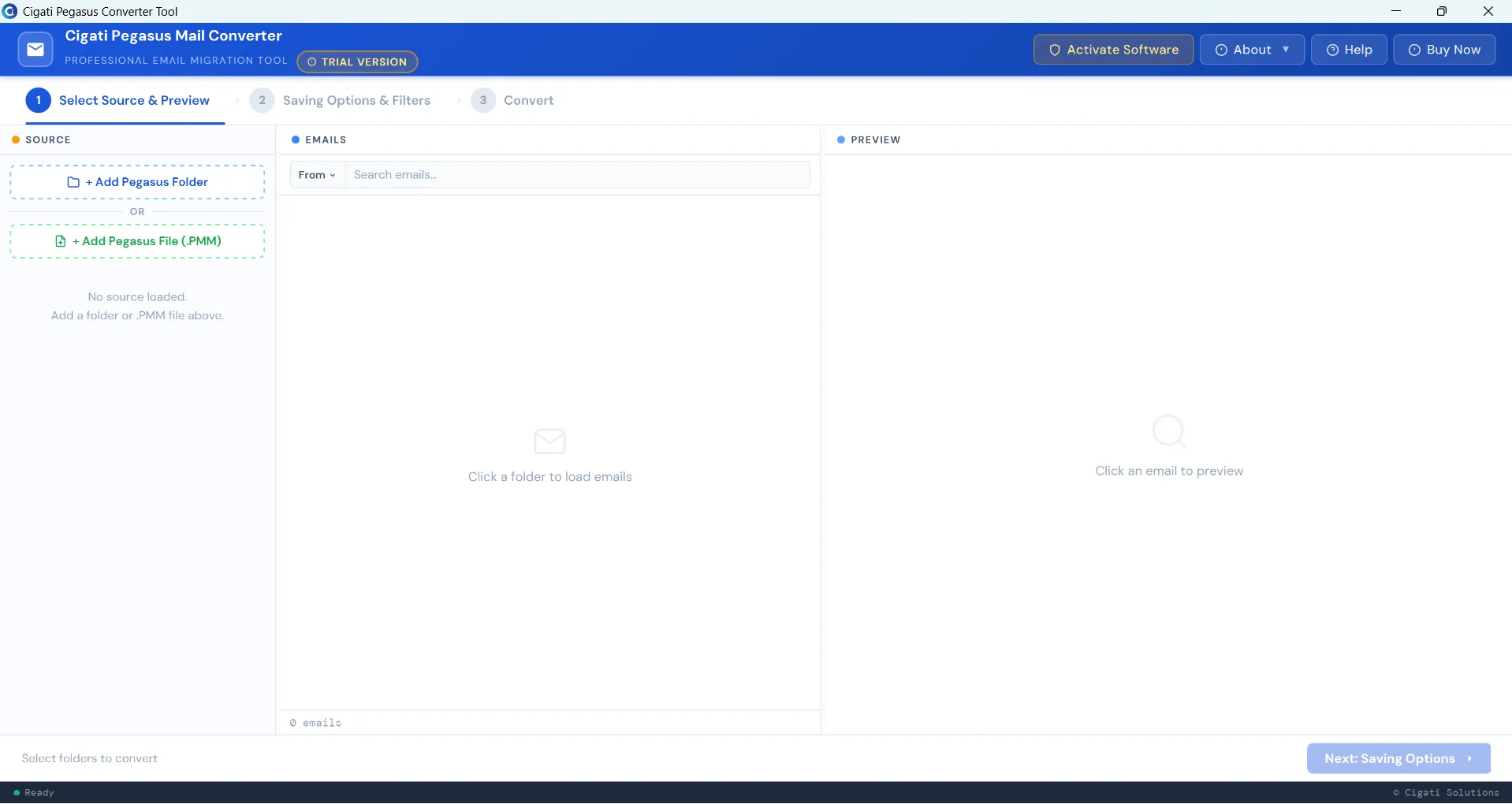
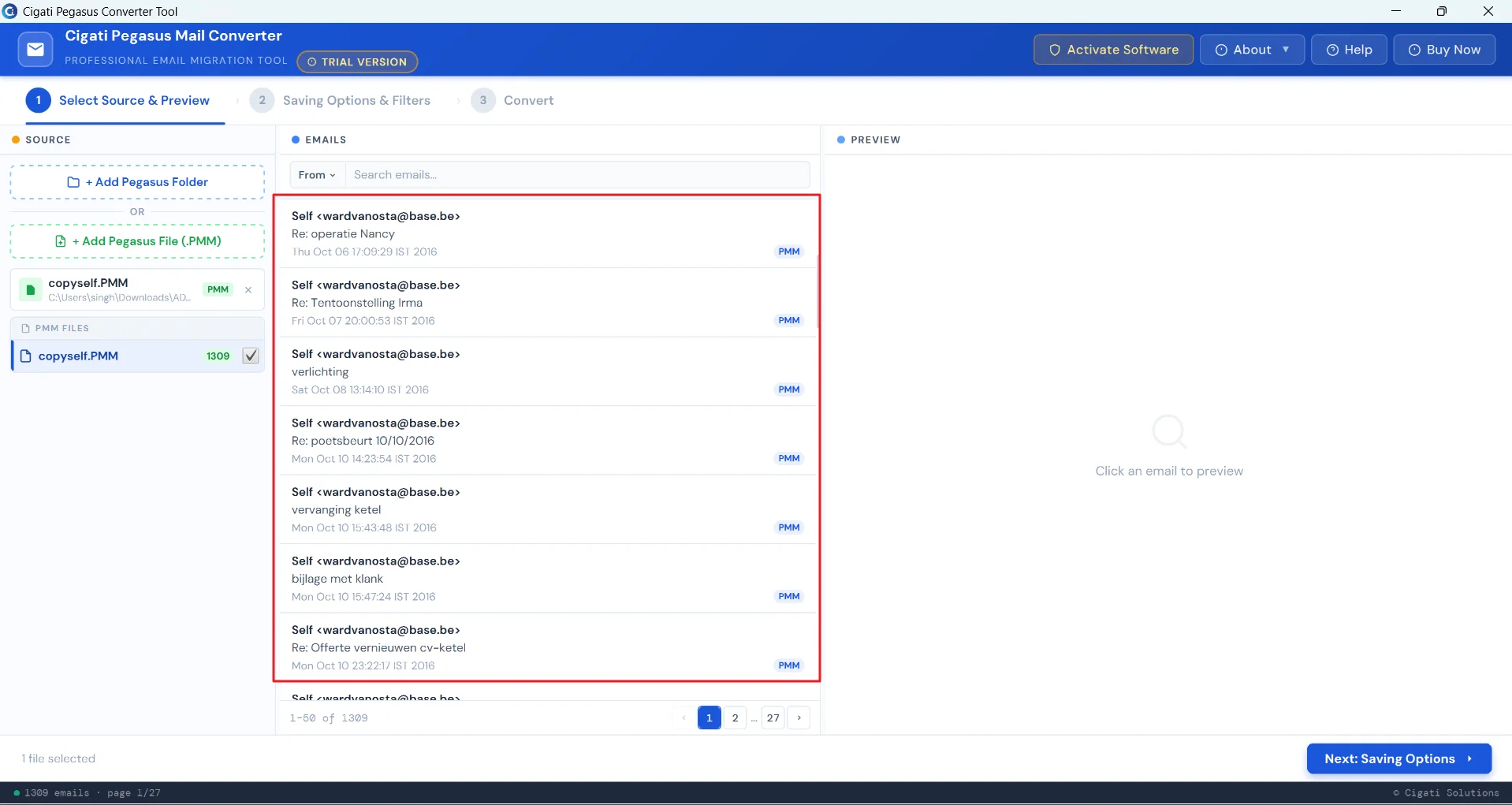
Cigati Pegasus Converter has a built-in preview panel that allows users to check the Pegasus Mail email content before conversion. Administrators can verify the accuracy and relevance of the data. Also, it reduces the chances of errors or data loss.

Date Filter

A Date-Range Filter for Time-Bound Migration

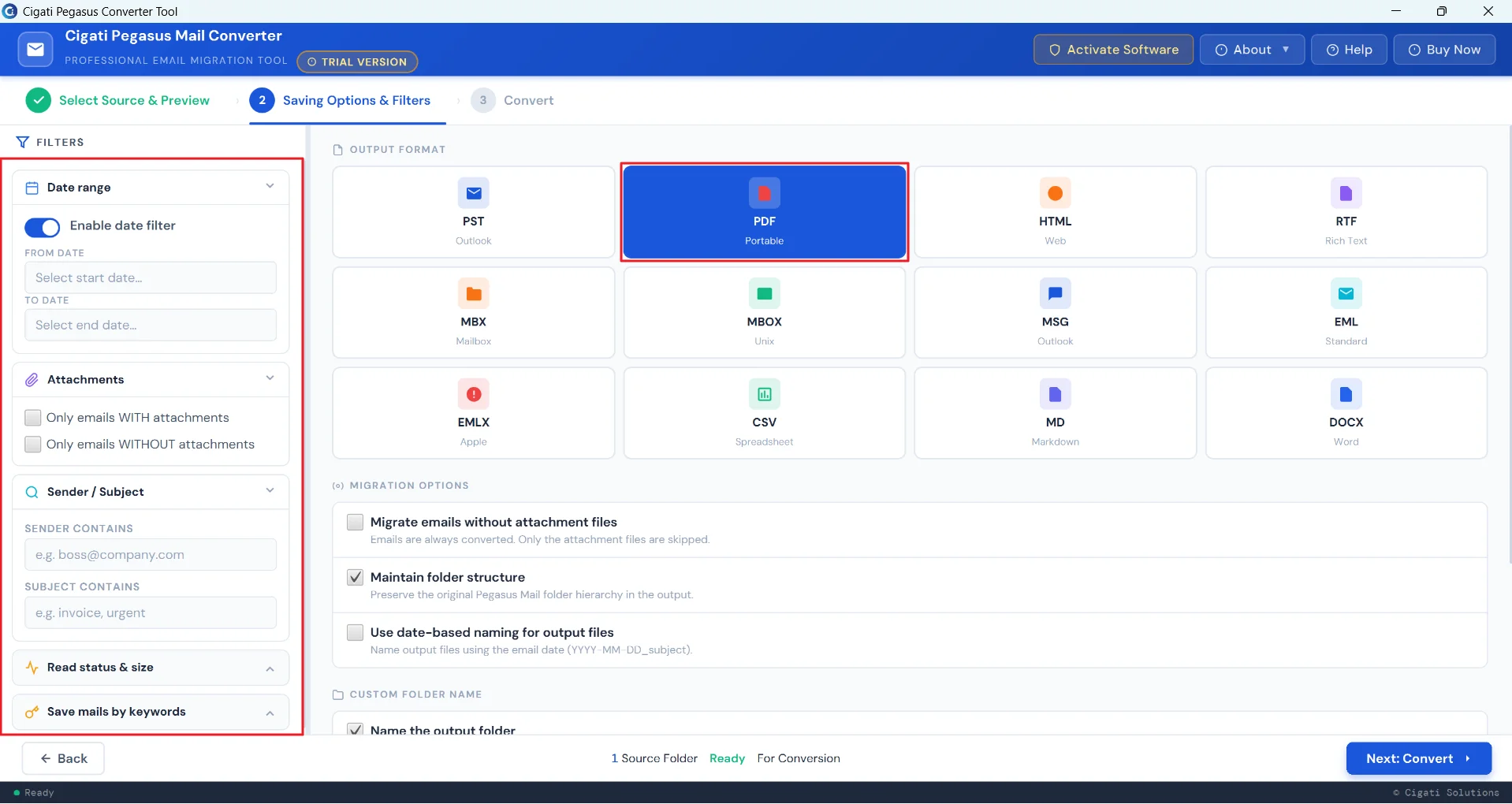
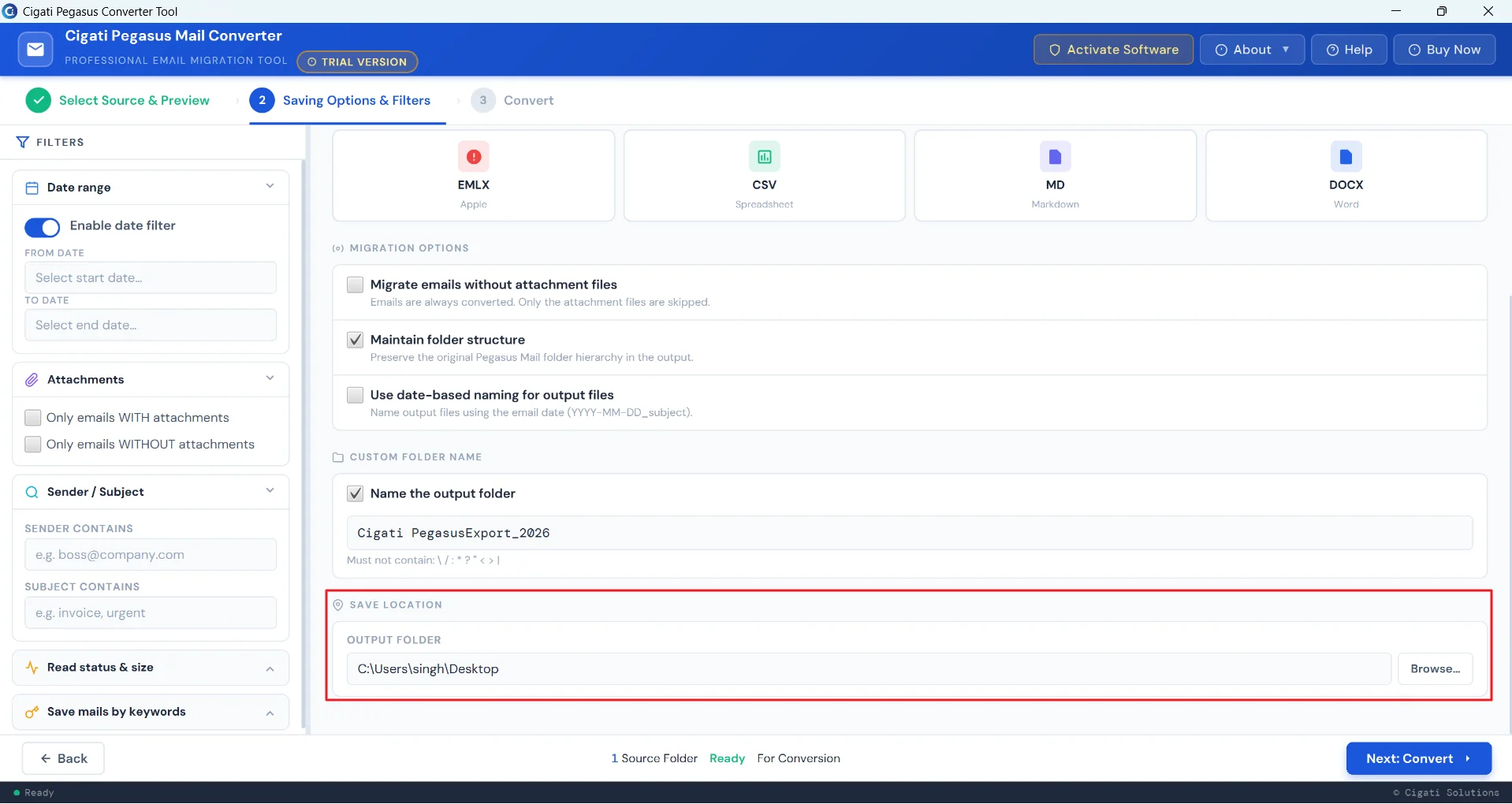
The Cigati Pegasus PMAIL Converter enables users to include or exclude emails, files, or records based on a specific timeframe. Users need to specify the start date and end date to scan the items and select the data that falls within that range.

Filter

Advanced Filters for Precision-Scoped Conversions

The solution allows administrators to define exactly what data gets processed and what does not. Software allows data extraction based on keywords, sender addresses, and subject lines. Also, users can extract unread emails with the specified email sizes.

Data

Maintains Source Data Authenticity

Cigati software ensures lossless mailbox export by maintaining the original folder hierarchy and formatting of the Pegasus email data. Additionally, it ensures clutter-free migration by removing duplicates during the conversion process. It is essential for businesses and IT teams to rely on an established folder taxonomy.

Window

Universal Windows OS Support

The Best Pegasus Mail Converter Software enables efficient execution across diverse system environments. It offers diverse compatibility across a wide range of Microsoft Windows OS. Moreover, it operates on both 32-bit and 64-bit Windows architectures. This makes it suitable for varied enterprise environments.

Technical Specification

Software Prerequisites & Recommendations

Software Name: Cigati Pegasus Mail Converter Tool
Version Support: Windows 11, 10, 8.1, 8, and 7
Size: 268 MB
Version: 26.04
Last Updated: April 2026
Download Link: Download
Product Box
Electronic delivery, you will receive a Download link with software activation key on email after purchase.
processor-img

Processor:

Hard Disk:

Memory:

Operating System:

trial-img

Trial limitation:

The trial version of the Best Pegasus Mail Converter Tool allows users to convert up to 50 emails per folder. To unlock full features and perform unrestricted operations, users need to purchase and activate the licensed version.

faq-img

FAQ:

Comprasion Table

Table of Free And Paid Version

Software Features Free Version Full Version
Supports Multi-format Export including PST, MBOX, EML, EMLX, PDF, MSG, and more. First 50 emails All
Perform Batch Processing for Large-scale Mailbox Migration First 50 emails All
Selective Processing of Emails with or without Attachments. First 50 emails All
Allows User-defined Folder Naming for Output Data Organization
Maintains native Mailbox Hierarchy without Structural Alteration
Facilitates Selective Email Export using Keyword-based Filtering
Provides Customizable Naming Patterns for Converted Email Items
Bulk EMLX File Conversion Capability
Enables Flexible Destination Path configuration for Exported Data
PDF-specific Export Modes: Multiple PDF or Single PDF
Advanced Date Filter for Targeted Email Conversion
Smart Preview Option for Accurate Selection
Works Smoothly Across Windows Platforms
100% Secure and Reliable Conversion Solution
Download and Purchase Download Purchase

FAQ

Frequently Asked Questions

The following are the steps to begin the Pegasus Mail migration to PDF format:

  1. Download and install the Cigati Pegasus Mail Converter Tool.
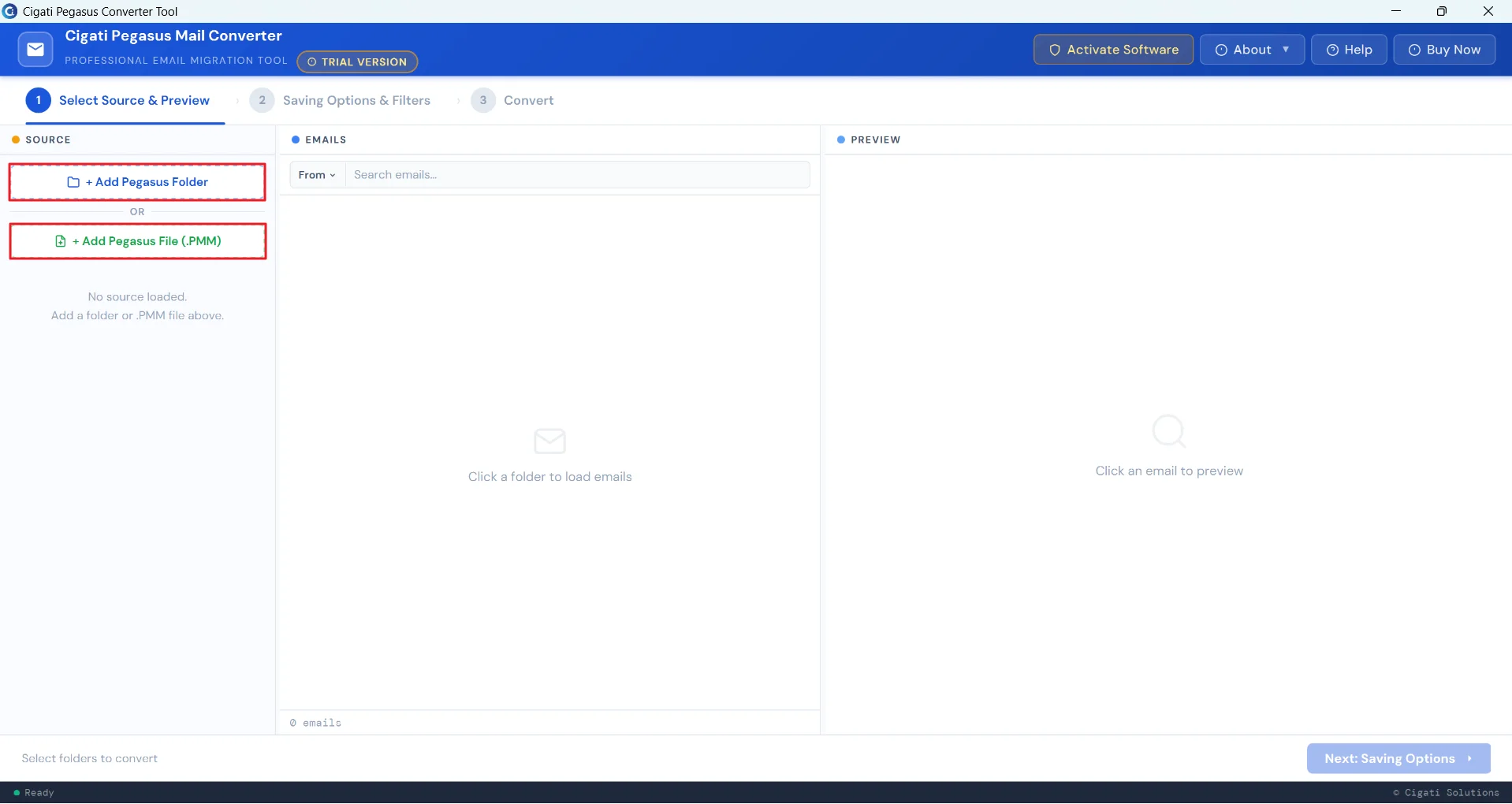
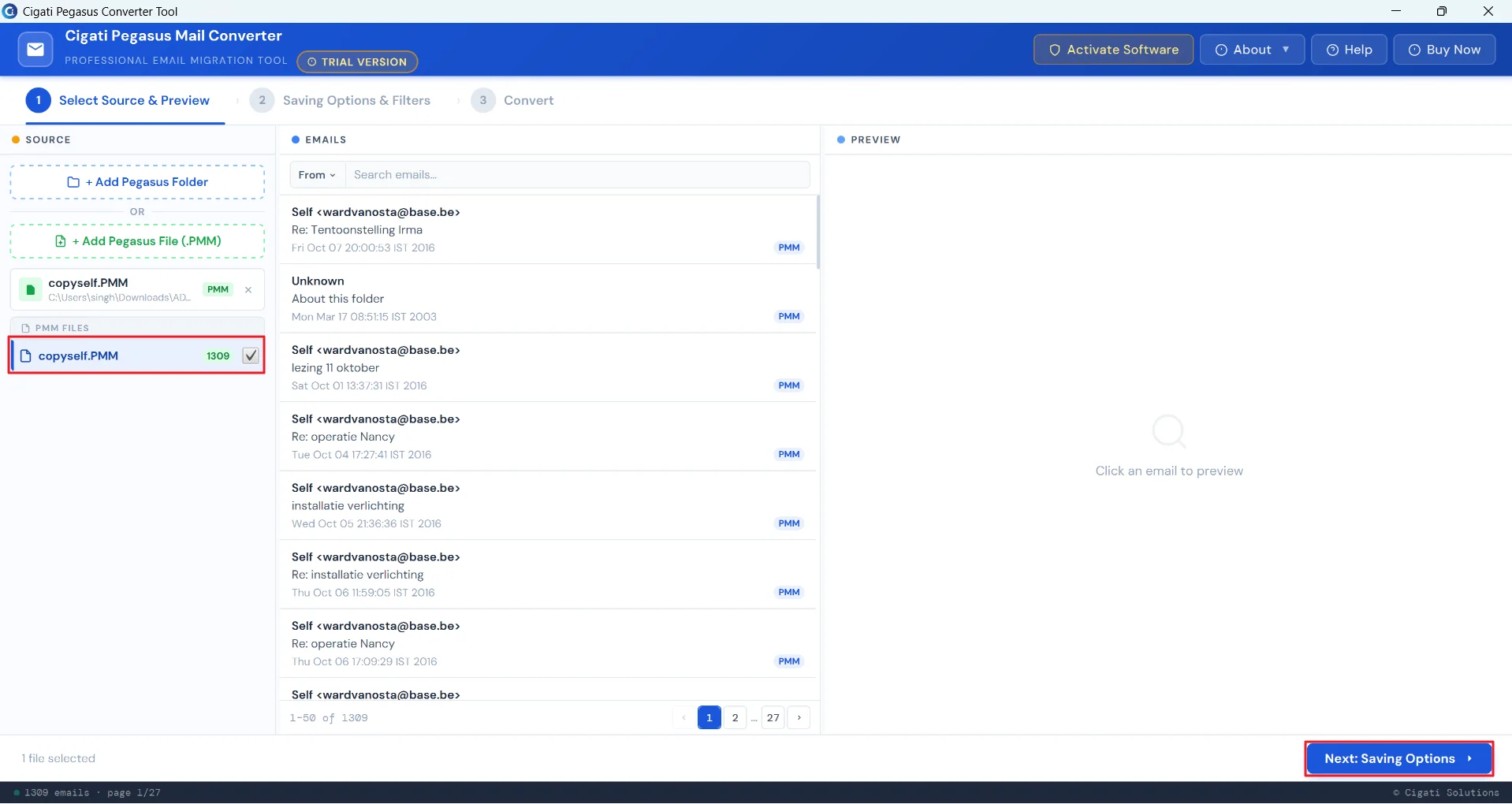
  2. Then, click on either Add Pegasus Folder or Add Pegasus File (.PMM).
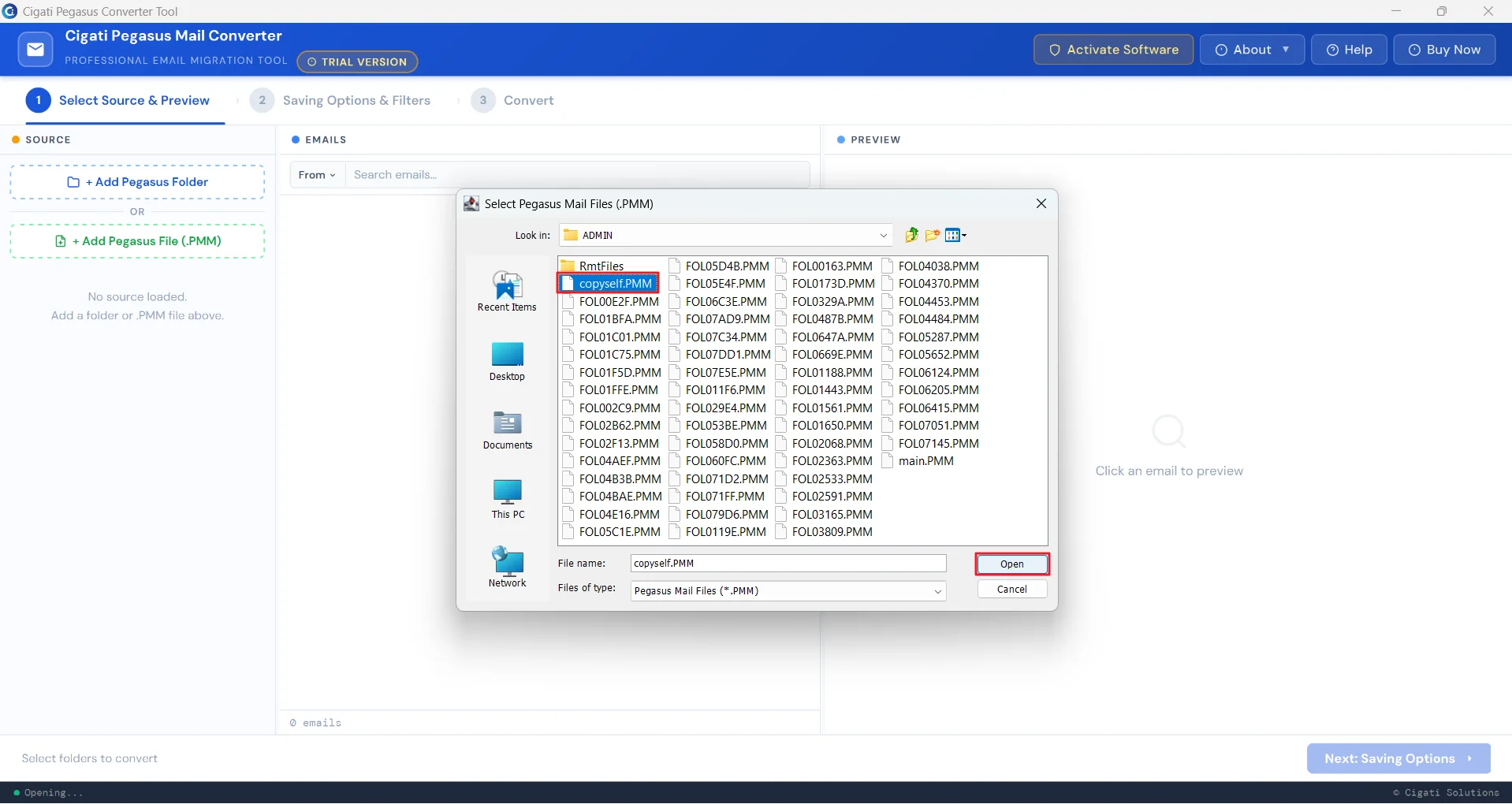
  3. Choose Add Pegasus File (.PMM), browse the file, and select the files you want to convert.
  4. Once added, click on the files to preview them one by one.
  5. Pick the ones you want to convert and click on the Next: Saving Options button.
  6. From the left panel, apply the filters if required and choose the output format as PDF.
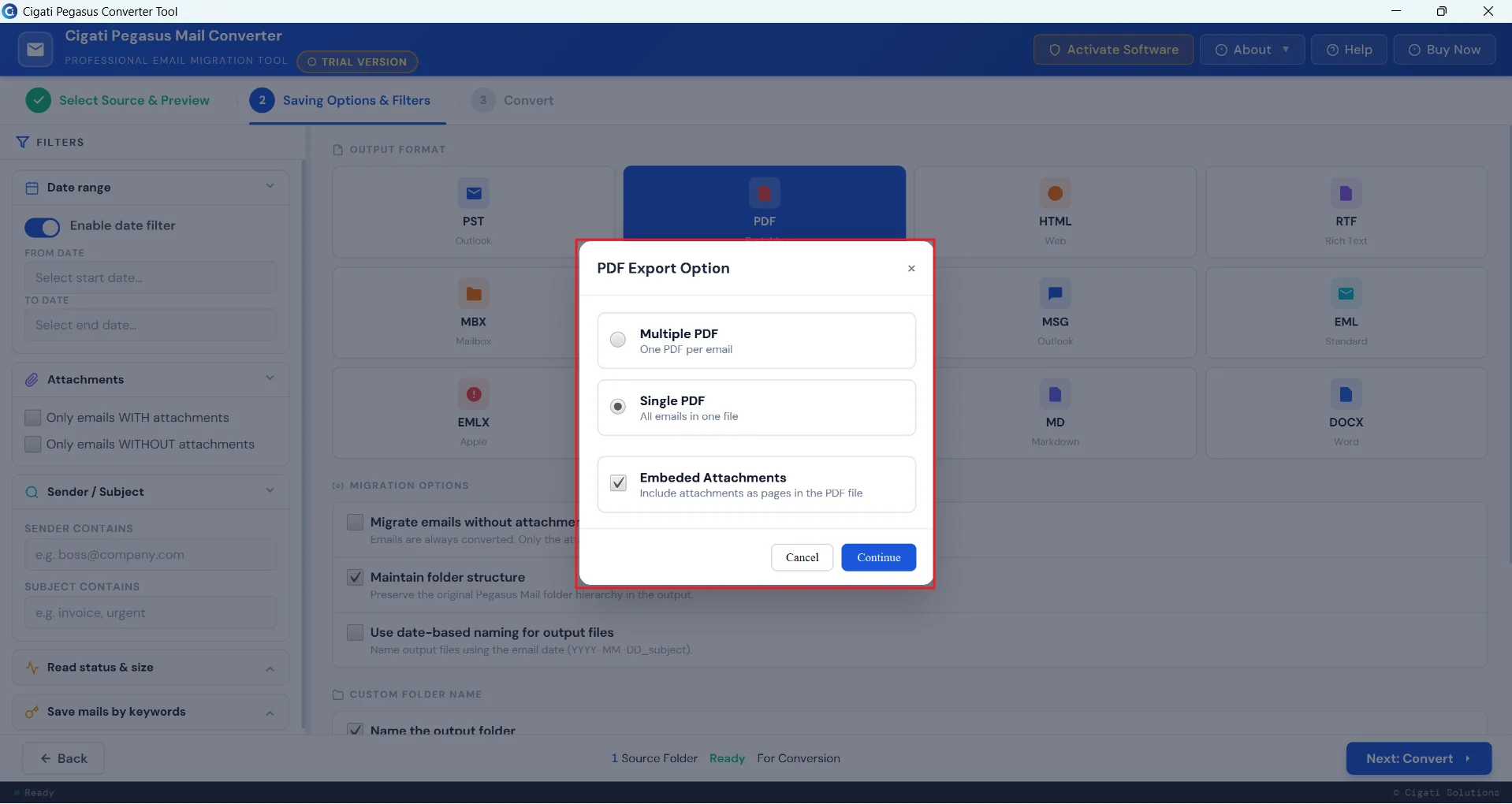
  7. Next, select the PDF Export Options as desired and then click on Continue.
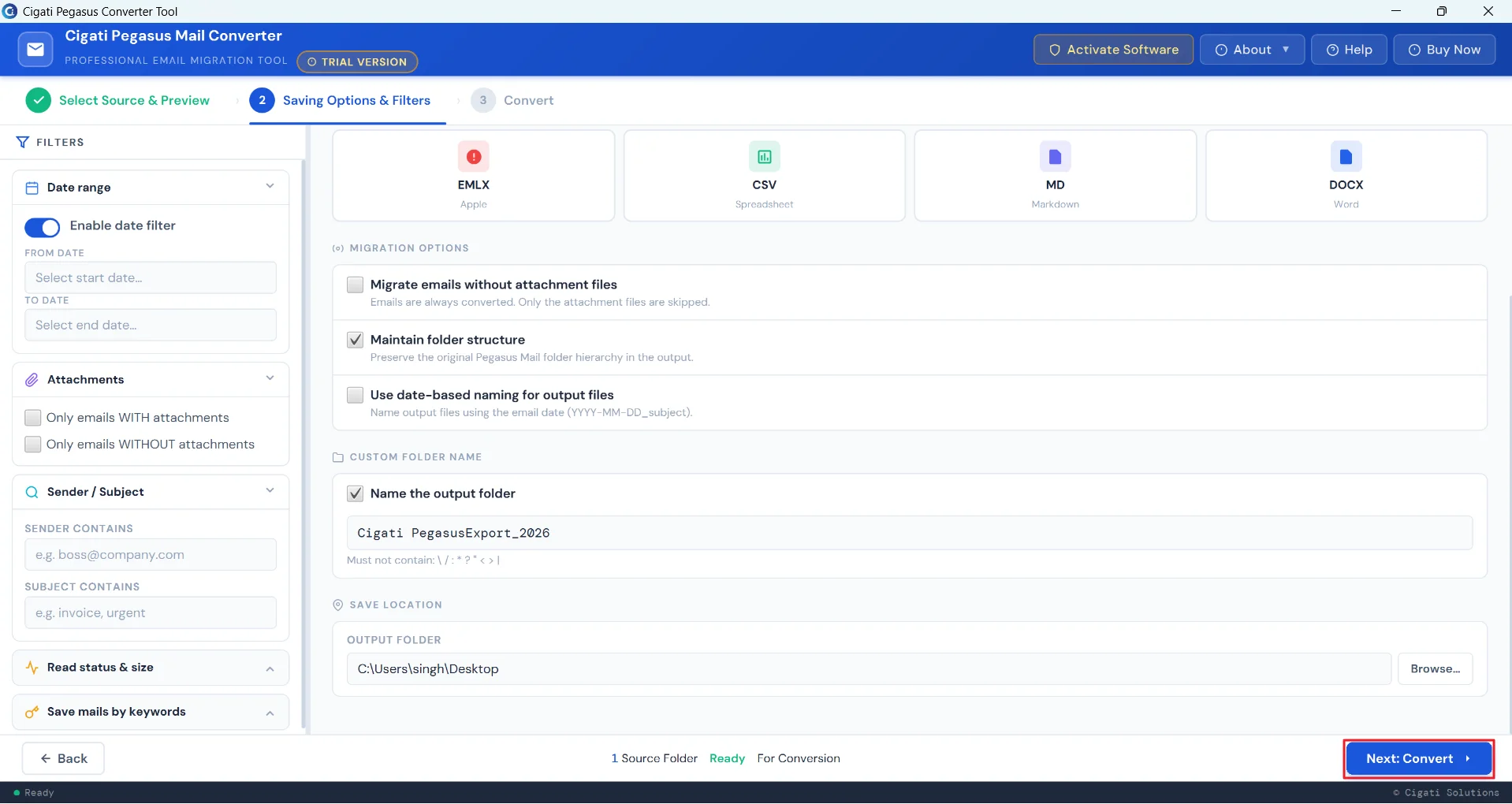
  8. Browse the saving location to save the resultant PDF file. Then, click Next: Convert to begin the process.

The software includes a built-in duplicate removal feature that filters out repeated emails, ensuring unique data is exported.

Yes, the Cigati Pegasus Converter software allows you to export emails in both formats. You can choose Single PDF to combine all emails into one file or Multiple PDF to save each email separately. It also provides an option to embed attachments within the PDF.

Yes, attachments can be included during conversion. You can choose to embed them within the output file or manage them separately, depending on your needs.

Yes, the tool provides a date filter option that allows you to select a start and end date, so only emails within that range are converted.

Yes, the tool includes a maintain folder structure option to preserve the original email hierarchy during conversion.

Yes, you can enable date-based naming to automatically name output files using the email date and subject.

Yes, the Cigati Pegasus Converter software supports batch conversion, allowing you to convert multiple emails in a single process without data loss.

Yes, the tool maintains original email properties such as formatting, attachments, headers, and metadata during conversion.

This usually happens if the selected file or folder is incorrect or unsupported. Make sure you are selecting a valid Pegasus Mail folder or .PMM file and that it is not corrupted.

Yes, the Cigati Pegasus Converter software provides a search option to help you quickly find specific emails before previewing or converting them.

Yes, the preview panel allows you to view email content before conversion, ensuring you select only the required data.

The Cigati Pegasus Converter software supports Pegasus Mail data files, such as .PMM files and complete mailbox folders for easy loading and conversion.

Yes, the software allows you to filter emails based on sender email address or subject keywords for precise conversion.

Yes, the Cigati Pegasus Converter software allows you to filter and save emails using specific keywords for more targeted conversion.

Yes, the software provides an Embedded Attachments option that allows you to include all email attachments directly within the PDF. The attachments are added as separate pages, ensuring that no important data is missed during the export process.

Yes, we understand that some users require the software for a one-time task. Cigati offers special discounts and flexible pricing options for such needs. Contact our support team to learn about the best available deals and offers.

Client Review

A Glimpse into Client Experiences

Thousands of satisfied customers have chosen our software and praised its reliability and performance. They have shared positive stories about how the Cigati Pegasus Mail Converter Tool has helped them manage their data efficiently.

Cigati Pegasus Mail Converter stands out for its ability to maintain data fidelity. From attachments to email headers and folder structure, everything was preserved accurately. Everything was organized just like the original mailbox. It saved us a lot of manual effort.”

Adam | UK

“The tool delivers exactly what it promises: lossless conversion with full structural fidelity. The filtering capabilities of the tool, especially date range and keyword-based extraction, made the conversion process extremely precise. I was able to migrate only the required data without touching legacy archives.

Sophie | USA

“We used the Cigati Pegasus Email Converter during a large-scale mailbox decommissioning project, and it performed exceptionally well. The software preserved folder hierarchy and metadata integrity throughout the migration process. The bulk migration feature significantly reduced our migration timeline without requiring post-processing.”

Martina | Mexico

Related Blogs

Related guides & how-tos