-
Written By Khushboo Maurya
-
Updated on August 12th, 2026
How to Convert Outlook PST to PDF Format on Windows 10 & 11
Fact-checked and reviewed in accordance with our
Editorial Policy
User Query: I’m the Microsoft 365 admin for our company, and I need to import PST to Office 365 for around 100 users. I know Microsoft Purview supports Network Upload, but the setup with AzCopy and CSV mapping looks like a lot of work. Has anyone used the built-in method for a large migration, or is a third-party PST migration tool a better option for saving time and handling multiple PST files?
Microsoft Outlook stores mailbox data in PST (Personal Storage Table) files, but these files can only be opened through Outlook or compatible applications. Most of the legal professionals & organizations prefer PDF because it is universally accessible and preserves email formatting for documentation purposes. However, Outlook does not provide a direct option to convert an entire PST file into PDF in one go. This article explains two reliable methods to convert PST to PDF, including a native approach & a professional Cigati PST to PDF Converter Tool for bulk & enterprise-level conversions.
Prerequisites to Convert PST File to PDF
- Install Microsoft Outlook on your Windows 10 or Windows 11 computer.
- Ensure the PST file is healthy and accessible.
- Verify that you have enough storage space to save the exported PDF files.
- Close unnecessary applications to improve conversion performance.
- Create a backup copy of the original PST file before making any changes.
Why Do Enterprises Convert Outlook PST to PDF?
Many professionals & organizations want to transfer PST files to PDF format for easier access & long-term storage. Some common reasons are given below:
- Access your emails on virtually any device without installing Microsoft Outlook.
- Original email formatting, embedded images, attachments, & metadata remain intact after conversion.
- Legal professionals and organizations widely use PDF documents for compliance, audits, & record-keeping.
- Additional security can be applied by protecting PDF files with passwords and access restrictions.
- Printing, archiving, and sharing email records become much simpler with the PDF format.
- Organizations can preserve important business communications in a universally accepted and easily accessible file format.
Native Methods to Convert PST to PDF
- Using Microsoft Outlook and Print to PDF
- Save Individual Emails as PDF
01 Method: Convert Outlook Data File to PDF via Microsoft Print to PDF
If users only need to save a handful of emails, they can do it natively within Microsoft Outlook.
- First, open Microsoft Outlook on your Windows PC.
- Next, import or open the required PST file if it is not already loaded.
- Then, browse to the email you want to export.
- After that, click File > Print.
- Now, under Printer, select Microsoft Print to PDF >> click Print.
- Thereafter, choose the destination folder where you want to save the PDF.
- Next, provide a suitable file name.
- Finally, press Save to create the PDF file.
02 Method: Save Individual Outlook Emails as PDF
You can also save emails individually using Outlook’s Save As feature combined with PDF printing.
- First, open Microsoft Outlook & access the required PST mailbox.
- Next, open the email that you want to convert.
- Then, click File >> Save As.
- After that, save the email in HTML format.
- Now, open the saved HTML file in your preferred web browser.
- Subsequently, press Ctrl + P to open the Print dialog box.
- Thereafter, select Microsoft Print to PDF as the printer.
- Finally, click Save to export the email as a PDF file.
Why Do Enterprises Avoid the Manual Conversion Method?
- Converts only one email at a time.
- Requires Microsoft Outlook installation.
- Does not support bulk PST conversion.
- Folder hierarchy is not maintained.
- Attachments are not embedded as separate PDF documents.
- Large PST files require significant manual effort.
Automated Solution to Convert PST to PDF
Manual conversion works fine if you’re only dealing with a handful of emails. Nobody needs software to export ten messages.
That’s where the Cigati PST to PDF Converter comes in. It moves your Outlook data to PDF without messing up the folder structure, the attachments, or the metadata tucked into each email. Everything stays intact, the way it was in Outlook.
It also isn’t locked into just PDF. You can export to a few different formats depending on what you actually need it for. That flexibility is why it works whether you’re one person cleaning up your own inbox, a small business archiving records, or an IT admin handling this for a whole company.
Verified Steps to Convert Outlook Data File to PDF
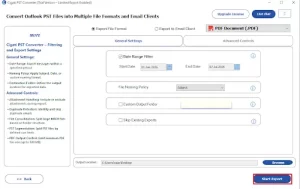
- First, download and launch the Cigati PST to PDF Converter tool on PC.
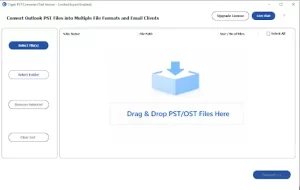
- Then, tap on Select File(s)/Select Folder to load the PST files >> click Proceed.
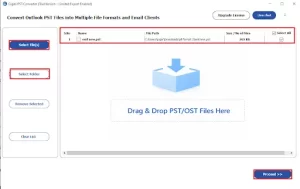
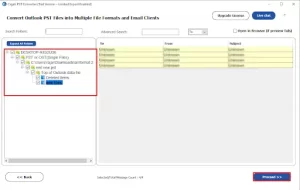
- Now, preview and select the PST files and tap Proceed.
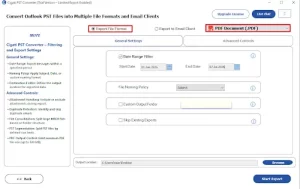
- After that, select PDF as the saving file format.
- Next, you need to apply filters like( Date Name filter, Custom Name Folder).
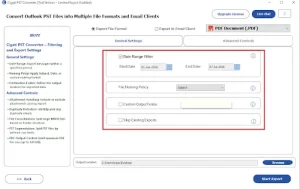
- Lastly, press Start Export to complete the migration process.
| Real-Life Scenario
David’s a legal consultant. Like a lot of people in his field, he had a mountain of Outlook emails that needed to become PDFs for compliance, for client records, the usual reasons law firms end up drowning in paperwork.
|
Final Conclusion
In this blog, we explored the best methods to convert PST to PDF. Native methods are suitable when users need to convert a few emails but become time-consuming for large PST files. The Cigati PST to PDF Converter Tool simplifies the conversion process by retaining email formatting, attachments, folder hierarchy, & metadata with zero data loss. Additionally, it supports batch conversion and advanced filters, making it ideal for personal, business, and enterprise requirements.
Frequently Asked Questions
Q1. Can the PST to PDF Converter convert multiple PST files at once?
Ans. Yes. The PST to PDF Converter supports batch conversion, allowing you to convert multiple PST files into PDF format in a single operation, saving both time and effort.
Q2. Does the PST to PDF Converter preserve email properties during conversion?
Ans. Yes. The PST to PDF Converter maintains the original email formatting, sender and recipient details, subject, date, attachments, and other metadata throughout the conversion process.
Q3. Can the PST to PDF Converter process password-protected PST files?
Ans. Yes. If you know the correct password, the PST to PDF Converter can access the protected PST file and convert its mailbox data without compromising the original content.
Q4. Is Microsoft Outlook required to use the PST to PDF Converter?
Ans. No. The PST to PDF Converter can process PST files without requiring Microsoft Outlook to be installed on your system, making the conversion process more convenient.
Q5. Does the PST to PDF Converter support selective conversion?
Ans. Yes. The PST to PDF Converter allows you to convert specific folders, selected emails, or items within a custom date range, helping you export only the required mailbox data.
About The Author:

Khushboo Maurya is a digital content and SEO professional focused on creating useful, search-friendly content that connects with the right audience. She specializes in content optimization, website growth, and practical SEO strategies that improve visibility, engagement, and organic reach.
Related Post