-
Written By Rohan Wiese
-
Updated on February 20th, 2026
Why Have My Yahoo Emails Disappeared from My Inbox? (Solved)
Facing the “Yahoo emails disappeared from Inbox” bug? Don’t stress! Many users have faced this same technical glitch. One reason could be the silent automation of Yahoo Mail filters. Instead of appearing in the Inbox, the emails are diverted to either the Spam or Trash folder. This simple issue can be easily solved with free solutions and an automated tool, the Cigati Yahoo Mail Backup Tool. With this automated tool, users can be assured of 100% data integrity.
Why Did My Yahoo Inbox Emails Disappeared?
Emails disappearing can be the result of automated protocols rather than a random system error. Given below are a few causes that may result in this issue:
- An accidental swipe or a misclicked action can relocate the email messages into a hidden subfolder.
- Sometimes, the Yahoo active filter rules might reroute the messages, bypassing the inbox and directing in Trash.
- A security breach, such as unauthorized access, is a major cause of the massive disappearance of email.
- Often, sync conflicts occur if a user deletes an email on one device, and it gets deleted on the desktop Inbox.
- If the user exceeds Yahoo’s 20GB storage ceiling, the Inbox will bounce off the new incoming messages.
Ways to Fix Yahoo Emails Disappeared from Inbox
You can use these manual approaches and check if they work in your case.
Method 1: Fix Yahoo Mail Disappeared from Inbox Issue By Using the Deleted Items Button
Frequently, when we have many messages, we fail to notice and unintentionally delete our unique information. In this case, you can follow the steps.
- Open your Yahoo email account in any browser.
- Navigate to the Deleted Items button, and hit it.
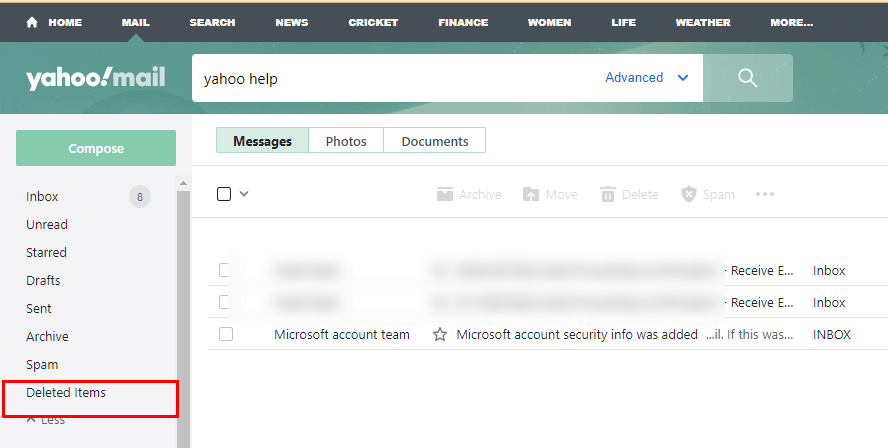
- Check your messages, if it is present in that box.
- If you found it, then you can restore it to your inbox folder in Yahoo.
- You can restore the messages by right-clicking on the selected messages.
- Then choose the Restore to inbox option from the list of choices.
By following the above steps, you can fix the issue of vanished messages in Yahoo Mail. If the aforementioned approach fails, try the next workaround.
Method 2: Emails Disappearing from Yahoo Inbox by Yahoo Help
Messages from your Deleted Items were frequently deleted as well. In this case, you can contact Yahoo Customer Service Support. Here are the steps you need to follow:
- Access your Yahoo Mail in your preferred browser.
- Steer to the name icon, and go to the Add or manage accounts option.
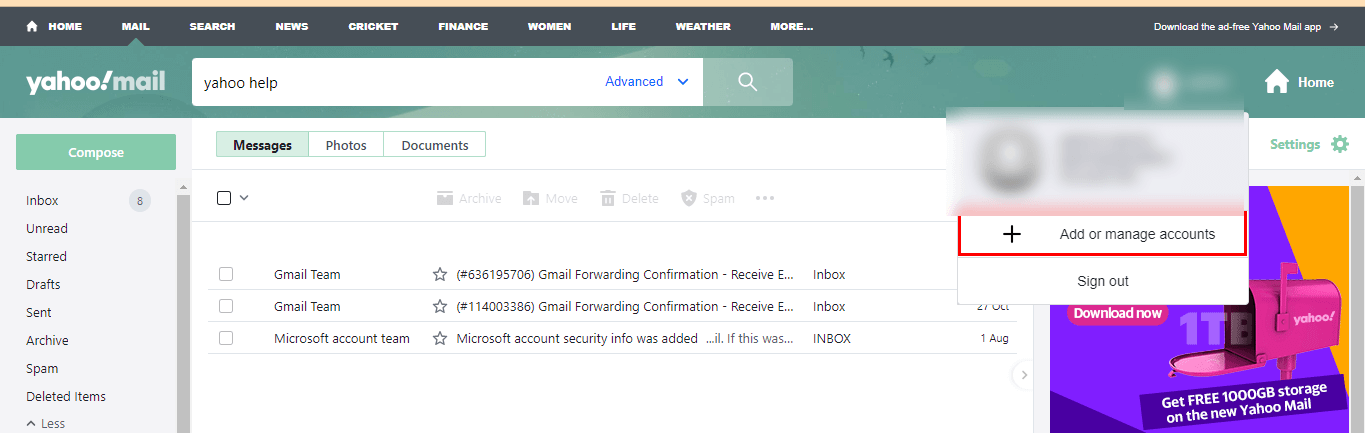
- After applying the above step, it will redirect you to the Help Section page. Click Help.
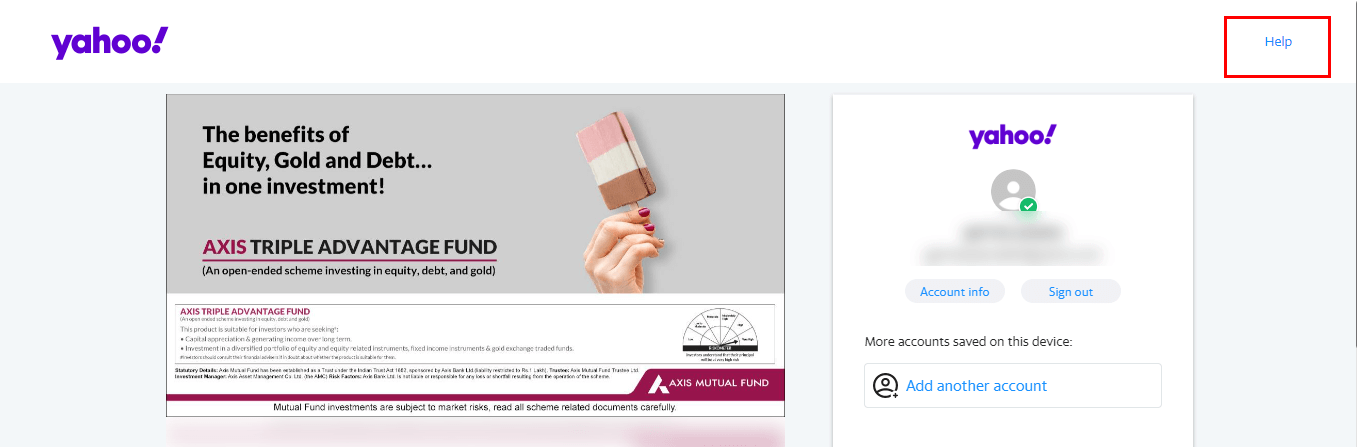
- Choose the Mail option from the choice list to settle the subject of Yahoo Mail disappearing from the Inbox folder.
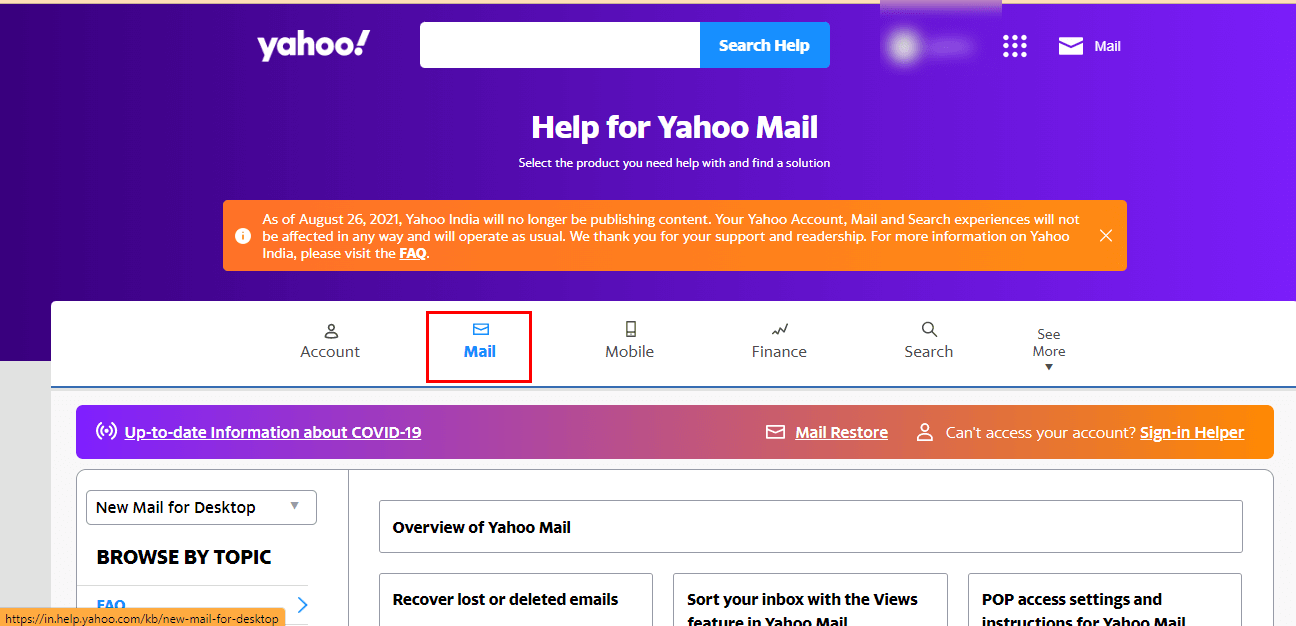
- Under the list of choices, opt for Recover lost or deleted emails.
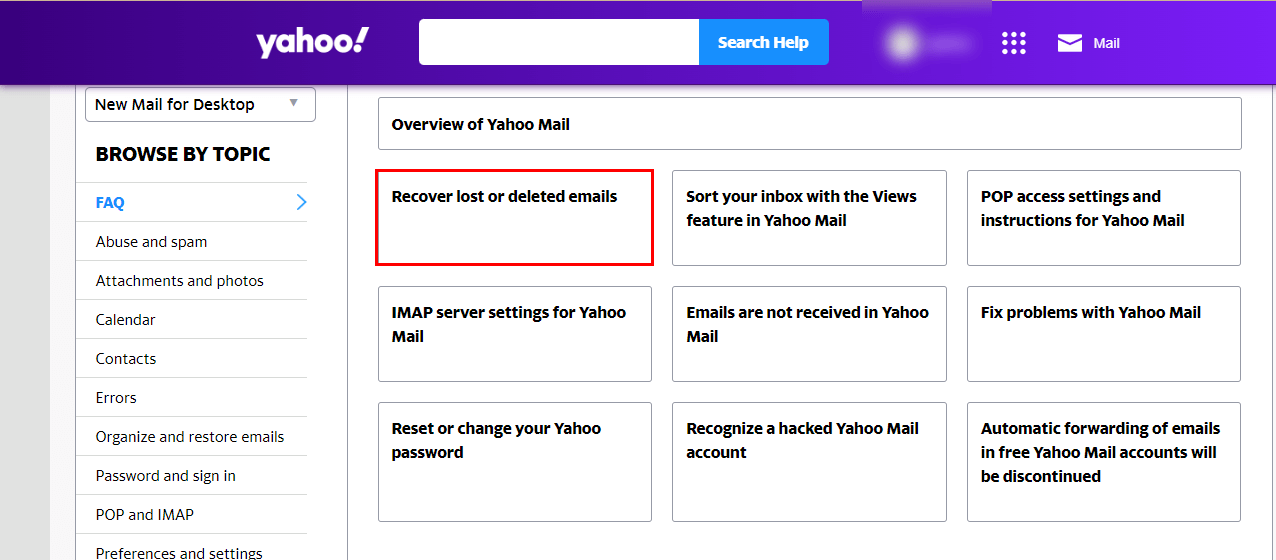
- It will navigate you to a request page.
- From there, click on Send a Restore Request.
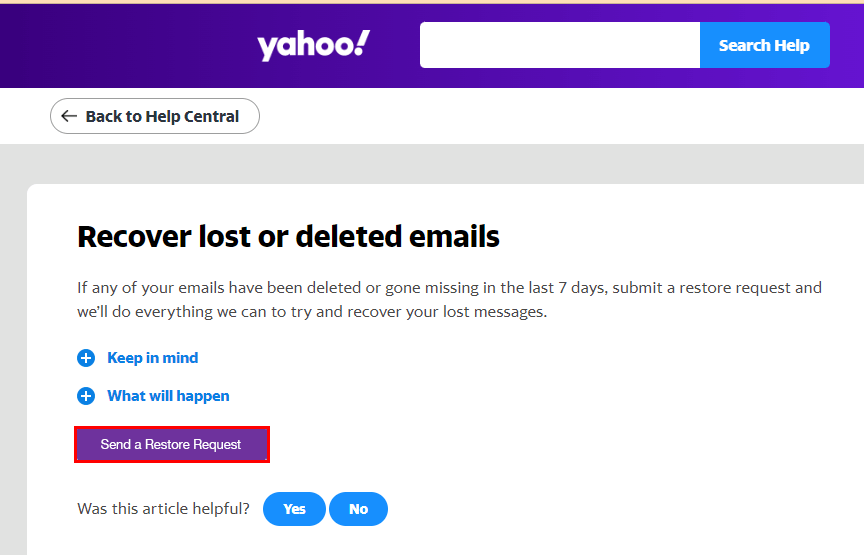
- Your above step will take you to the Email a Specialist Page.
- On this page, fill in the required credentials in accordance. Such as Describe the Problem, When did you last see the missing messages, Yahoo ID, etc.
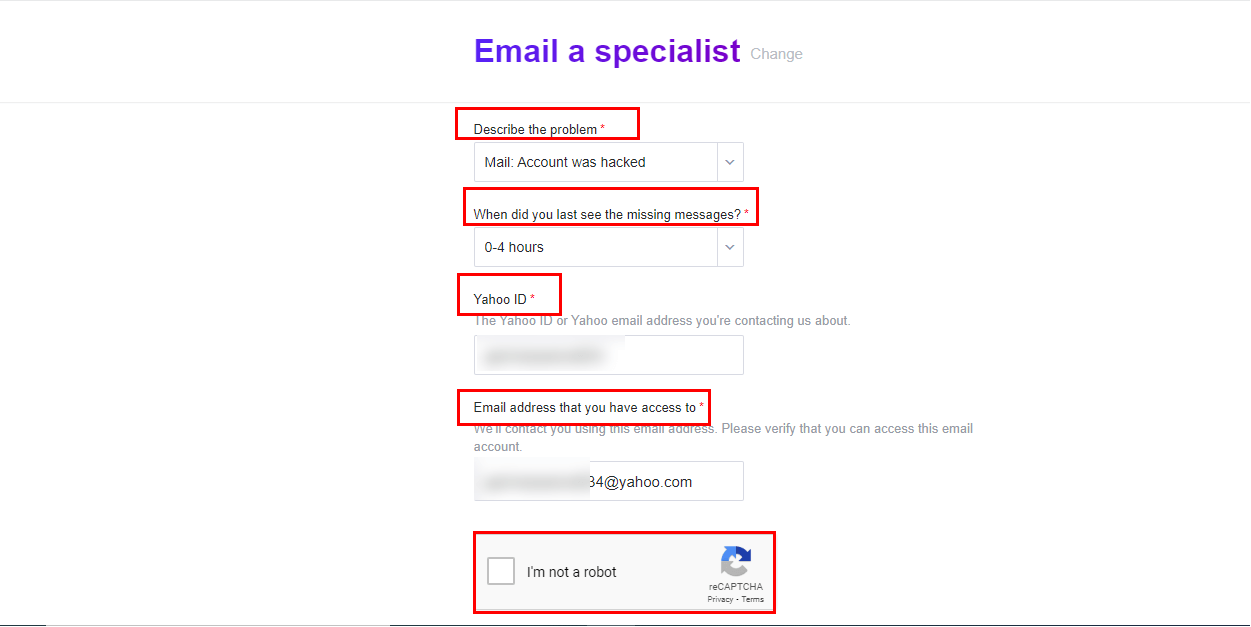
- And at last, click on the Create Request button. It will start the process of resolving the matter of Yahoo Emails Not Showing in the Inbox.
You were able to resolve the issue with Yahoo emails that disappeared from your inbox by using the steps above. But the above-defined method has some flaws. That you may experience, during this time. Here is a list of a few of them.
Constraints of the Manual Approach
- It is a tedious task while approaching the Yahoo Help Center.
- Sometimes it is too long for the Help Center executive to take time to approach.
- You must possess technical know-how.
These are some constraints that a user may face while executing the above approaches to fix the Yahoo Mail Disappearing from Inbox Folder issue. In this case, you can use a professional tool that offers you so many additional features, such as email converted into so many useful file formats and email clients, with no data loss. Let us enhance the details about the tool.
Professional Way to Resolve Yahoo Emails Disappeared from Inbox Folder
The Cigati Yahoo Mail Backup Tool is a full-fledged utility that allows you to migrate your Yahoo emails and attachments into more than 21 file formats and email clients. In addition, you can save your emails and their data with or without attachments. Besides, there are other advanced features of the utility; the list of attributes is represented below.
Why Prefer Yahoo Mail Backup Tool?
- Converts Yahoo Mail and its data into many more file formats.
- You can migrate Yahoo mailbox items such as tasks, calendars, etc.
- Back up your Yahoo Mail and its data by maintaining the hierarchy of the Yahoo Mailbox.
- Allows you to import your Yahoo Mail into several email clients.
- Offers you to have a copy of your data in your selected format for future reference.
- Saves your machine storage from unnecessary duplicate emails.
Simplified steps to resolve “Yahoo Inbox Emails Disappeared”:
- Start by downloading and installing the tool.
- Then, open it and click on Continue.
- Pick between Single Mode or Batch Mode.
- After that, log in with your Yahoo Email ID, Password, Host, and Port.
- From the left-panel, expand the folders and choose the ones you want to backup.
- Click Next and pick the desired File Format, such as PDF, to backup emails.
- Next, opt for the smart filters, specify the destination to save the file, and hit Convert to begin the process.
Conclusion
Factors such as storage limits, temporary service disruptions, or sync delays can result in the “Yahoo emails disappeared from Inbox” issue. I hope that after following the article, you have successfully fixed this issue. Though we also provide you with a few manual approaches, they have some limitations and demands for advanced technical skills. On the other side, with the Cigati Yahoo Mail Backup Tool, you can enjoy certain advantages of the utility with no prior technical know-how.
Also Read: Yahoo Mail Not Receiving Emails
Frequently Asked Questions
Q: Why did my Yahoo emails disappear from the Inbox?
Ans: The different reasons can be: accidentally archived, automated Yahoo Mail filters, sorting settings, and sync issues. Other issues can be storage limits, unauthorized access, or incorrect POP/IMAP configurations.
Q: How can I prevent Yahoo emails from disappearing in the future?
Ans: One of the best solutions is to keep a backup of your Yahoo emails. Use a professional backup tool that can easily backup emails with complete data integrity.
About The Author:

Rohan Wiese works as Technical Content Writer at Cigati Solutions. He writes technical blogs, articles, newsgroups, etc. on Database Recovery, Email Backup & Migration for Cloud and Webmail Email Clients. He has almost two years of writing experience and has written about many Technologies such as Cloud Computing, Intelligence, IoT, and Email Management.
Related Post