Cigati Yahoo Backup Tool

Simple to download and operate - Cigati Yahoo Backup Tool lets you backup multiple Yahoo mailboxes at once. Store data in multiple formats, prevent data loss, and access it anytime without depending on the server.

(Average Rating 4.9 Based on 2312 Reviews)

Benefits of

Cigati Yahoo Mail Backup Tool

  • Backup Yahoo emails to PC or external drive in PST, PDF, MBOX, and more.
  • With the batch mode feature backup multiple Yahoo mailboxes at a time.
  • Directly migrate emails from Yahoo Mail to Gmail, G Suite, Office 365, etc.
  • Supports mailboxes of all sizes, including large and bulky emails.
  • Folders are displayed in a tree structure, easy to select before migration.
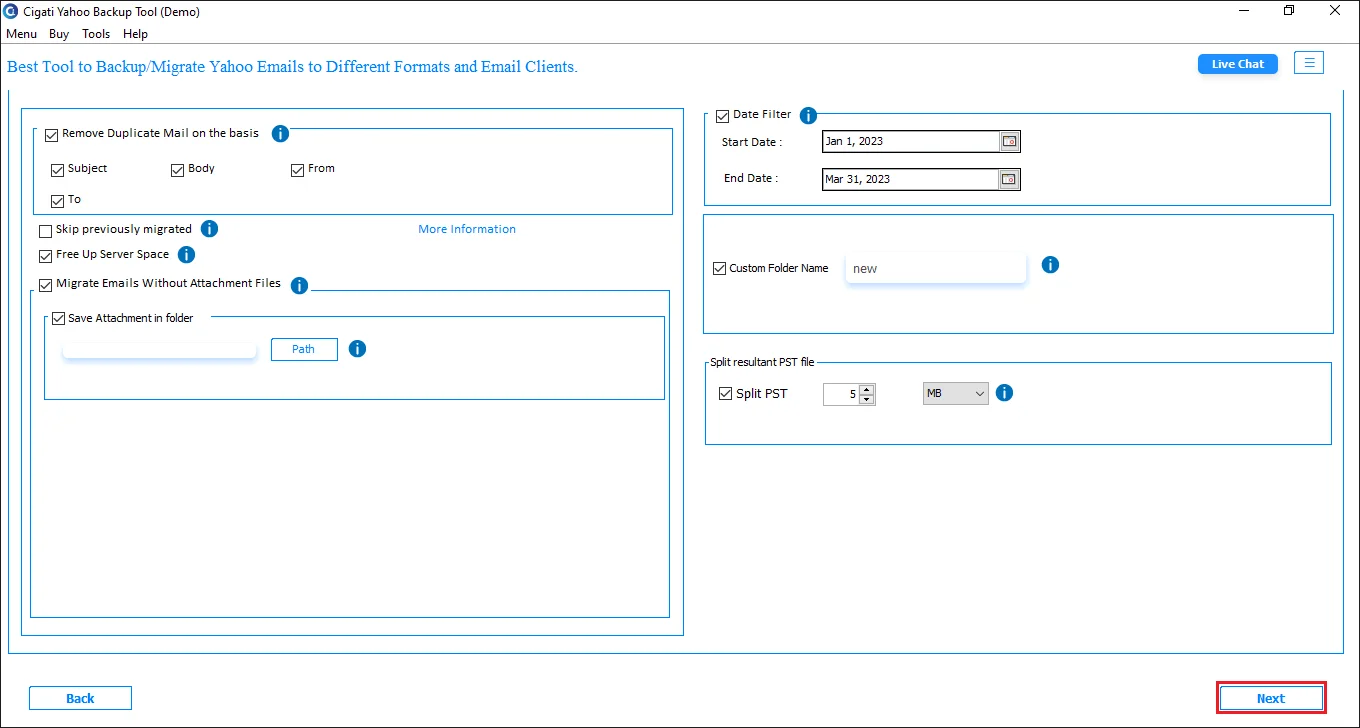
  • Filter emails based on Date and backup only the required ones.
  • Remove duplicate emails from the mailbox based on predefined criteria.
  • Backup Yahoo emails without attachments or save them separately in a folder.
  • Custom folder name and free up server space features are also available.
  • Split large resultant PST files into smaller and manageable parts.
  • Skip previously backed up or migrated emails to avoid duplication.
  • Works with all versions of Windows, including Windows 11.
  • Free Yahoo Backup Tool to backup only a limited emails per folder.
benefit-img

Best Features of

the Yahoo Email Backup Tool

Save Yahoo Emails Locally

Save Yahoo Emails Locally

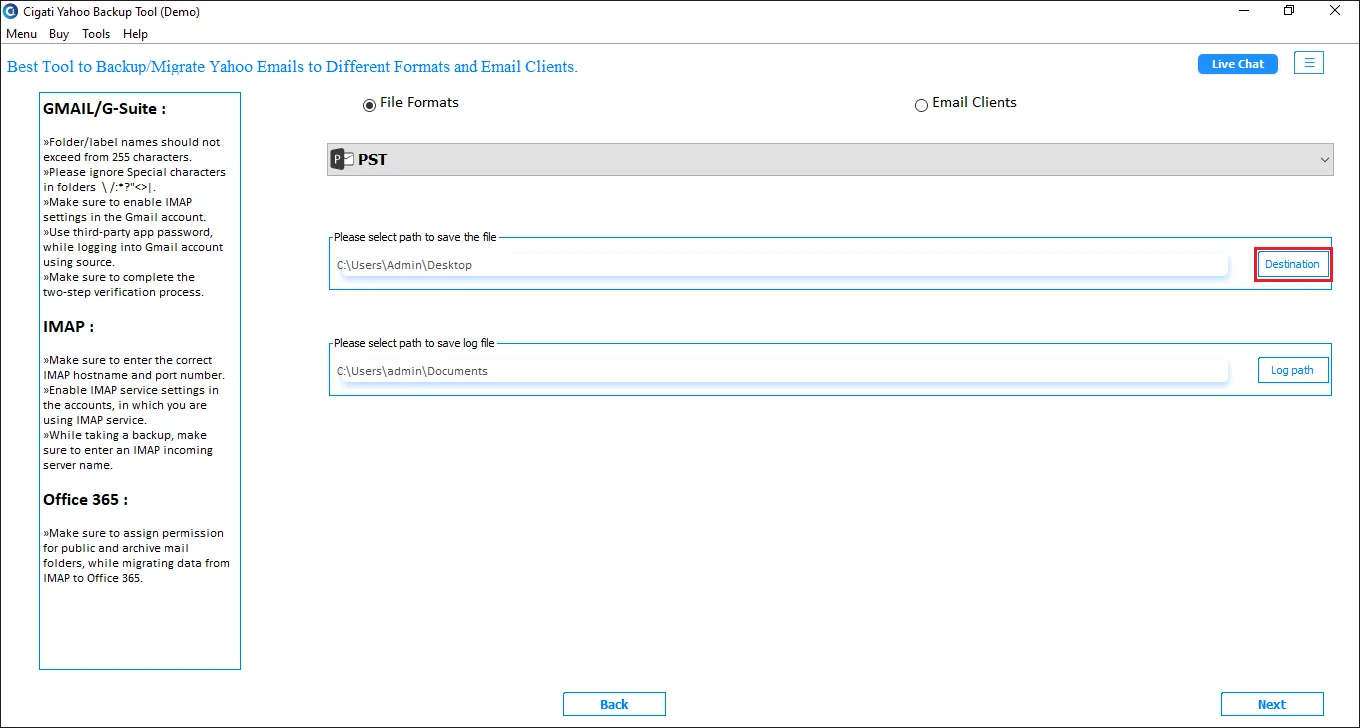
The Best Yahoo Mail Backup Tool lets users backup mailbox data into multiple formats and save it on a local PC. You can choose to export emails into PST, PDF, EML, MSG, MBOX, DOC, and DOCX. Additionally, save Yahoo emails to CSV format for a more organized appearance. The tool lets you save a backup file on PC as well as any external storage.

Migrate Yahoo Emails to Cloud

Migrate Yahoo Emails to Cloud

If you are planning to migrate Yahoo emails to the cloud, Cigati Yahoo Backup Wizard does that with ease. Users can smoothly migrate Yahoo emails to G Suite, Office 365, and Gmail. Moreover, you can move emails to IMAP accounts like Outlook, Thunderbird, Apple Mail, Windows Mail, and others. With minimum login requirements, you can perform the migration easily.

Single and Batch Mode Migration

Single and Batch Mode Migration

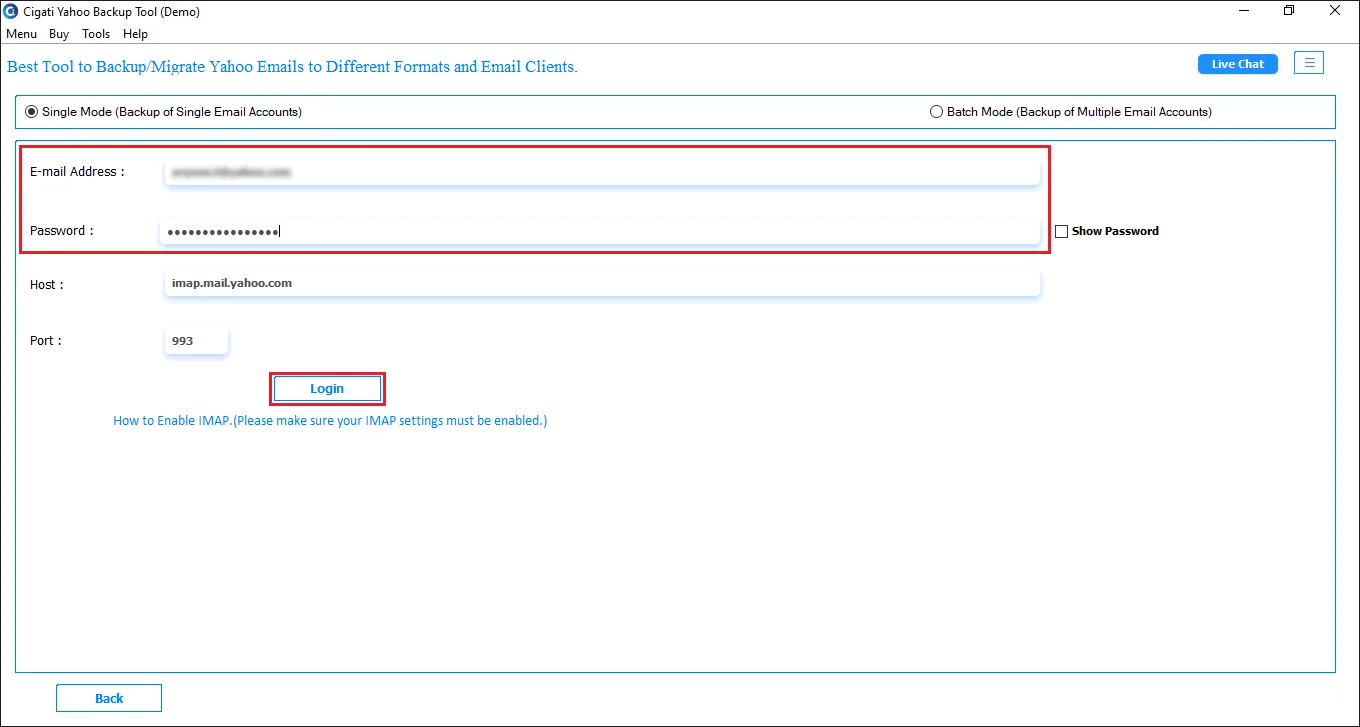
As soon as you run the software, you will see two modes for migration: Single mode and Batch mode. Single mode allows migrating emails from one account at once, whereas Batch mode is used to migrate data from multiple Yahoo mailboxes at once. To migrate through batch mode, you need to arrange all Yahoo mailbox credentials in a CSV and upload it. The process goes smoothly and eliminates any kind of complexity.

Save Emails With or Without Attachments

Save Emails With or Without Attachments

Most emails in your mailbox contain some attachments that can be important or unimportant. So, Yahoo Backup Tool offers you multiple options to manage attachments. Choose to backup emails without attachments or save attachments separately in a folder or a PDF format. This helps users to keep data organized as well as making it easy to access depending on what they are looking for.

Delete Duplicate Emails from Yahoo Mail

Delete Duplicate Emails from Yahoo Mail

Cigati Yahoo Email Backup Tool features a duplicate removal option for users. If your mailbox is cluttered by duplicate data, choose the ‘Remove Duplicate Emails’ option to declutter the mess. There are pre-defined criteria like To, From, Subject, and Body. If you have already initiated migration once, choose the ‘Skip Previously Migrated’ option to prevent duplication again.

Delete Duplicate Emails

Feature for Selective Email Migration

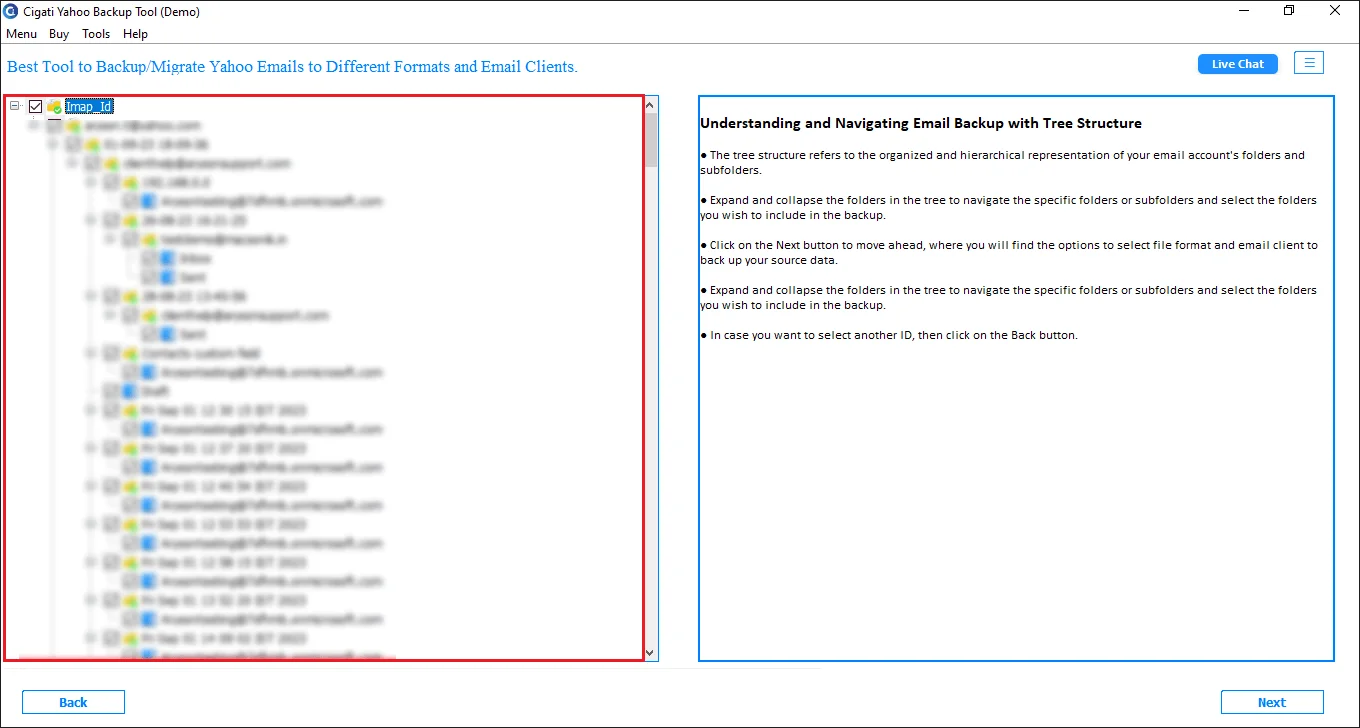
You will get two features to migrate emails selectively: select folders from the preview panel and ‘Date Filter’. Choose the required Yahoo mailbox folders from the tree-structure panel before proceeding to migrate. Additionally, apply a date range filter to move only selective emails based on dates. Thus, avoid migrating unnecessary data to a new space.

Free Yahoo Backup Software

Free Yahoo Backup Software

For assurance, run the free demo version before investing a penny. Free Yahoo Email Backup Software by Cigati is to help you test the features of the tool. It is free of cost and includes all features of the Enterprise license; however, it limits email backup and migration. You can only migrate 50 emails per folder with the trial version.

Wide Windows OS Compatibility

Wide Windows OS Compatibility

This software is highly compatible to run on all Windows operating systems, irrespective of the version. It works on Windows 11 as well as Windows 7 without any issues. Moreover, you can also download the respective tool for macOS, which is equally compatible with all versions of Mac, including the latest macOS 26 Tahoe.

Technical Specification

Software Prerequisites & Recommendations

Software Name: Cigati Yahoo Backup Tool
Version Support: Windows 11 & below versions
Size: 112 MB
Version: 21.09
License: S/A/T/E
Download Link: Download
box
processor-img

Processor:

Hard Disk:

Memory:

Operating System:

trial-img

Trial limitation:

The Trial version of Yahoo Backup Tool provides access to all features included in the enterprise license; however, it possesses some limitations too. You can easily test the eligibility of features and how it perform without investing any amount. You can backup or migrate only 50 emails per folder from the Yahoo mailbox. Purchase full software depending on business requirements and migrate as much data volume as you want without fearing data loss.

faq-img

FAQ:

Comprasion Table

Table of Free And Yahoo Email Backup Software and Paid Versions

Software Features Free Version Full Version
Backup Yahoo emails to PST, PDF, MBOX, MSG, EML, CSV, DOC, and DOCX Export 50 Emails per Folder
Migrate mailbox data to other email clients: Gmail, G Suite, Office 365, and IMAP accounts Export 50 Emails per Folder
Dual mode migration: Single mode and Batch mode Export 50 Emails per Folder
Preview and select mailbox folders from the tree structure
Date filter for selective migration
Feature to remove duplicate emails
Migarte or backup emails without attachments
Split resultant PST file
Skip previously migrated emails
24*7 Tech Support & 100% Secure
High Compatibility with all Windows Versions
Download and Purchase Download Purchase

FAQ

Frequently Asked Questions

Follow the steps below to save Yahoo emails to PST format:-

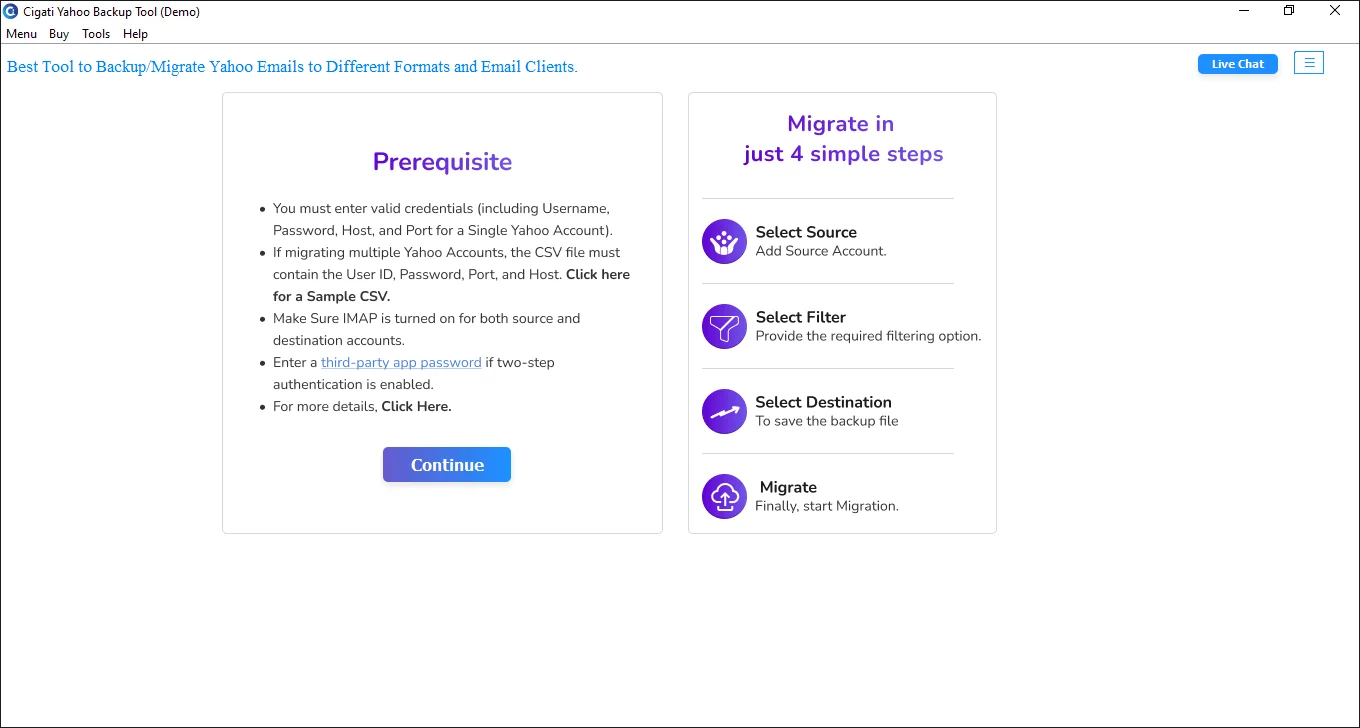
  • Install the Cigati Yahoo Backup Wizard. Click Continue.
  • Choose the mode: Single or Batch mode.
  • Enter your Yahoo Mail login credentials and click Login.
  • Select folders from the tree structure that you want to back up.
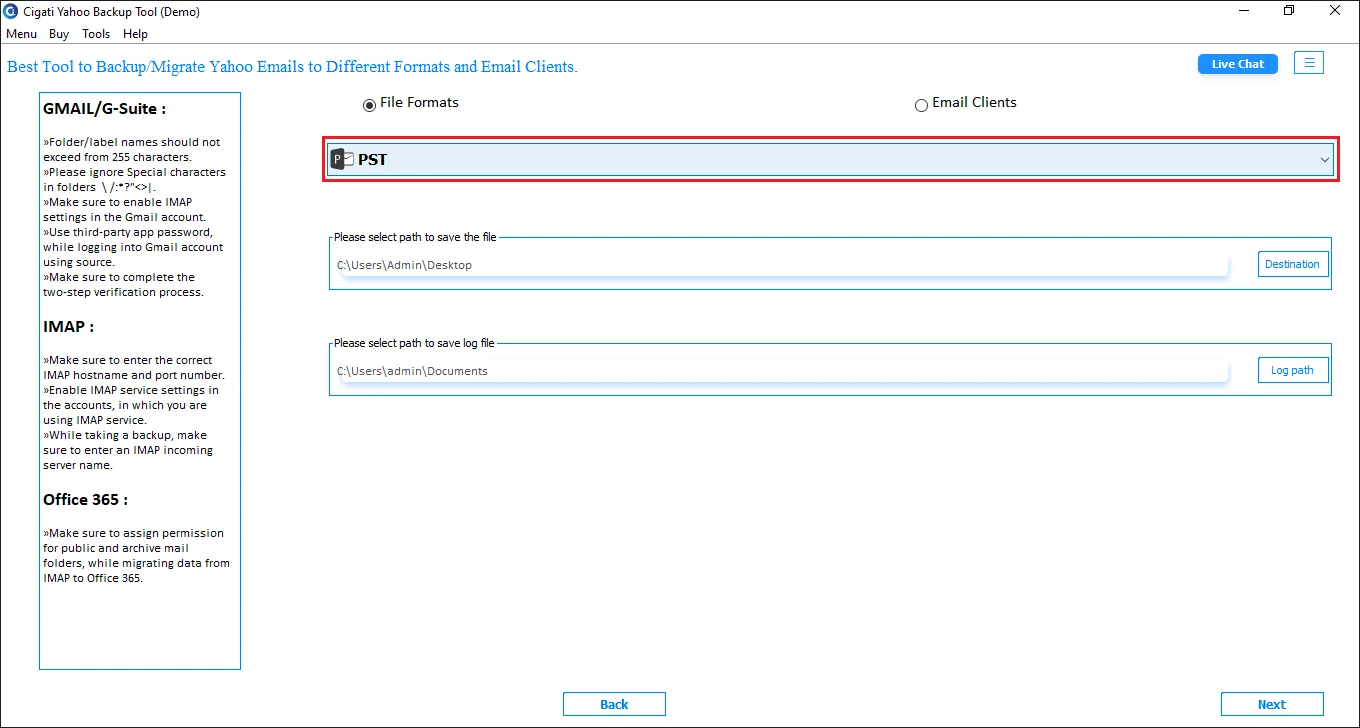
  • Choose PST as the file format and specify the saving path.
  • From built-in options, apply what suits your needs.
  • Click on Start Process to backup.

Yes, the software has two modes for migration: Single and Batch mode. Switch to Batch mode for migrating data from multiple Yahoo accounts simultaneously.

It's a simple process, just follow the steps of the Yahoo Email Backup Tool:

  • Install and launch the software, then click Continue.
  • Select Single or Batch Mode.
  • Enter your Yahoo Mail login details and hit Login.
  • Select the folders you want to backup.
  • Go to Email Clients > Choose Gmail.
  • Log in to Gmail account and set the save location.
  • Apply filters if needed and click Start Process.

For selective email migration, Cigati Yahoo Backup Software lets you choose folders from the preview panel. Moreover, to be more precise, apply the Date Filter further.

Yes, it is mandatory to create an App password. However, new Yahoo emails may not support this, so our software works well for older accounts.

Cigati Software is an all-in-one software for Yahoo users. It offers a built-in feature to remove duplicates while migrating or backup. Simply select the “Remove Duplicate Emails” and predefined criteria. You will get all fresh emails in the output. Also, select Free up server space option to automatically delete emails from the server.

This highly compatible software supports all Windows OS, including Windows 10 and other versions in use.

Trial software is free of cost for all, but it allows users to backup or migrate only 50 emails per folder.
Admin consent is required when the application needs access beyond a single user’s data, such as organization-wide or multi-user permissions. In such cases, only a Microsoft 365 administrator can approve the login for security purposes.

Yes. Modern Authentication requires user sign-in access to generate the authentication token. If sign-in is disabled, the tool cannot connect or access mailbox data. Please ensure user sign-in is enabled for all accounts before using Modern Authentication.

Client Review

A Glimpse into Client Experiences

The Cigati Yahoo Backup Tool is very simple and user-friendly. I was able to back up all my emails without facing any difficulty. The process was smooth, and I didn’t need any technical knowledge. It saved me time and gave me peace of mind knowing my emails are safe.

“The Cigati Yahoo Backup Tool worked great for me. I was able to save important emails from my Yahoo account to my computer without any trouble. The process was clear, and it gave me confidence that my data is safe.”

Rachel Green | Brussels

“I just wanted a simple way to back up my Yahoo mailbox, and this software did exactly that. It was quick, reliable, and didn’t confuse me with too many steps. Now I feel more relaxed knowing I have a local copy of my emails with the help of Cigati Software. Highly recommended!”

David Miller | USA

“What I liked most about the Cigati Yahoo Backup Tool was the speed and easy-to-understand interface. I could back up only the emails I needed by setting a date filter, and got rid of duplicates with the remove duplicate feature. This saved me from downloading unnecessary emails. It’s a very practical tool.”

Liam Anderson | Mexico