Cigati Google Drive Duplicate Finder & Remover

Cigati Google Drive Duplicate Finder is the most-awaited software for Google Drive users. Packed with advanced features, this server-based software boasts an intuitive interface. It scans Google Drive data, including storage, files, folders, and file types stored. The software allows users to select and delete desired data from the drive one by one, as well as in bulk, with utmost security.

(Average Rating 4.9 Based on 2345 Reviews)

Benefits of

Cigati Google Drive Duplicate Finder & Remover

  • Advanced software to scan and search for duplicate files across the Google Drive account.
  • Offers the flexibility to switch between drive-level and folder-level scanning.
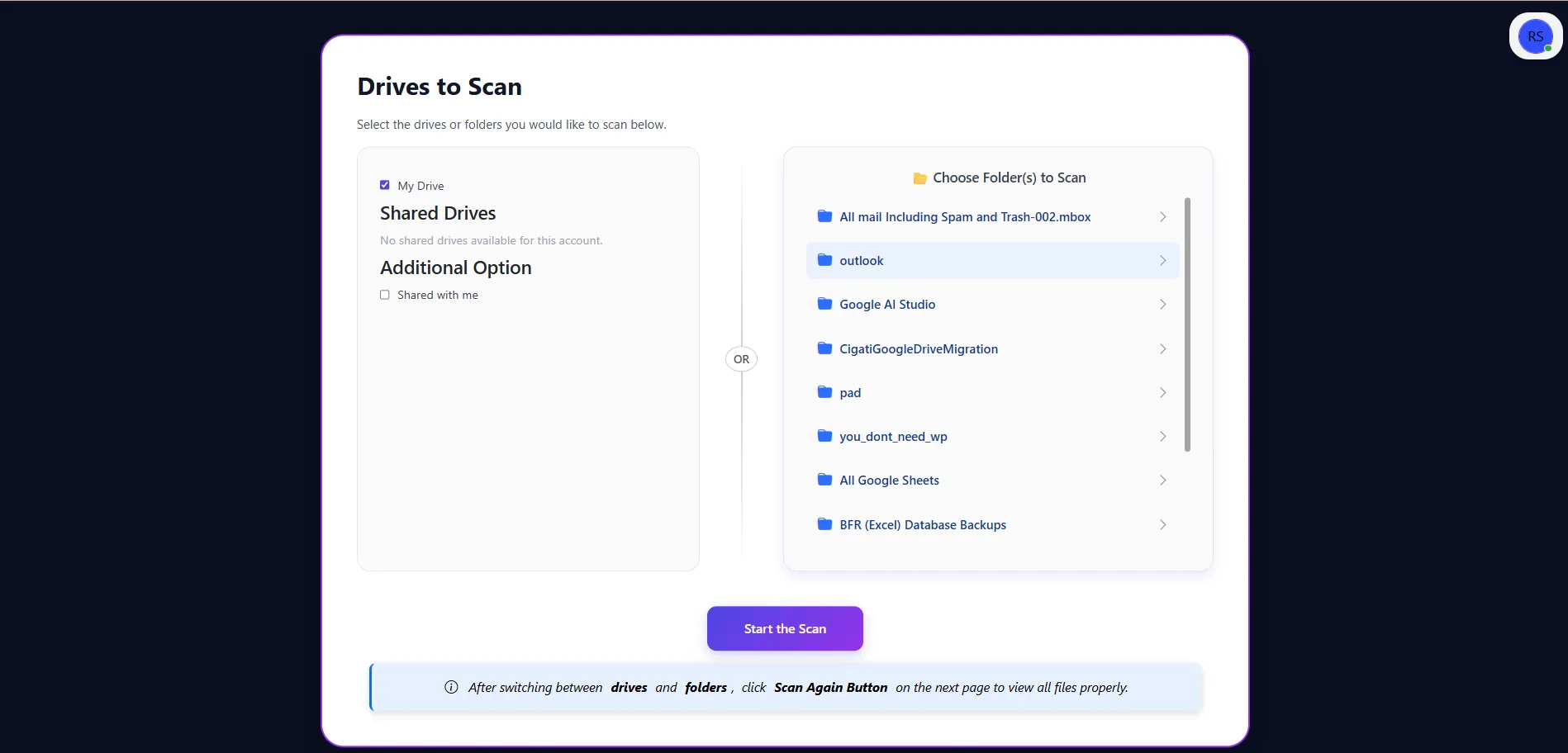
  • Feature to choose drives for scanning: Choose My Drive or/and the Shared with Me drive.
  • Lists all folders in the drive and lets users scan only selected folders instead of the entire drive.
  • The software can scan and process multiple files simultaneously without any glitches.
  • Displays a storage summary of Google Drive showing total, used, and free space in a chart.
  • Organized views, including Files by Category, Folders by Category, and Browse by File Group.
  • Detects duplicates across multiple formats such as documents, images, archives, PDFs, videos, audio, etc.
  • Separates files by category grouping, such as duplicates, hidden, not-owned, and empty files.
  • The Scan Again feature helps to refresh results after switching between drives and folders.
  • Size-based filtering for greater than/less than size conditions and supports multiple units: Bytes, KB, MB, GB
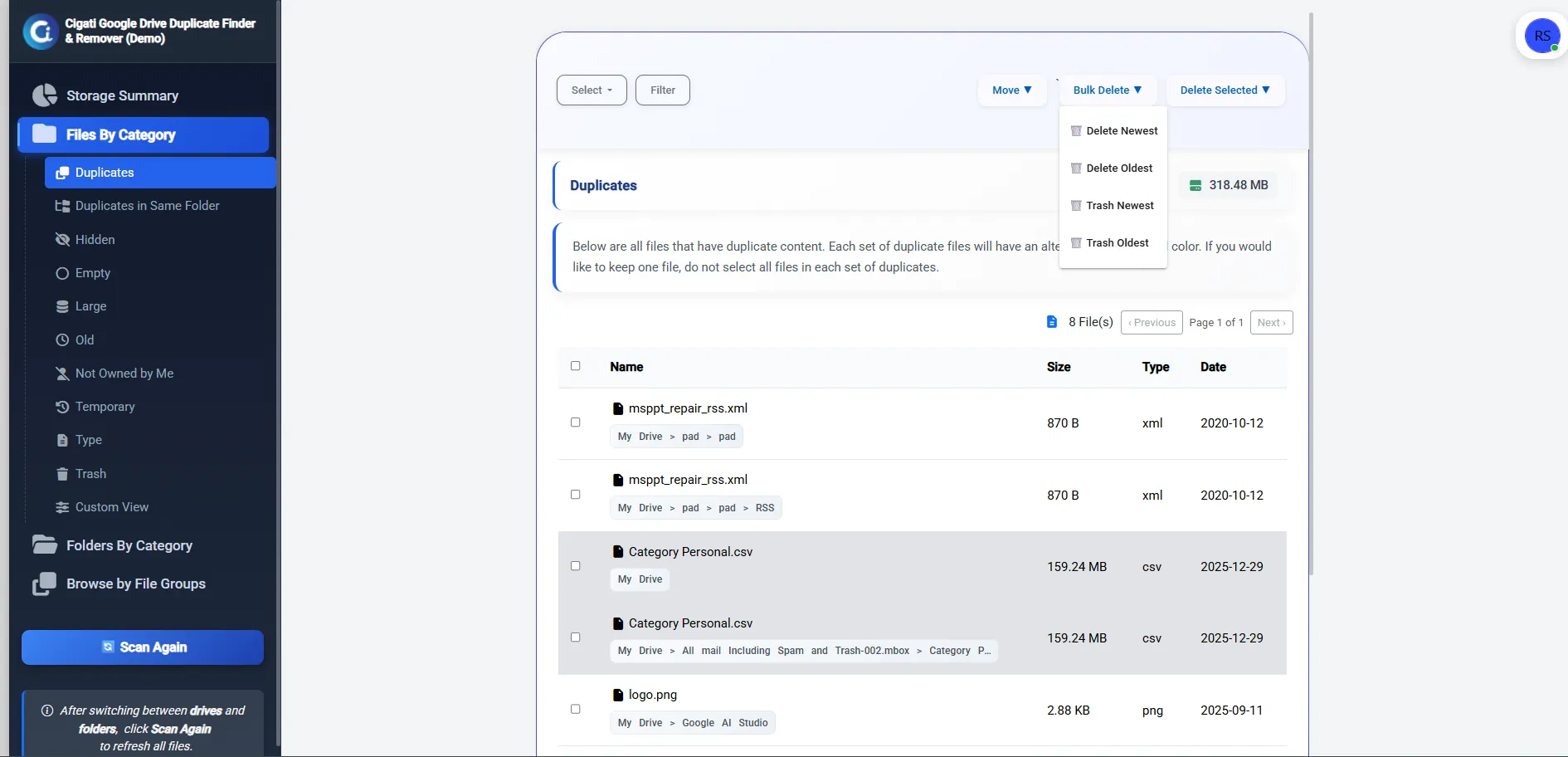
  • Delete duplicate files permanently or move to Trash: Choose in bulk or only selected files
  • Quick file selection options and an in-built filter to find files by owners, created date, file types, etc.
  • Besides removing duplicates, users can move files (all or selected) from a folder to a destination folder.
  • Possesses extraordinary support for bulky drives and scans large data files without disruption.
  • Free Google Drive Duplicate Finder & Remover has limited features and scans up to 100 GB of data only.
  • Supports all Windows OS, including Windows 11, 10, 8.1, 8, 7, Vista, XP, 2000, 98, NT, and 95.
benefit-img

Understand Your Google Drive After Scan – At a Glance

Once the scan is complete, Cigati Google Drive Duplicate Cleaner organizes all results into four sections. Each section is designed to help you quickly understand your storage and decide what to clean, without confusion or extra steps.

  • Charts and quick stats to show the total space, used space, and free space of Google Drive.
  • Highlights key problem areas such as duplicate files, hidden files, files not owned by you, and empty folders.
  • Best to understand where your storage is going before taking any action.
  • Files are grouped by their condition and usage to spot unnecessary or space-consuming files
  • Categories like Duplicates, Hidden, Large, Old, Temporary, Not Owned by Me, and Trash
  • Focuses specifically on folders, highlighting empty/unused folders found
  • Helps to identify directories that no longer contain any data and are only adding clutter to your Drive
  • Organized files by file type like Documents, Photos & Images, Audio, Video, ZIP archives, and Other files.
  • Easy to target specific file types, especially finding large media files taking up the most space.

Worth Every Penny – Enterprises and Large Organizations!

  • Handles large volumes of Drive data smoothly, even at scale
  • Secure Google Drive login with protected authentication
  • Flexible licensing based on your Drive data size
  • Clear visibility into storage usage before cleanup
  • Eliminates duplicate data to reduce ongoing storage costs
  • No disruption to existing user workflows
  • Ideal for shared and team-based Google Drive environments

Explained Features of

Cigati Google Drive Duplicate Finder & Remover

Safe Duplicate Removal with Full Control

Safe Duplicate Removal with Full Control

Cigati Google Drive Duplicate File Finder is designed to let users manage duplicate files with full control. The tool first scans Google Drive in a read-only manner, displays the results clearly, and lets users decide what should be removed. It does not delete or modify any file on its own, just filters duplicates. Thus, ensures data accuracy and prevents accidental loss.

Scan Only Needed – Drive or Folder

Scan Only Needed – Drive or Folder

Instead of forcing a full Drive scan every time, Cigati Software allows users to choose the scan scope. You can scan the entire Google Drive for deep cleanup or select specific folders where duplication is expected. This targeted scanning saves time, reduces unnecessary processing, and is especially useful when working with large or shared Drive structures.

Bulk File Scan and Selection

Bulk File Scan and Selection

If your Google Drive has a large data volume, finding duplicates and deleting them one by one is risky. The bulk processing feature of the software allows users to select multiple files simultaneously and perform actions on them together. Moreover, it can process large and bulky files or folders (of all sizes) saved within Drive without data loss.

Clear and Structured Scan Results

Clear and Structured Scan Results

Cigati Google Drive Duplicate File Remover presents all detected files in a well-organized structure after scanning. Files are not shown randomly; instead, they are grouped logically, which helps users to review files confidently. Files are organized by Category, File types, and Folder Groups. This makes navigation easy, even for users with large volumes of data.

Smart File Categorization

Smart File Categorization

To simplify duplicate cleanup, Cigati G Drive Duplicate Remover categorizes scanned data into meaningful groups such as duplicate files, hidden files, files not owned by the user, and empty files. This categorization removes guesswork and allows users to focus on unnecessary data first, making storage optimization faster and more effective.

Visual Storage Overview in Detail

Visual Storage Overview in Detail

In addition, the software also provides a graphical overview of Google Drive storage. It depicts the total space, used space, and available space in your drive. Also, it shows the file groups summary and folders with the number of files or size. This visual summary helps users understand storage usage at a glance and clearly see the impact of duplicate removal after cleanup.

Filter Files by Size/Created Date/Owner

Filter Files by Size/Created Date/Owner

Cigati Software includes filter options, too, that let users search for specific files or file types. Size-based filtering allows users to find files larger or smaller than a defined value. The creation date filter allows users to locate files created within a specific time range. Moreover, users can search for files by their owners and file types, facilitating a quick search.

Clean Duplicates by File Type

Clean Duplicates by File Type

The software also categorizes files by their file types – Browse by File Groups – such as documents, images, PDFs, ZIP archives, and more. This also relates to the file-type-based filtering that helps users focus on specific formats without affecting others. It is particularly useful when certain file types, like media files, consume excessive storage.

Delete Permanently or Move to Trash

Delete Permanently or Move to Trash

Once you have figured out duplicates in the drive, the tool offers flexibility in how duplicates are handled. Users can permanently delete files to instantly free up storage. Besides, choose to move them to the Trash for temporary safety. The Trash option acts as a backup layer, in case you want file recovery. One can also move files (selected or in bulk) within the same interface to a destination folder.

Re-Scan Option for Updated Result

Re-Scan Option for Updated Result

After deleting duplicates or moving files, users can run the Scan Again button to re-scan drives/folders. This is suggested when you switch between drives and folders. It instantly refreshes the results and ensures that the displayed data accurately reflects the current state of Google Drive. It helps users verify cleanup results and detect newly created duplicates if needed.

Designed for Individuals and Enterprises Alike

Designed for Individuals and Enterprises Alike

The software is built to handle both personal Google Drive accounts and large shared environments. It has a simple interface that makes it easy for beginners. While advanced filtering and bulk actions make it suitable for enterprises that require scalable and controlled duplicate management.

Free Duplicate File Finder for Google Drive

Free Duplicate File Finder for Google Drive

Use the free version of the software to connect your Google Drive account, scan stored data, and identify duplicate files without any cost. You can preview detected duplicates and understand where storage is being wasted before making a purchase decision. However, it scans only upto 100 GB of data for free with limited features.

Works on All Major Windows Versions

Works on All Major Windows Versions

Cigati Google Drive Duplicate Finder & Remover is compatible with a wide range of Windows versions. This operates smoothly on both older and newer systems. This ensures that users do not need to upgrade their operating system to manage Google Drive duplicates efficiently.

Safe Login to Google Drive Account

Safe Login to Google Drive Account

Cigati uses secure authentication to connect with Google Drive. The software accesses your Drive only for scanning and does not modify or delete any data without your permission. Login credentials are not stored, and access is limited to what is required for duplicate detection.

Technical Specification

Software Prerequisites & Recommendations

Software Name: Cigati Google Drive Duplicate Finder & Remover
Version Support: Windows 11 & below versions
Size: 141MB
Version: 26.01
License: S/A/T/E
Download Link: Download
box
processor-img

Processor:

Hard Disk:

Memory:

Operating System:

trial-img

Trial limitation:

The Free Google Drive Duplicate File Remover allows users to scan duplicate files up to 100 GB of Google Drive data. Advanced features such as filters and cleanup actions remain locked in the free version. To scan larger data volumes, apply filters, and permanently remove duplicates, upgrade to the Premium version and get complete control over your Google Drive storage.

faq-img

FAQ:

Comprasion Table Table of

Free Google Drive Duplicate Finder and Paid Versions

Software Features Free Version Full Version
Scan Google Drive data – Drive Level and Folder Level Upto 100 GB Data According to Licenced Type: 100GB /250GB /500GB or unlimited
Preview duplicate files Upto 100 GB Data
View dive storage summary
List and View Files by Category
Folders by Category view
Browse by File Groups (Organized by File Type)
Quick Search – Apply advanced filters (size, date, owner, type, etc.)
Easy File Selection Options
Select multiple files for cleanup
Delete duplicate files permanently
Move duplicates to Trash
Move Files to Other Folder in Bulk or Selectively
Scan Again Feature to Re-scan after cleanup
One-time cleanup without restrictions
24*7 Tech Support & 100% Secure
Compatible with All Windows Versions
Download and Purchase Download Purchase

FAQ

Frequently Asked Questions

Here is the quick working of the Cigati Software to help you find and delete duplicates from Google Drive:

  • Launch Cigati Google Drive Duplicate Finder & Remover on your system.
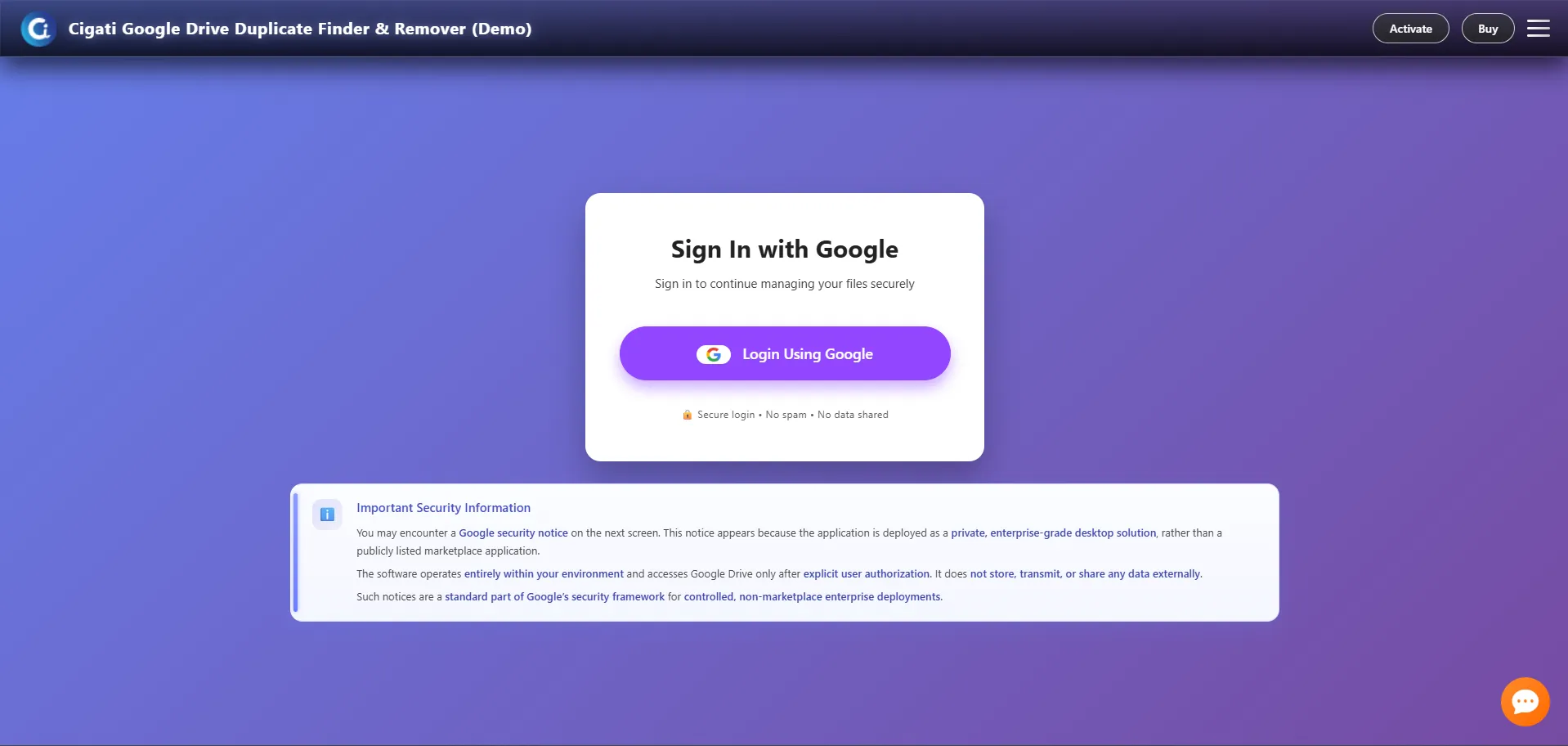
  • Click Login using Google and authenticate your Google Drive securely.
  • Select the Drive or specific folders to scan. Click Start the Scan.
  • Review detected duplicates, storage, files, folders, etc., and select files.
  • Delete duplicates permanently or move to Trash to free up space.
  • Click Scan again to re-scan for fresh results.

Yes. Cigati Google Drive Duplicate File Finder can scan and identify duplicate media files as well. After scanning the software groups' files as per their file type, including audio and video. Moreover, it can scan documents, images, PDFs, and other file types stored in Google Drive.

The software offers a folder-level scan, too. It allows you to choose specific folders for scanning, so you don’t have to scan the entire Google Drive. This helps save time and focus only on selected data.

Cigati Software is designed to handle large volumes of Google Drive data efficiently. It supports scanning extensive Drive storage and helps manage duplicates even in long-used and heavily populated accounts. Best known for bulk action, making it suitable for enterprise users.

Yes. With the Cigati Google Drive Duplicate Finder Premium version, you can apply filters to search for files quickly. Filters are based on file size, creation date, owner, file type, and folders to ensure precise and safe cleanup.

Only if you choose to move files to Trash, they remain recoverable according to Google Drive’s policy. Permanent deletion removes files completely, making it impossible to recover.

If you have huge drive data to scan, upgrading removes scan limits, unlocks filters, and enables full duplicate cleanup. Hence, it helps you reclaim storage, reduce clutter, and maintain long-term control over Google Drive data without restrictions.

Cigati Google Drive Duplicate Finder & Remover can scan both files owned by you and files shared with you. You can also filter results to view only “Owned by Me” files if you want to manage your own data separately.

This message appears while logging into the software, but it does not mean the software is unsafe. You can safely proceed by selecting Advanced and then clicking Go to app to allow secure access to your Google Drive.

Client Review

A Glimpse into Client Experiences

Thousands of satisfied customers have chosen our software and praised its reliability and performance. They have shared positive stories about how the Google Drive Duplicate Finder & Remover Software has helped them manage their files efficiently.

“Our organization relies heavily on Google Drive, but over time, it became cluttered with repeated and outdated data. Consequently, the workflow slowed down. My purchase of Cigati Google Drive Duplicate Cleaner helped us clearly see what was unnecessary. Its amazing feature that filters duplicate files and helps us get rid of them without disrupting ongoing work. It brought structure back to our shared Drive and saved ongoing storage costs.”

Thomas Weber | Brussels

“I highly recommend and appreciate how well-designed the software is. Cigati Google Drive Duplicate File Remover has handled my drive data with utmost care. Nothing was removed without review, which made me confident while cleaning. After using it, my Drive felt lighter and more organized. It’s especially helpful if you’ve never properly reviewed your storage before.”

Isabella Conti | USA

“It was too late when we realized how much duplicate data was piling up across teams. One scan from Cigati Software gave us clarity, and cleanup became straightforward instead of overwhelming. It helped me to reduce clutter and avoid unnecessary storage expansion. I even deleted unnecessary media files that were of no use, including outdated documents and PDFs. Must buy if duplicates are bothering you!”

Nathan Brooks | Mexico