-
Written By Rohit Singh
-
Updated on June 11th, 2026
Expert Guide to Migrate Office 365 to Zoho Mail Without Data Loss
Fact-checked and reviewed in accordance with our
Editorial Policy
| Query of Mateo Silva, Boston “Our company uses Microsoft 365 for emails and Zoho One for CRM and other operations. Since management wants to consolidate costs by shifting to Zoho Mail, we need to migrate around 40 user accounts along with years of email history, contacts, and calendar data. I have never handled an email migration before, so what is the safest way to migrate Office 365 to Zoho Mail without any data loss?” |
Businesses running Zoho One often find it more convenient to bring their email setup under the same platform. It helps to bring all the communication, but moving multiple user accounts needs a reliable approach to avoid data loss or downtime. This blog covers both the manual migration method and a faster, more dependable alternative using the Cigati Office 365 Backup Tool, which simplifies the entire process with direct account-to-account migration, folder-level selection, and zero data loss, making it a suitable choice for businesses of any size.
Difference Between Office 365 and Zoho Mail
| Feature | Office 365 | Zoho Mail |
| Primary Focus | Full productivity suite with email | Email-first platform with business tools |
| Integration | Deep integration with Microsoft tools | Deep integration with the Zoho One ecosystem |
| Pricing | Starts at $6 per user per month | Free plan available, paid starts at $1 per user per month |
| Admin Controls | Advanced via Microsoft Admin Center | Advanced via Zoho Admin Console |
| Collaboration Tools | Microsoft Teams, SharePoint, OneDrive | Zoho Cliq, Zoho WorkDrive, Zoho Connect |
| Security | Enterprise-grade with Microsoft Defender | Enterprise-grade with built-in encryption |
| Best Suited For | Microsoft-heavy environments | Zoho One users and cost-conscious businesses |
Who Needs Email Migration to Zoho Mail from Office 365?
- Zoho One users aiming to cut the cost of running a Microsoft 365 subscription separately.
- SMEs want a simpler and cheaper email system without compromising on its essential features.
- A business is planning on moving its whole process onto Zoho applications, including Zoho CRM, Campaigns, Projects, and HR.
- Teams dealing with sales and support tasks require tight integration of emails with Zoho CRM and Zoho Desk.
- Firms are considering ditching Microsoft 365 due to expensive renewal fees.
Manual Method to Migrate Office 365 to Zoho Mail
The manual method we described below uses the built-in migration feature of Zoho Mail. To experience an error-free process, check the pre-migration checklist below.
Prerequisites
- Make sure to enable IMAP access for all the mailboxes of Office 365.
- Ensure admin credentials and required migration permissions.
- Create corresponding user accounts in Zoho Mail before migration.
- Temporarily disable EWS throttling policies to avoid migration interruptions.
Steps for Migration from Microsoft 365 to Zoho Mail
- Log in to the Zoho Mail Admin Console and click on Data Migration > Create.
- Select Microsoft 365 as the source protocol and click Sign In.
- You will be redirected to the Microsoft login page. Grant the necessary permissions and click Allow.
- Enter the Office 365 server details required for connection.
- Select the mailboxes and data types you want to migrate.
- Name the migration batch, click Add, and set the maximum connection limit.
- Click Create to begin the migration process.
- Monitor the progress from the Migration Dashboard inside Zoho Mail Admin Console.
Why Manual Method Fails?
- Requires technical knowledge of Microsoft 365 and Zoho Mail administration.
- Migration speed depends on the internet bandwidth and server performance.
- Large mailboxes may take significant time to complete.
- EWS throttling and API limits can slow down or interrupt migration.
- User accounts must be created manually before migration.
- Risk of mailbox mapping errors during bulk migrations.
- Limited control over advanced filtering and selective migration.
- Continuous monitoring is required to identify and resolve migration failures.
- May not efficiently handle large-scale enterprise migrations.
- Possibility of missing data if permissions or configuration settings are incorrect.
Cloud-Ready Way to Migrate Office 365 to Zoho Mail
Organizations managing multiple user accounts with years of email history need a more controlled approach than the manual method. The Cigati Office 365 Backup Tool handles the entire migration directly to Office 365 through Microsoft Modern Authentication. The tool ensures that no credentials will be stored locally. Also, it provides features to migrate within a date range, remove duplicates, and more. Additionally, there is a demo version to verify the tool features according to your requirements.
Steps for Office 365 to Zoho Mail Migration
- Download the Software and choose Backup.
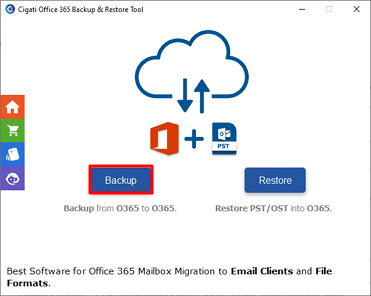
- Then, use Office 365 credentials and hit Sign In.
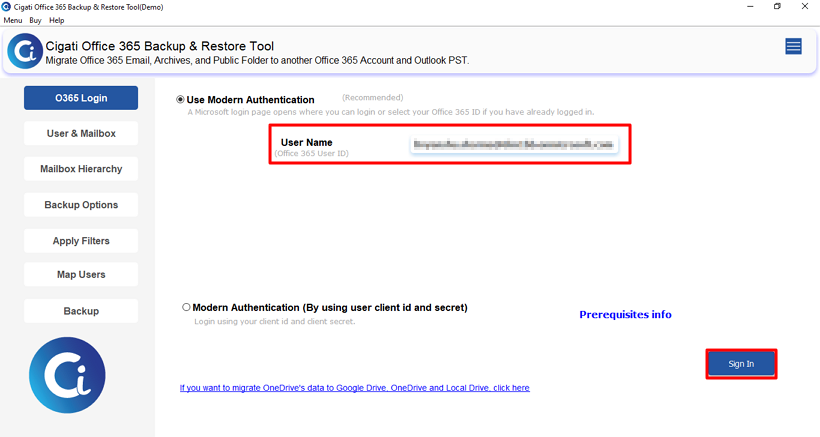
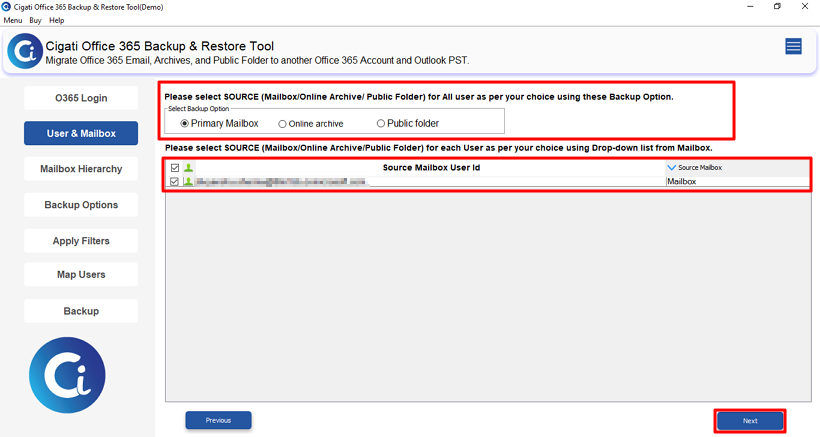
- Further, select the Backup Option and User ID and hit Next.
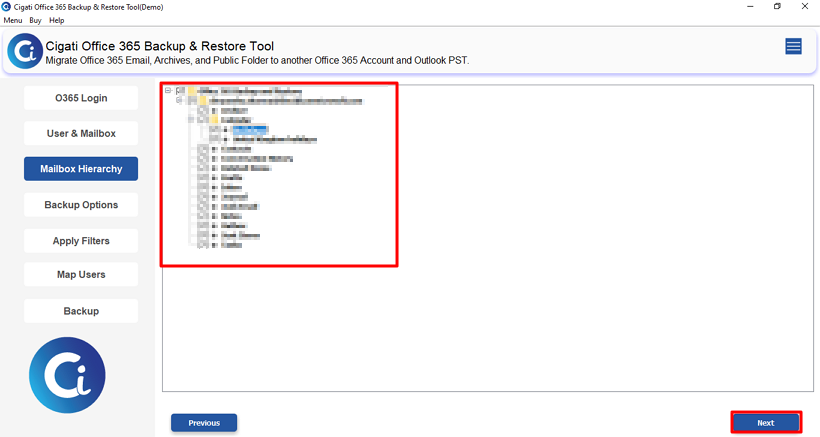
- Now, open the folder structure, select the files, and press Next.
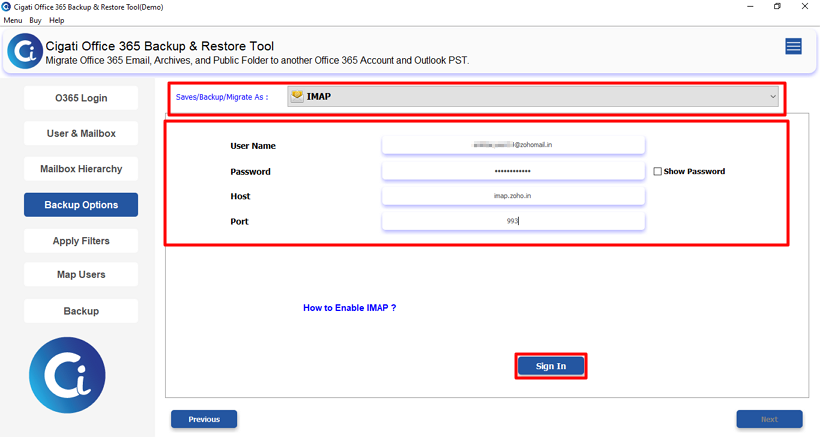
- Thereafter, choose IMAP and use Zoho credentials to sign in.
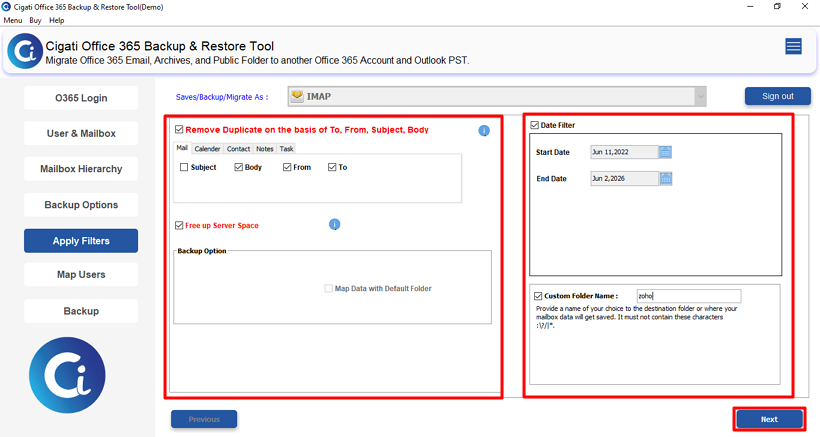
- After that, use the filter option and click Next.
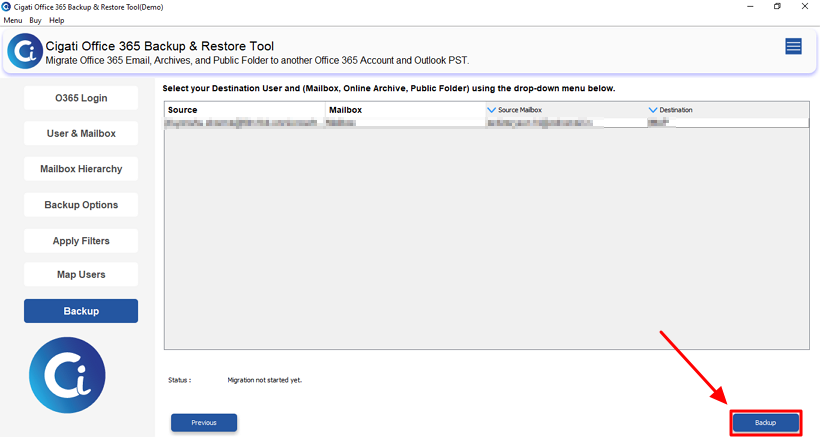
- At last, click the Backup button to start migration.
Conclusion
To conclude, the built-in Zoho Mail migration option works well for smaller teams but can get complicated when multiple accounts and years of data are involved. The Cigati Office 365 Backup Tool is useful to migrate Office 365 to Zoho Mail more easily by handling everything from one place, including date filtering, duplicate removal, and bulk account migration, while keeping all data intact.
You May Also Read: Migrate Office 365 to Google Workspace
Frequently Asked Questions
Q1. Can I migrate Office 365 emails, contacts, and calendars to Zoho Mail at the same time?
Ans. Yes. Zoho Mail supports migration of emails, contacts, and calendars from Microsoft 365. Professional solutions such as the Cigati Office 365 Backup Tool can also migrate these data types while offering additional control over the process.
Q2. How long does it take to migrate Office 365 to Zoho Mail?
Ans. The duration depends on mailbox size, number of users, internet speed, and server limitations. Small migrations may finish within hours, while larger organizations may require several days.
Q3. Can I migrate only specific date-range emails from Office 365 to Zoho Mail?
Ans. The native migration process offers limited filtering capabilities. The Cigati Office 365 Backup Tool includes advanced date-range filters so administrators can migrate only the emails that fall within a selected period.
Q4. Is there a way to verify that all emails were migrated successfully?
Ans. Yes. Administrators can compare mailbox item counts, review migration logs, inspect folder structures, and perform user-level validation before finalizing the migration.
Q5. Which is better for large-scale migrations: the manual method or a migration tool?
Ans. For a small number of mailboxes, the manual method is often sufficient. For organizations handling dozens or hundreds of accounts, a dedicated migration tool such as the Cigati Office 365 Backup Tool offers better automation, filtering, monitoring, and error management.
About The Author:

Rohit Singh is a technology professional with 7+ years of experience specializing in email systems, Exchange Server, Office 365, MS Outlook, and data migration solutions. He creates clear, practical, and solution-oriented content to help users and IT professionals resolve complex technical challenges efficiently.
Related Post