-
Written By Khushboo Maurya
-
Updated on September 11th, 2026
Fix “Outlook Not Accepting Password”: 10 Solutions That Actually Work
Fact-checked and reviewed in accordance with our
Editorial Policy
When Outlook rejects a password you know is correct, the cause is almost always one of four things: cached old credentials in Windows, a missing app password after enabling two-factor authentication, a locked Microsoft account, or a password-protected PST data file. The first three are account problems you can fix in minutes with the steps below. The fourth is a file problem, and it needs a different fix entirely. This guide covers all of them.
Before you troubleshoot – which problem do you actually have?
A. You can’t sign in to your Outlook or Microsoft account. Wrong password errors, endless password prompts, “we couldn’t verify your account,” or a locked account. This is a Microsoft account issue. The 10 fixes below solve it, and no third-party software can reset a Microsoft account, so don’t pay anyone who claims otherwise.
B. A saved .pst file asks for a password you lost. Outlook itself opens fine, but a specific Outlook data file (an old archive, an ex-employee’s file, an inherited backup) won’t open. Account fixes won’t help here; you need to remove the password from the file itself.
Why Does Outlook Say My Password Is Incorrect When It’s Right?
Outlook checks more than the characters you type. It reuses credentials saved in Windows Credential Manager, and if those are stale, every sign-in fails no matter what you enter. If you turned on two-factor authentication, your normal password stops working in older Outlook versions until you generate an app password. Microsoft also locks accounts after unusual sign-in activity, and a locked account rejects even the correct password. Work and school accounts add one more layer: your IT admin’s security policies can block sign-in from Outlook entirely.
Run through the fixes in order. Most people are done by step 4.
How to Fix the “Outlook Not Accepting Password” Error
1. Rule out the Obvious First
Type the password by hand instead of pasting it; copied passwords often pick up a trailing space. Check Caps Lock and your keyboard language layout. Then test the same password at Outlook on the web. If it works in the browser but not in the desktop app, your password is fine, and the problem is local to Outlook – skip to step 3.
2. Reset your Microsoft account password
If the password fails in the browser too, reset it at account.live.com/password/reset. Microsoft sends a verification code to your recovery email or phone. For Gmail or Yahoo accounts added to Outlook, reset the password with that provider directly, then update it in Outlook.
3. Clear cached credentials in Windows Credential Manager
This is the most common fix on Reddit and Microsoft’s own forums, because Outlook keeps using the old saved password after you change it.
- Close Outlook.
- Open the Start menu, type Credential Manager, and open it.
- Select Windows Credentials.
- Remove every entry that starts with MicrosoftOffice, Outlook, or MS.Outlook.
- Restart Outlook and sign in with the current password.
4. Create an app password if two-factor authentication is on
After you enable 2FA, classic Outlook and older Outlook versions can no longer accept your regular password. You need a one-time app password instead. For Microsoft accounts, go to account.microsoft.com/security, open advanced security options, and create an app password. For Gmail accounts inside Outlook, generate one at myaccount.google.com/apppasswords. Enter that 16-character code in Outlook’s password field instead of your normal password.
5. Check whether your account is locked
Microsoft locks accounts after repeated failed sign-ins or unusual activity, and a locked account rejects the correct password everywhere. Sign in at account.microsoft.com/security — if the account is locked, Microsoft walks you through unlocking it with a code sent to your phone. Review recent sign-in activity on the same page while you’re there.
6. Update Outlook and Windows
Microsoft permanently disabled Basic Authentication for Exchange Online. Older Outlook versions that rely on Basic Authentication can no longer connect to Microsoft 365 mailboxes. In Outlook, go to File > Office Account > Update Options > Update Now. Outlook 2013 is no longer supported by Microsoft. Although Modern Authentication can be enabled in some environments, upgrading to a supported Outlook version is strongly recommended.
7. Stop the endless password prompt loop
If Outlook accepts the password and then asks again seconds later, open File > Account Settings > Account Settings, double-click the account, go to More Settings > Security, and untick Always prompt for logon credentials. If that option is already off, the loop usually traces back to the stale credentials from step 3 or a corrupt profile – step 8.
8. Create a new Outlook profile
A damaged profile can reject valid sign-ins permanently. Open Control Panel > Mail > Show Profiles > Add, create a fresh profile, add your account to it, and set it as the default. Your mail redownloads from the server; nothing on the server is lost.
9. Remove and re-add the account
If a single account misbehaves inside an otherwise working Outlook, remove it under File > Account Settings, restart Outlook, and add it back. This forces a clean authentication handshake and clears whatever token was stuck.
10. Work or school account? Talk to your IT admin
Microsoft 365 business accounts sit behind admin-controlled policies: conditional access, blocked legacy protocols, forced password resets. If your credentials work in the Microsoft 365 web portal or another Microsoft web application but fail only in Outlook, the issue may be related to your Outlook configuration or your organization’s security policies.
Microsoft Rejected My Account Recovery Request – What Actually Works
If you’ve lost access to your recovery email and phone, the account recovery form at account.live.com/acsr is the only path back, and no software or paid service can bypass it. Microsoft’s automated system approves the form based on how much of your answer set matches its records, so the way you fill it matters more than how many times you submit it.
What raises your approval odds, based on what Microsoft’s own support agents tell users on the community forums:
- Fill the form from a device and network you regularly use with the account, home Wi-Fi, your usual laptop. Location and device history are part of the match.
- List old passwords, even partially remembered ones. Wrong guesses in the right pattern still help.
- Add exact subject lines of emails you recently sent and the addresses you sent them to. Ask friends to check their inboxes for emails from you.
- Include billing details if you ever bought anything with the account, card type, name on card, Skype or Xbox purchases.
- You can submit twice per day. Change and expand your answers each time instead of repeating the same set.
If the form keeps failing after several well-prepared attempts, the account is effectively unrecoverable, and Microsoft support cannot override the system by phone; agents have no manual reset button, which is a deliberate security design. At that point, create a new account and redirect your services to it. One honest note from our side: tools like ours work on local Outlook data files, not on Microsoft accounts, so nothing we sell helps with this specific problem.
How to Open a Password-Protected PST File When You Lost the Password
If a specific Outlook data file (.pst) asks for a password you no longer have, you can’t recover it through Microsoft or your account settings. The password is stored in the PST file itself and isn’t synchronized with Microsoft accounts or Exchange servers. The direct fix is to strip the password from the file with a dedicated tool such as Cigati PST Password Remover, which unlocks PST files offline in a few clicks, with no Outlook installation and no Microsoft sign-in involved.
This situation comes up more often than people expect: an archive you protected years ago, a mailbox backup from a former employee, a PST handed over during a migration. Microsoft’s repair tool ScanPST does not remove passwords, and the old pst19upg.exe trick only ever worked on ANSI-format files from Outlook 2002 and earlier; it does nothing for the Unicode PST files every modern Outlook creates.
Steps to remove a PST file password
- Download Cigati PST Password Remover (Windows or Mac).
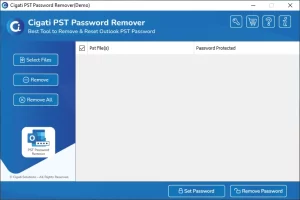
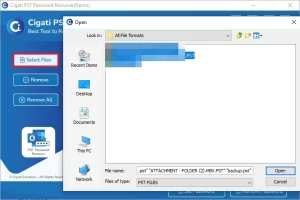
- Click Select Files and add one or more locked .pst files. A lock icon marks the protected ones.
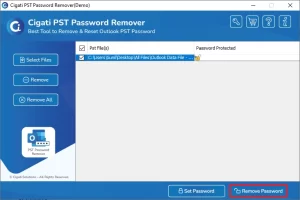
- Click Remove Password. The password is stripped and the files open normally.
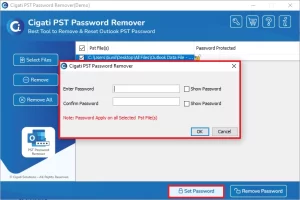
- Optional: use Set Password to protect the file again with a password you’ll keep.
The free version shows you the first two characters of the existing password, so you can confirm the tool reads your file before spending anything. If it does, the full version unlocks it completely, and it handles ANSI and Unicode files from any Outlook version, in batch.
Account password vs. PST file password – the difference in 20 seconds
| Features | Account Password | PST File Password |
| Protects | Your mailbox on Microsoft’s or your provider’s server | One local .pst data file on your computer |
| Who controls it | Microsoft / your email provider / your IT admin | Whoever set it on the file |
| Reset by | Microsoft’s reset page or the recovery form | A PST password removal tool — there is no official reset |
| Can software fix it? | No, never | Yes, offline, in minutes |
Wrap Up
Password errors in Outlook split into two very different problems. Account-side failures, stale credentials, missing app passwords, locked accounts, are fixed for free with the ten steps above and Microsoft’s own tools. A locked .pst file is the one case where software is the answer, because no reset page exists for a file password: Cigati PST Password Remover strips it offline in minutes, and the free version proves it can read your file first. Match the fix to the problem, and you’re back in your mail today.
Frequently Asked Questions
Q1. Why does Outlook keep asking for my password over and over?
Ans. A repeating password prompt usually means Outlook is stuck on old saved credentials, or the “Always prompt for logon credentials” setting is enabled. Delete the Outlook and Office entries in Windows Credential Manager, untick that setting under the account’s security options, and restart Outlook. If the loop continues, build a new Outlook profile.
Q2. Why did my password stop working right after I enabled two-factor authentication?
Ans. Because with 2FA active, classic and older Outlook versions no longer accept your regular password — they need an app password instead. Generate one at account.microsoft.com/security for Microsoft accounts, or at myaccount.google.com/apppasswords for Gmail, and enter that code in Outlook’s password field. Your normal password keeps working in the browser
Q3. The Microsoft recovery form keeps getting denied. Can support reset my password by phone?
Ans. No. Microsoft support agents have no ability to manually reset or unlock a personal account — the recovery form at account.live.com/acsr is the only mechanism, by design. Improve your odds by submitting from your usual device and network, listing old passwords, and adding exact subjects and recipients of recent emails. You get two attempts per day.
Q4. My password works at outlook.com but not in the Outlook app. Why?
Ans. That combination means your password is correct and the fault is local. The usual causes are stale credentials in Windows Credential Manager, a missing app password after enabling 2FA, an outdated Outlook build that still uses retired basic authentication, or a corrupt profile. Work through fixes 3, 4, 6, and 8 above in that order.
Q5. Does ScanPST remove a PST file password?
Ans. No. ScanPST (the Inbox Repair Tool) fixes structural corruption in PST files; it does not touch passwords. The legacy pst19upg.exe workaround only applied to ANSI PST files from Outlook 2002 and earlier. For Unicode PST files — everything Outlook has created since 2003 — a dedicated removal tool is the only working method.
Q6. How do I open a PST file if I forgot its password?
Ans. Remove the password from the file with an offline tool such as Cigati PST Password Remover. It strips the password directly from the .pst, so the file opens without the original password and without any Microsoft sign-in. It works on ANSI and Unicode files from every Outlook version and can process several files at once.
Q7. Is removing a PST password safe and legal?
Ans. Removing the password from a .pst file you own or are authorized to access is safe and standard IT practice — typical cases are your own old archives, inherited backups, and files left behind by former employees. The process runs entirely offline, so the data never leaves your machine. Only unlock files you have the right to access.
Q8. Will removing the PST password delete or change my emails?
Ans. No. The password on a PST file is an access gate stored in the file’s header, separate from the mailbox data itself. Removing it leaves every email, contact, attachment, and folder exactly as it was. If you want protection afterward, set a new password on the file once it’s unlocked.
About The Author:

Khushboo Maurya is a digital content and SEO professional focused on creating useful, search-friendly content that connects with the right audience. She specializes in content optimization, website growth, and practical SEO strategies that improve visibility, engagement, and organic reach.
Related Post