-
Written By Rohit Singh
-
Updated on September 10th, 2025
How to Batch Convert EML to Text (.txt) Format?
Fact-checked and reviewed in accordance with our
Editorial Policy
Summary: This guide will explain the best and most reliable methods to convert EML to text. You will also learn about the manual methods in this article. But by using a professional EML to TXT Converter tool you have several easiest options to do this conversion task.
EML is the file format used by many applications, like Gmail, Thunderbird, Outlook for Mac, Apple Mail, and others. Although it is challenging to change this format. But sometimes, the user wants to add or delete some text, attachments, links, and others. In this case, many users want to convert an EML file to text. So, in the section that follows, we’ll go over how to convert EML files and folders to a .txt format.
Also Read: Convert EML to OFT
Manual Approach to Convert EML to Text Format
Make sure you made a duplicate file of the data before using this method. Else, you may face text formatting mismanagement. Follow the steps below to convert EML data to.txt.
Steps to Convert EML to TXT
- Select the EML files from your existing device.
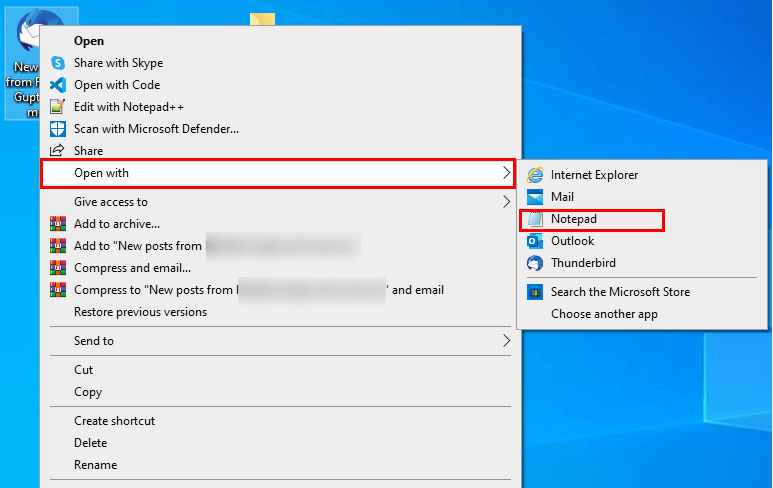
- Right-click on these chosen files.
- Follow the Open with > Notepad option.
- Once your data is open in the Notepad file.
- Move to the File option and choose the Save As option from the list of choices.
- Assign the name and destination for the resultant file.
- Choose saving format as Text Document (*TXT).
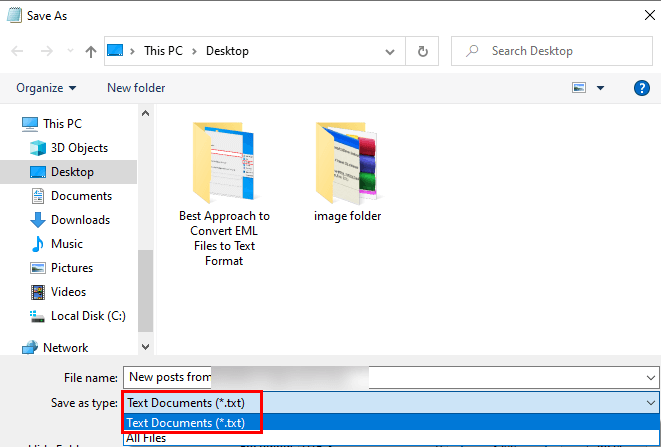
- Finally, click on the Save button.
The above-stated manual steps will Convert EML to Text. You may be feeling, this method is easy to use, but when you select Notepad to open EML files. You will see a lot of coding in the Notepad application, and in some cases, you will also lose the formatting of the original document. Additionally, if you EML files in bulk, then you need to choose a new EML file every time to convert it into Text. Though, with an automated tool, you can remove all these problems in no time. Below is the complete description of the advanced tool in detail.
Professional Tool to Convert Multiple EML File to Text in Bulk
The Cigati EML Converter is a full-featured utility that has the capacity to convert EML files and their attachments to TXT format. Additionally, you also have the option to convert EML files into several other documents and email clients. Examples of a few email clients and file formats in which you can migrate EML data are Gmail, Yahoo, PDF, PST, HostGator, and other 18+ formats. Below are the steps to take
Steps to Batch Convert EML to TXT
- Download and install the Cigati EML Converter.
- Add the EML single or multiple files.
- Choose the files or folder from the tree structure you wish to change in DOC format.
- Decide the saving format as DOC from the preference list.
- Select the features of the advanced tool in accordance.
- Click on the Convert button.
Following the above steps will Convert the EML file to text format.
Conclusion
I hope now you have enough ways to convert EML to text. With a manual approach, you cannot convert multiple EML files. But with a professional utility, you can change EML to TXT and other formats and email clients.
You May Also Read: Convert EML File to HTML
Frequently Asked Questions
Q: How do I convert EML to TXT using Thunderbird?
Ans: Open the EML file in Thunderbird, then right-click and choose Save As → Plain Text, or use the “Save As” option from the File menu.
Q: Can I simply open EML in Notepad?
Ans: Yes. you can open an EML file in Notepad (or any plain text editor), then use “Save As” to change the extension to .txt. This method will include raw headers, HTML, and metadata.
Q: Can Outlook convert EML directly to text?
Ans: Yes. import the EML into Outlook (e.g., by dragging it into your Inbox), open it, then choose File → Save As → Text Only (*.txt).
Q: Are there professional tools to convert EML files to TXT more efficiently?
Ans: Yes. software like Cigati EML Converter, MigrateEmails EML Converter, MacSonik EML Converter Wizard, and others offer batch processing, preserve structure, and support filtering and various output formats.
About The Author:

Rohit Singh is a technology professional with 7+ years of experience specializing in email systems, Exchange Server, Office 365, MS Outlook, and data migration solutions. He creates clear, practical, and solution-oriented content to help users and IT professionals resolve complex technical challenges efficiently.
Related Post