Cigati MBOX Converter

Convert MBOX Files to Multiple Formats and Cloud Platforms with Data Integrity

Cigati MBOX Converter is developed with a high-performance algorithm designed to resolve a wide range of MBOX file conversion challenges. It's a straightforward solution for those looking to migrate from MBOX-supported email clients. Convert multiple MBOX files to other email formats along with attachments for easy import on the respective platform.

(Average Rating 4.9 Based on 4555 Reviews)

Convert MBOX files up to 10 GB with a Limited Days License for only $25.

Benefits of

Cigati MBOX File Converter

  • Export MBOX data to PST, MBOX, EML, MSG, PDF, and CSV file formats for backup.
  • With the “Select Profile” feature, directly fetch emails from the Thunderbird profile to convert.
  • Import MBOX files into Office 365, Gmail, Google Workspace, Outlook.com, GoDaddy, and IMAP accounts.
  • No size restrictions; users can convert large MBOX files without risk of file corruption.
  • Ensures complete data consistency, no loss of email attributes, formatting, inline images, or metadata.
  • Options to merge and split resultant MBOX files with defined size limits in MB or GB.
  • Save each MBOX as a PDF file of a maximum of 500 MB, and set the desired size of each PDF file.
  • Split the resultant PST into smaller files during MBOX to PST conversion to avoid oversized files.
  • The Free MBOX Converter Tool allows you to export or migrate up to 50 emails per folder for free.
  • Widely supports all Windows OS versions, older or newer, including the latest Windows 11.
benefit-img

MBOX File Supported By Different Email Services

Cigati MBOX File Converter Tool supports converting MBOX files created by multiple MBOX-supported email clients. Here are some of them listed:

Thunderbird

Mozilla Thunderbird

Spicebird

Spicebird

Google Takeout
Google Takeout
Apple Mail
Apple Mail
Netscape
Netscape
Opera Mail
Opera Mail
Postbox
Postbox
Claws Mail
Claws Mail
Google Vault
Google Vault
Powermail
Powermail & More

Newly Launched Features of

Cigati MBOX Exporter Tool

Fetch Emails From Thunderbird Profile Automatically fetch MBOX emails directly from Thunderbird profiles without manual MBOX file selection
Advanced Preview Features Before Export
  • Built-in preview feature to view emails, metadata, and attachments before conversion.
  • Quick search feature in the Preview to find a folder/file from the Tree and table content.
  • The View in Browser if Preview Fails feature lets users read emails directly through the browser.
  • Complete view of HTML Attachment, Plain text, Headers, MIME, Raw HTML.
Merge Options for MBOX Split MBOX files with file size limits, or merge large MBOX files into a single MBOX Files
Manage Attachments

Three options to handle attachments:

  • Export attachments separately
  • Embedded attachments
  • Exclude attachments
Customized Saving Options for PDFs Define the output PDF size and save the PDF in preferred sizes.

What Happens to Email Data

Data integrity remains a primary consideration throughout the conversion process. The Cigati MBOX File Converter tool retains the following elements accurately during every export:

  • Email Content: Message bodies are preserved in their original form, which includes text, HTML formatting, and embedded elements that make sure readability remains consistent after conversion.
  • Attachments: All file attachments linked to emails are retained & mapped correctly to their original messages, maintaining accessibility without requiring separate extraction steps.
  • To/CC/BCC: Recipient details across To, CC, and BCC fields are preserved precisely, that maintain an accurate record of communication threads and distribution.
  • Date & Time: Original timestamps for sent and received emails are maintained. This allows chronological order and audit trails to remain intact after conversion.
  • Folder Structure: The hierarchical arrangement of folders & subfolders is retained, that makes sure the converted output mirrors the source mailbox organization closely.
  • Email Formatting: Font styles, layout structure, & visual formatting within messages are preserved, keeping the appearance of emails consistent with the original source.
  • Metadata: Associated metadata, including headers, message IDs, and other properties, is retained to support authenticity and traceability of converted email data.

Mailbox Mapping & Migration Options

Migrating MBOX files to Microsoft 365 or Google Workspace requires accurate mailbox assignment. Cigati MBOX Converter Wizard offers flexible mapping options, letting administrators control exactly which files go to which destination accounts.

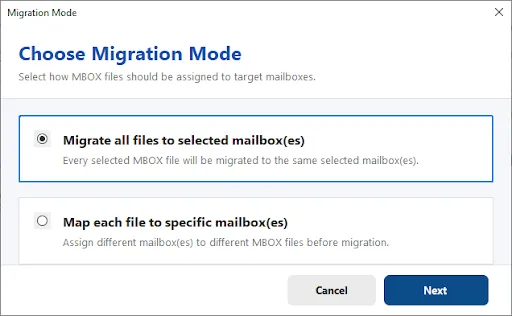
Choose Migration Mode

Before migration begins, users select how MBOX files map to target mailboxes.

  • Migrate All Files to Selected Mailbox(es) sends every selected file to the same destination accounts.
  • Map Each File to Specific Mailbox(es) lets each file be assigned individually, which suits migrations involving multiple users.
step-1

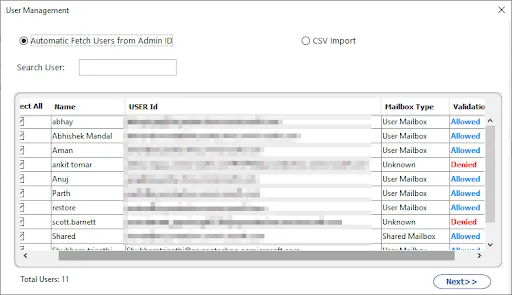
Automatic User Fetch from Admin ID

Users are fetched directly from the admin account, displaying name, user ID, mailbox type, and validation status for each one. A search bar helps locate specific users quickly, while a CSV import option is available for uploading a predefined user list instead.

step-1

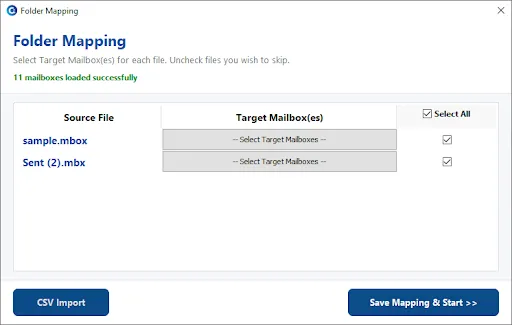
Folder Mapping for Microsoft 365

Each source MBOX file can be mapped to one or more target mailboxes before migration. Users can select individual mailboxes or use Select All, with licensed and unlicensed accounts clearly marked to prevent assignment errors. A search bar and CSV import make handling larger user lists easier.

step-1

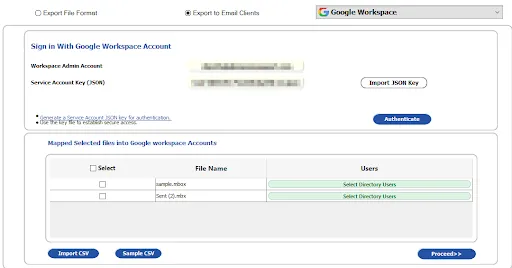
Google Workspace accounts are listed with user IDs after authentication through a JSON key, letting users choose specific destination accounts. Each MBOX file can then be matched to its corresponding Google Workspace user, with CSV import and sample templates available for bulk mapping.

step-1

Note: Whether managing a handful of accounts or a full organization, mapping options adapt to migration needs of any scale.

General Settings
Configure basic backup preferences before starting the mailbox export process here.
Advanced Controls
Fine-tunebackup behaviour using detailed configuration options built for specific requirements.
Date Range Filter: Restrict backup scope by selecting a defined start and end date. Attachment Handling: Decide whether attachments should be included, excluded, or saved separately.
File Naming Policy: Set naming conventions for exported files to keep backups organized properly. It is enabled only for EML, MSG, & PDF. Duplicate Detection: Identify and filter out repeated items before finalizing the export.
Custom Output Folder: Choose a specific folder name for easier organization after export. Merge Options for MBOX Files: Combine multiple MBOX files into a single consolidated file during export.
Skip Existing Exports: Avoid reprocessing files already exported during earlier backup sessions automatically. Split Option for Separate MBOX Files: Divide MBOX files into smaller separate files based on chosen criteria.
Browse: Navigate your system folders to select source files or destination paths. PDF Size Restriction: Limit individual PDF file size to keep output manageable and organized.
Start Export: Click to begin the export process once you verify the selected filters PST Segmentation: Break large PST files into smaller segments for easier handling.

Convert Multiple MBOX Files Together

The MBOX Exporter Tool supports adding several MBOX files or entire folders in a single session, removing the need to process each file individually. Businesses and technicians handling large volumes of mailbox data can select multiple sources at once and run the conversion as one combined task, saving considerable time during large-scale migrations or backups.

Handling Large MBOX Files Without Data Loss

The tool is built to process large MBOX files reliably, without imposing strict size limitations that could interrupt the conversion. Large mailboxes convert intact, keeping data structure and content accurate throughout, so users working with extensive archives can proceed without concerns about file corruption or forced splitting.

Secure Authentication and Data Privacy

  • OAuth/Modern Authentication: Cloud migrations use OAuth-based sign-in, allowing secure authorization without exposing account credentials during the process.
  • Password Storage: User passwords are never stored by the tool, reducing risk and keeping account credentials fully under user control.
  • Local Processing: All mailbox conversion happens directly on your computer. Data isn't uploaded to external servers, so your emails stay under your control throughout.
  • Data Privacy: Your data is never accessed, shared, or exposed to third parties during conversion. What's on your system stays on your system.
  • GDPR Compliance: The tool is built to align with GDPR principles. It gives you full control over your data & respecting privacy requirements at every step of the migration.

How Does This Software Work?

01

Download the Cigati MBOX Exporter Tool and run it.

02

Load an MBOX File from your device.

03

Preview Mailbox data along with complete details.

04

Select a destination, then configure the filters and start migration.

Prominent Features of

Cigati MBOX Converter Software

Batch MBOX File Conversion

Batch MBOX File Conversion

Unlike manual methods, the Cigati MBOX File Converter enables users to convert multiple MBOX files in one go. Regardless of the file count or size, the software ensures smooth and consistent performance. It supports MBOX files from all major platforms and can also directly fetch emails from Thunderbird profiles. Also, you can easily convert emails from platforms like Apple Mail, Thunderbird, Eudora, Entourage, Spicebird, SeaMonkey, and more.

Convert MBOX to PST and Other Formats

Convert MBOX to PST and Other Formats

This outperforming software enables users to convert MBOX files to PST, making it easy to import them into Outlook. Besides PST, you can save MBOX data to EML, MSG, MBOX, PDF, CSV, and Thunderbird. This flexibility of saving in a desired format lets users backup and access emails on multiple platforms. Additionally, all email properties of MBOX files, such as attachments, subject, sender, messages, dates, and folder hierarchy, remain intact in whichever format you save.

Advanced Preview Feature

Advanced Preview Feature

Cigati MBOX Conversion Tool includes an inbuilt preview panel that allows users to view email content and attachments before conversion. These users can search the folder tree, find specific emails, or quickly locate files using the search bar at the top. Recently, we have introduced a new feature, “View in Browser if Preview fails,” that lets users read emails directly in their web browser. This offers a more convenient viewing choice.

Supports MBOX File Migration

Supports MBOX File Migration

The software is not limited to backup and conversion features; it also allows migrating MBOX files to various email clients and webmail services. Leverage this feature to directly Import MBOX to Google Workspace,Office 365, Gmail, GoDaddy Mail, Hotmail, and other IMAP-based email accounts. It maintains complete data integrity and, therefore, it is a professional’s first choice over any other method.

Filter Data for Selective Conversion

Filter Data for Selective Conversion

To make the conversion more effective for you, the software has multiple built-in filtering options. The Date Range Filter is used to convert or migrate emails from specific time periods by providing a date range. This offers a focused data export. Additionally, the Remove Duplicate Emails feature ensures that duplicate messages are excluded based on certain criteria, maintaining the size of output files.

Manage Emails Attachments

Manage Emails Attachments

The Cigati MBOX Migrator includes a dedicated attachment management feature. This gives users full control over how attachments are handled during export or migration. Users can choose to save attachments separately, include them within the same email file, or exclude attachments entirely if they are not required. This helps to reduce file size and keeps data organized.

Skip Previous Migrated Mails

Skip Previous Migrated Mails

If you are performing migration or backup operations periodically with Cigati MBOX Converter, the “Skip Previously Converted Files” option is extremely useful. You can choose this option to detect and skip already transferred MBOX files. This ensures no duplicates are created and saves the unnecessary processing time.

Backup MBOX Data to PDF File

Backup MBOX Data to PDF File

When you export or backup MBOX emails as PDF files, you get the flexibility to manage file sizes. The tool allows you to define a maximum PDF size of up to 500 MB per MBOX, automatically splitting files when needed. Hence, you can easily create accessible PDF backups of your mailbox data without oversized files.

Split Resultant PST File

Split Resultant PST File

The Split PST File feature helps users manage large Outlook data files easily. When you convert MBOX to PST format, the resulting file can sometimes become very large and difficult to handle. To prevent this, the software allows you to split the resultant PST file into smaller parts based on size (for example, 1GB, 2GB, 5GB, or more).

Custom Folder Name Feature

Custom Folder Name Feature

The Custom Folder Name feature gives users more control and personalization while saving converted or migrated data. Instead of saving files with default or system-generated names, this option lets you assign your own folder name before starting the conversion. For example, you can name the folder “Important emails backup”.

Merge or Split Output MBOX Files

Merge or Split Output MBOX Files

Cigati MBOX Exporter Tool has launched a feature for better management of MBOX. This allows users to merge multiple MBOX files into a single file or split a large MBOX into smaller files by defining the desired size. It helps to avoid oversized files and ensures smoother storage.

Naming

Naming Convention Feature

Free MBOX Converter is one of the best features of the software. It's actually a demo version of the software with conversion limitations. You can run the software for free and test all its features by converting 50 emails per folder. It possesses all features of the licensed version; however cannot convert entire mailbox data.

Free MBOX Converter Tool

Free MBOX Converter Tool

Free MBOX Converter is one of the best features of the software. It's actually a demo version of the software with conversion limitations. You can run the software for free and test all its features by converting 50 emails per folder. It possesses all features of the licensed version; however cannot convert entire mailbox data.

Simple Gui

Simple Interface & Windows Compatible

Over manual steps, this software makes MBOX file conversion easier with its simple-to-use interface. Moreover, the software is fully compatible with all versions of Windows OS, including Windows 11, 10, 8, 7, and earlier. Whether you are a beginner or an IT professional, enjoy hassle-free MBOX conversion from start to end.

Technical Specification

Software Prerequisites & Recommendations

Software Name: Cigati MBOX Converter Tool
Version Support: Window 11 and its below version
Size: 244 MB
Version: 26.07
License: S/A/T/E
Download Link: Download
box
processor-img

Processor:

Hard Disk:

Memory:

Operating System:

trial-img

Trial limitation:

Use the free MBOX Converter Tool for a free of cost evaluation. It is a demo software for users to test the functionalities of the software with certain limitations. It allows you to convert only 50 emails per folder. To convert the entire mailbox, purchase our premium license.

faq-img

FAQ:

Comprasion Table

Best MBOX Converter Software Full Version and And Free Version

Software Features Free Version Full Version
Convert Single/Multiple MBOX Files
Migrate MBOX Files to Microsoft 365, IMAP Server, Gmail (App Authentication), Google Workspace, Outlook.com, Gmail (OAuth 2.0), GoDaddy (Microsoft 365) email clients 50 emails per folder All
Import MBOX Files to PST, PDF, EML, MSG, CSV, MBOX, Mozilla Thunderbird 50 emails per folder All
Duplicate Emails Detection
Smart Preview Feature
Maintains the Folder Hierarchy
Skip the previously migrated items from backup
Migrate or Backup Emails Without Attachment Files
Date-Range Based Filtering
Custom Output Folder
Download and Purchase Download Purchase

FAQ

Frequently Asked Questions

Yes. The conversion process works independently of any email client. So there's no requirement to have Thunderbird or a similar MBOX-based application installed on your system.

It does. You can add several MBOX files or complete folders together & process them all within a single session, rather than converting one file at a time.

The MBOX Converter Wizard handles large files without imposing strict size caps. So data remains intact no matter how large the mailbox is.

The original folder hierarchy carries over exactly as it was, so the converted output reflects the same organization as the source mailbox.

Attachment settings give you the choice to include or leave out attachments. It depends on what your storage or output needs call for.

There's an option to skip empty folders entirely, keeping your converted output tidy and free of unnecessary blank entries.

The MBOX Converter Software relies on OAuth-based modern authentication. It enables a secure sign-in to platforms such as Microsoft 365 or Google Workspace without ever exposing your credentials.

No connection is needed for these local conversions, since PST & EML processing takes place entirely on your own system.

Data integrity is maintained throughout the process. So if something interrupts the process, you can restart without risking damage to files already converted.

Metadata, which includes headers and message identifiers, stays intact through conversion, which helps preserve accurate tracking & authenticity of your emails.

An include-items setting lets you narrow the scope to particular data types. It gives you control over exactly what gets carried into the final output.

Client Review

A Glimpse into Client Experiences

Thousands of satisfied customers have chosen our software and praised its reliability and performance. They have shared positive stories about how the Email Address Extractor Software has helped them manage their data efficiently.

I had hundreds of MBOX files from Apple Mail, and converting them manually was a nightmare. This software saved me hours! The browser preview feature is a nice touch. It lets me view and search emails quickly before conversion. Simple interface, fast conversion, and excellent support from the Cigati team!

Jessica M. | Brussels

As a system admin, I often have to deal with large MBOX files from different email clients. Cigati MBOX Converter against other tools in terms of its data integrity and advanced filtering options. Plus, exporting to PDF with attachments worked flawlessly. A dependable and efficient solution overall!

Daniel R. | USA

A must-buy tool! What amazed me most is that I can convert MBOX files from any platform. It worked completely hassle-free, and the processing speed was very good. I extremely liked the performance of the software.

Robert Hughes | Mexico