Cigati PDF Merge Tool

The Cigati PDF Merge Tool offers a fast, accurate, and secure solution to merge multiple PDF files into a single document within seconds. Designed for both personal and enterprise-level users. It ensures precise merging without altering the original formatting or structure. It maintains data integrity to protect user privacy. Key features include batch processing, custom page selection, metadata editing, and flexible output settings for better document management.

(Average Rating 4.7 Based on 2536 Reviews)

Benefits of

The Best PDF Merge Software

  • Combine multiple PDF files into one document in seconds.
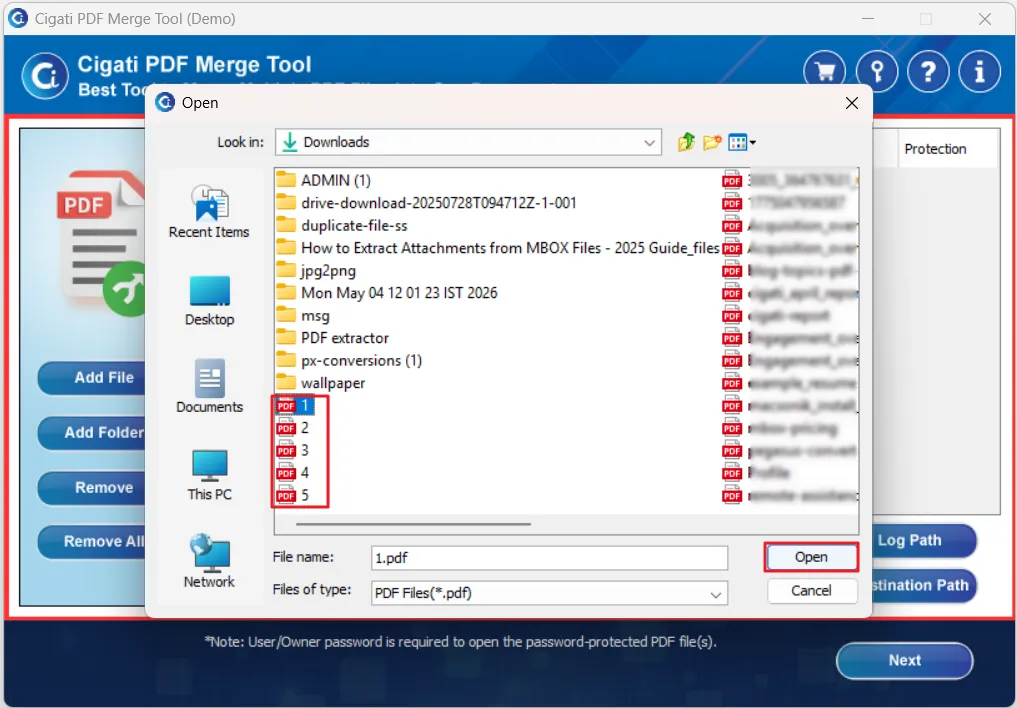
  • Add individual PDF files or entire folders for batch processing.
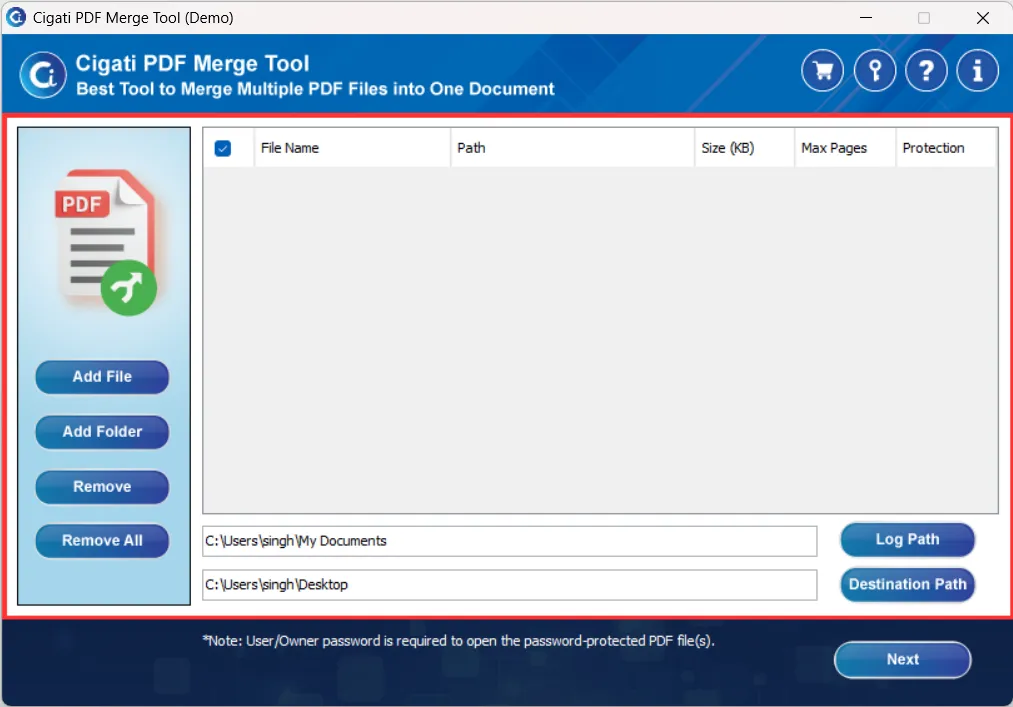
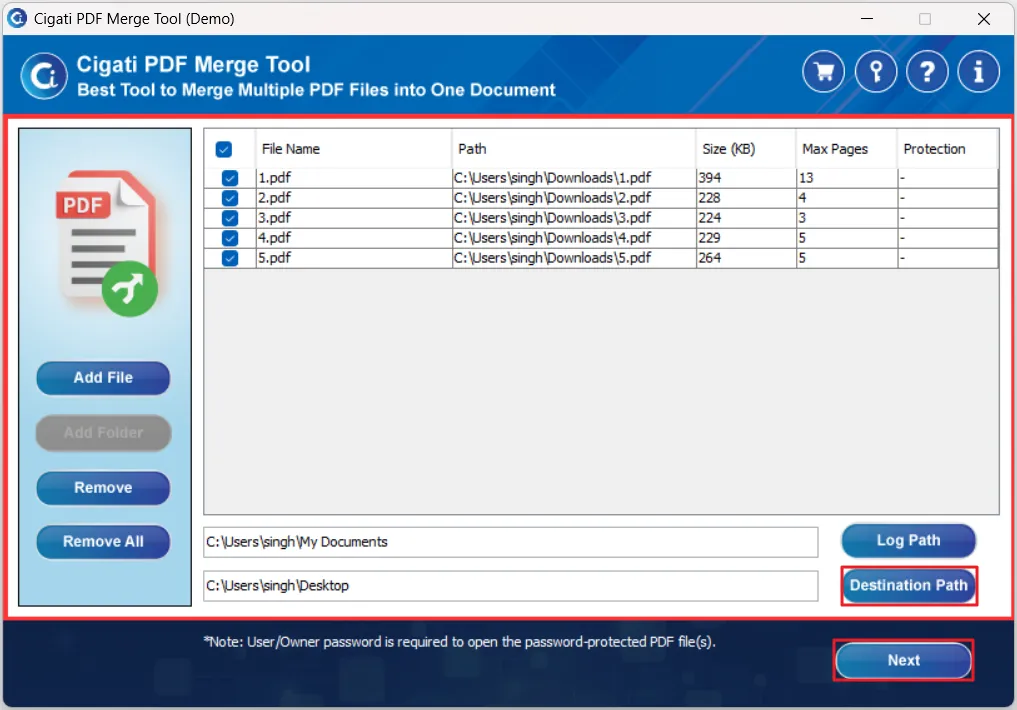
  • Preview file details like name, size, path, and page count before merging.
  • Easily remove unwanted files or clear the entire list before starting.
  • Choose a custom location to save the merged PDF file.
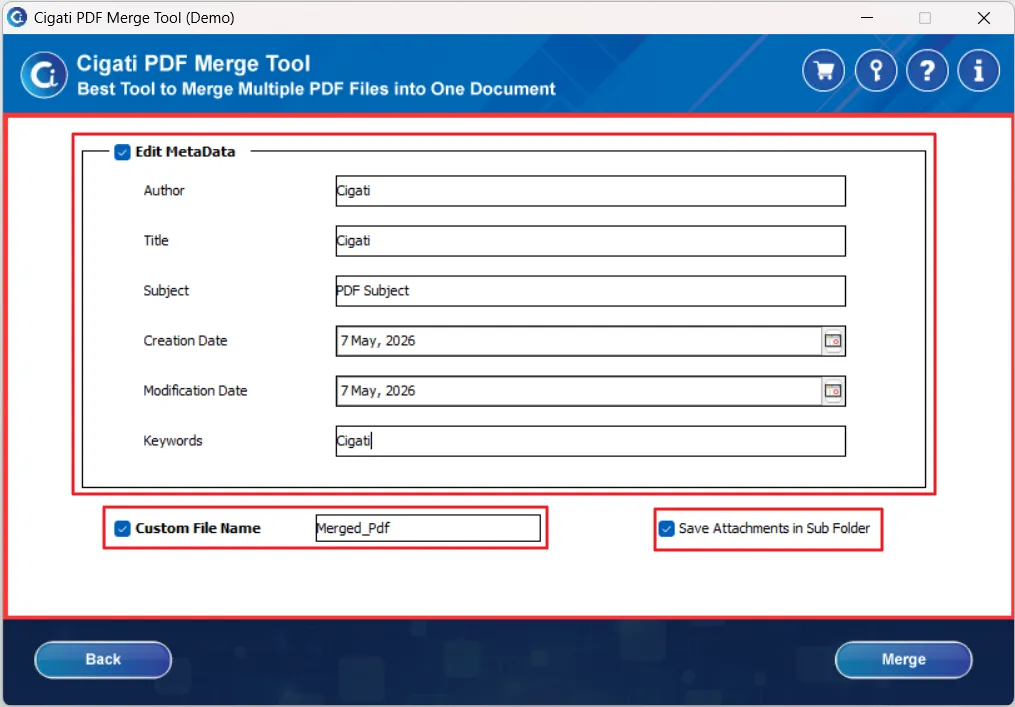
  • Modify PDF metadata, including author, title, subject, and keywords.
  • Extract and save attachments from PDF files into a separate folder.
  • Merge password-protected PDF files by entering the correct password.
  • Ensures complete data integrity while preserving the original formatting and structure.
  • Automatically generate and save a log report to a selected location.
  • Compatible with all major Windows and macOS versions.
benefit-img

Data Security & Integrity Assurance

Ensure complete protection of your documents throughout the merging process. The Cigati PDF Merge Program is built with a security-first architecture that safeguards sensitive data, maintains file integrity, and delivers reliable output without any risk of data exposure or alteration.

High-Speed Processing
Built with an optimized engine to merge multiple PDF files quickly without compromising system performance or output quality.

Zero Data Leakage Architecture
Built with a privacy-first approach, it guarantees complete protection of sensitive and confidential documents throughout the process.

Preserved File Structure
Maintains the original formatting, layout, images, and embedded elements of each PDF file without any distortion.

100% Data Integrity
Ensures that the final merged document is an exact consolidation of input files with no loss, modification, or corruption of content.

PDF Types Supported by PDF Merger Tool

Cigati PDF Merge Software works with all standard PDF formats used across industries. Whether you are handling financial records, legal documents, or internal business files, the tool processes them all into one clean, structured output without data loss or formatting issues.

Invoices & Bills
Merge multiple invoices and billing records into one file for easier payment tracking and cleaner financial records.
Bank Statements
Combine monthly or annual banking records into a single document that is ready to share or archive without opening multiple files.
Credit Card Statements
Bring transaction histories from multiple accounts into one place to make reconciliation and financial review faster.
Educational PDFs
Merge assignments, study guides, and reference material into one file that is easier to review and store.
PDF Magazines & E-books
Compile separate sections of a magazine, e-book, or brochure into one complete, readable document without losing formatting.
HR & Employee Documents
Keep resumes, onboarding files, and training manuals together in one clean record instead of scattered across multiple folders.
Legal & Contractual Files
Merge agreements, contracts, and case files into one complete document to reduce the risk of missing pages during sharing or review.
Reports & Documentation
Combine business reports, whitepapers, and research files from different sources into one final output ready for distribution.

Prominent Features

Cigati PDF Merger Tool

bulk-conversion

Merge Multiple PDF Files

The PDF Merge Tool can merge multiple PDF files into a single document. It does not affect the content of the original file during the process. Whether you are merging two files or twenty, the structure and formatting of each document stays exactly as it was.

pdf

Show PDF File Info

Before the merge runs, the tool displays key details for every file you have selected, including location, file size, total page count, and password status. This gives you a chance to review and confirm your selection before anything gets processed.

edit.svg

Modify PDF Descriptions

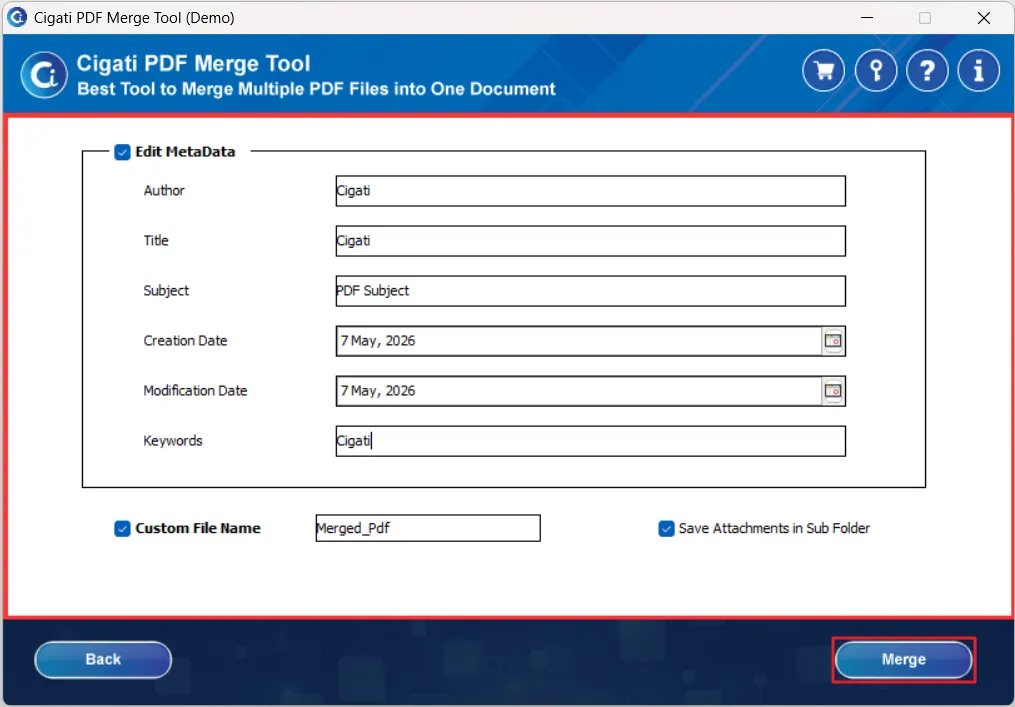
After you select your files, you can set a custom title, author name, subject, and keywords for the output file. If you want to use these exclusive features, you just need to enable the PDF description option. These features help users to track their documents and keep the metadata consistent.

strip-pdf-merge-tool

Merge Encrypted PDF File

The tool supports password-protected PDF files and includes them in the merge without any extra steps beyond entering the password. Once you provide the correct credentials for each protected file, the tool accesses the content and processes it the same way it handles any regular file.

naming-convention

Custom File Naming

When you merge multiple PDF files, the tool lets you assign a specific name to the output file before saving it. Instead of getting a default name like "merged_output_1" or a random string, you can type the name of the file in exactly the name you want the file to be called.

interactive

Interactive User-Interface

The PDF Merger Software interface is clean and does not require any technical knowledge to navigate. Both technical and non-technical users can load files, configure settings, and complete a merge in just a few steps without needing a manual or any outside help.

merge-emails

Reliable Software

The tool is designed to protect your source files throughout the entire merging process. It does not modify, overwrite, or damage the original documents in any way. All content is carried across to the merged output exactly as it exists in the source files, with no data loss, no corruption, and no need to go back and fix anything after the process completes.

support

Widely Supportable

The tool is compatible with all major versions of the Windows operating system, including Windows 7, 10, and 11. You do not need to run compatibility checks before deploying it across different machines in your organization. The performance and output quality remain consistent regardless of which Windows version the system is running.

Technical Specification

Software Prerequisites & Recommendations

Software Name: Cigati PDF Merger Tool
Size for Window: 91 MB
Size for Mac: 23 MB
Version: 22.10
Last Updated: April 2026
Download Link: Download for Win   Download for Mac
Product Box
Electronic delivery, you will receive a Download link with software activation key on email after purchase.

System Requirement for Windows

processor-img

Processor:

Hard Disk:

Memory:

Operating System:

System Requirement for Mac

Processor:

Mac System with Apple Silicon Processor M1, M2, M3, M4, and next-generation series

Hard Disk:

Around 1 GB of free space is needed for installation, and the tool requires at least 5 GB of free space to store data.

Memory:

Minimum 4 GB of RAM is required (8 GB Recommended).

Operating System:

MacOS X 11.0 (Big Sur), MacOS X 12.0 (Monterey), MacOS X 13.0 (Ventura), MacOS X 14 (Sonoma), MacOS X 15.0 (Sequoia), MacOS (10.15 "Catalina") and above versions.

trial-img

Trial limitation:

The trial version of the PDF Merge Tool allows users to merge PDF files with a watermark. To access full features and remove limitations, users must purchase and activate the licensed version.

faq-img

FAQ:

Comprasion Table

Free vs paid version of Cigati PDF Merging Tool

Software Features Free Version Full Version
Add and combine multiple PDF files
Merge unlimited PDF files Limited Unlimited
Edit PDF metadata (author, title, etc.)
Merge PDFs without data loss
Save merged PDF files With watermark Without watermark
Technical Support Priority 24/7 Support
Download and Purchase Download Purchase

FAQ

Frequently Asked Questions

You can easily merge PDF files by clicking on the Add File or Add Folder option to upload documents. After selecting the files, click Next, make any required settings, and then click Merge to combine them into one PDF.

Yes, the tool allows you to upload a complete folder using the Add Folder feature, enabling you to merge multiple PDFs in a single operation.

Yes, you can select or deselect files using checkboxes and arrange them in the desired order before starting the merging process.

Yes, it provides detailed information such as File Name, Path, Size, Number of Pages, and Protection Status so you can verify files before merging.

Yes, the tool supports merging password-protected PDFs. You just need to enter the correct password to access and process such files.

Yes, by enabling the Custom File Name option, you can assign a specific name to the output merged PDF file.

Yes, the Edit Metadata feature lets you modify details such as Author, Title, Subject, Creation Date, Modification Date, and Keywords before merging.

This option allows you to extract and save attachments from PDF files into a separate subfolder during the merging process.

Yes, the software supports batch processing, allowing you to merge multiple PDF files simultaneously.

No, the tool can handle large PDF files efficiently. However, performance may vary depending on your system specifications.

Yes, the tool maintains the original layout, formatting, and structure of all PDF files after merging.

Yes, the tool is completely secure and ensures that your original files remain unchanged during the merging process.

Yes, we understand that some users require the software for a one-time task. Cigati offers special discounts and flexible pricing options for such needs. Contact our support team to learn about the best available deals and offers.

Testimonials

A Glimpse into Client Experiences

Thousands of professionals across legal, financial, and corporate teams have used Cigati PDF Merge Tool to handle their document workflows without running into the usual problems that come with merging files manually.

I handle contracts and case files daily, and errors in merged PDFs are simply not acceptable. Since switching to the Cigati PDF Merge Tool, I haven’t faced a single issue. Page order stays accurate, formatting remains intact, and I can secure files before sharing. It’s a dependable solution I trust for every document.

James Carter | Legal Document Coordinator

We used to spend a lot of time fixing incorrectly merged reports. Now, with Cigati PDF Merge Tool, the process is seamless. Upload, arrange, and merge are done in minutes. No rework, no delays. It has significantly improved our team’s efficiency

Patrick Biar | Finance Operations Analyst

Managing documents for multiple clients can get overwhelming, but this tool makes it easy. I can combine files, organize them, and save everything correctly in one go. The custom naming feature alone is a huge time-saver. It just works smoothly and reliably.

Sandra Müller | Independent Consultant