Key Benefits of
Common User Pain Points:
Cigati’s Intelligent Solutions
One tool, Zero stress, Maximum efficiency - Cigati PST Converter Tool. This is Enterprise Ready Conversion Software with these features:
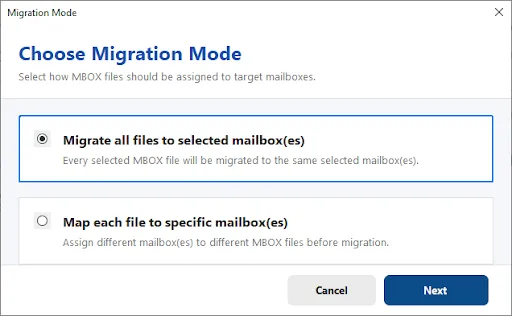
Moving PST files into Microsoft 365 or Google Workspace depends on precise mailbox assignment. Cigati PST File Converter provides several mapping options, giving administrators full control over which files reach which destination accounts.
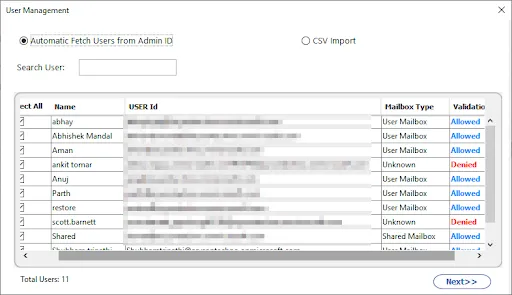
The software pulls user records directly from the connected admin account, including name, user ID, mailbox type, & validation status. A built-in search bar helps locate specific users quickly, and a CSV import option allows administrators to load a predefined list of accounts.
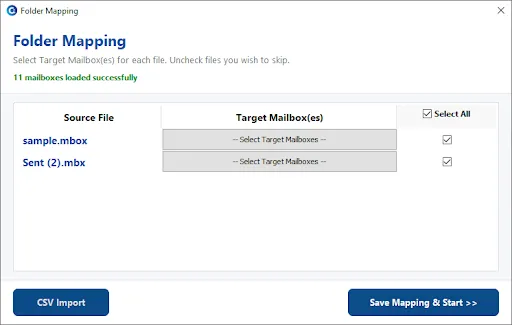
Each source file can be linked to one or more target mailboxes within Microsoft 365. A "Select All" option speeds up bulk assignments, while licensed & unlicensed accounts remain clearly labeled throughout the process. The search bar and CSV import support efficient handling of larger user sets.
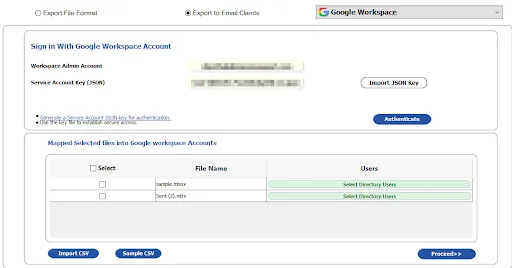
Once JSON key authentication is complete, Workspace accounts appear listed with their corresponding user IDs. Administrators match each MBOX file to the correct Workspace user, and CSV import with ready-made templates simplifies mapping across bulk migrations.
Standout Features of
Cigati PST File Converter Tool helps users convert Outlook PST files into various formats. Save PST to PST, MBOX, EML, MSG, DOCX, PNG, ICS, VCF, PDF, CSV, MD/ Mozilla Thunderbird. Every email’s formatting, metadata, & attachments remain intact during conversion. This allows users to access Outlook data across various platforms, devices, and applications without restrictions.
Before starting PST conversion, the software provides a detailed preview of the PST file. Users can view HTML, attachments, contacts, journals, tasks, calendars, plain text, header, MIME, Raw HTML, & notes in a structured pane. The preview mode also shows metadata such as To, From, Subject, Date, & Size. This makes sure accuracy by helping users verify the content they are converting and letting them select folders, too.
Cigati Software supports batch processing of PST files. If you have single or multiple PSTs stored on your system, this software converts them all in one go. Users can also load entire folders containing multiple PSTs. This eliminates repetitive work & is especially beneficial for administrators and users who manage large email archives.
Cigati PST Migrator enables direct migration of PST files to cloud-based and IMAP-supported platforms. Users can migrate PST to Microsoft 365, Google Workspace, GoDaddy, Outlook.com, & other IMAP Server accounts. Users simply need to authenticate their email account in the software, and all mailbox items are securely migrated without data loss.
This software allows users to extract every email from a PST file & save them collectively in a CSV format. It is especially useful for a structured, searchable, and lightweight version of the entire mailbox. Besides emails, it captures key email attributes like Sender, Recipient, Subject, Date, Message ID, Folder Name, & more.
During PST file conversion or migration, the tool preserves the original folder structure, including subfolders, categories, and labels. It preserves all email properties such as Formatting, Hyperlinks, Inline images, Read/Unread status, & Header data (To, CC, BCC). This makes sure the output file is an accurate reflection of the source PST file, without disturbing any element.
The PST Converter allows users to extract contacts and calendars separately from the PST file. Contacts can be exported to VCF (vCard)/CSV format. On the other hand, Calendar entries can be exported to ICS (iCalendar) format. These formats are compatible with Android, iPhone, & multiple applications, making them ideal for syncing data across devices.
With the advanced built-in filters of the software, you can refine the output. One of them is the Date filter, which lets you convert emails from a specific timeframe. You can also use Detect Duplicate Mails to prevent exporting identical emails by choosing criteria like To, From, Subject, Body, and CC. This helps extract only relevant data and reduce file size.
The software includes three powerful attachment-handling which include merged, include or exclude options. You can backup or migrate emails without attachments, whatever the resultant file is. On the other hand, if you convert PST to PDF, you have two choices: convert attachments to PDF/save them in a separate PDF.
Outlook Email Converter includes an intelligent Skip Previously Migrated feature to prevent the duplication of emails during repeated or incomplete exports. Once you select the option, it automatically detects emails that have already been migrated in earlier sessions. Thus, excludes migrated emails during the new conversion.
The free Outlook PST Converter Software is a demo version that allows users to export the first 50 items per folder. It gives users complete access to all premium features before purchasing. This lets users assess speed, accuracy, and interface performance without limitations. To convert all data from PSTs, upgrade to the licensed version.
Cigati PST File Converter works smoothly on all versions of Windows OS: Windows 11, 10, 8.1, 8, 7, Vista, XP, & Windows Server editions. Moreover, it requires no additional technical components and can be used by beginners, IT teams, & enterprises alike. The processing speed and performance remain unbeatable across all Windows OS.
Technical Specification
| Software Name: | Cigati PST File Converter |
| Version Support: | Windows 11 and its below version |
| Size: | 247 MB |
| Version: | 26.07 |
| License: | Single / Multiple Users |
| Download Link: | Download |
Processor:
Hard Disk:
Memory:
Operating System:
Trial limitation:
The trial version of the software allows converting only the first 50 items per folder. It provides access to all premium features, but upgrading to the full version removes limitations and enables unlimited PST conversions.
Comprasion Table Table of
| Software Features | Free Version | Full Version |
|---|---|---|
| Convert PST to EML, MSG, PST, MBOX, EMLX, HTML, CSV, and many email and non-email formats | Convert 50 Emails per Folder | |
| Export PST to PDF, DOC, DOCX, TIFF, PNG, GIF, JPG | Convert 50 Emails per Folder | |
| Import PST to Gmail, Office 365, AOL, Yahoo, and other IMAP-supported platforms | Convert 50 Emails per Folder | |
| Batch Conversion: Convert Single/Multiple PST Files | ||
| Preview Outlook PST Emails, Attachments, and Metadata | ||
| Converts PSTs of all Sizes, including Large and Oversized Files | ||
| Remove Identical/Duplicate Emails | ||
| Extract all emails in a CSV format | ||
| Date Range Filter for selective data conversion | ||
| Skip Previously Migrated Emails | ||
| Backup/Migrate Emails Without Attachments | ||
| Split Resultant PST File | ||
| Custom Folder name feature | ||
| 24*7 Tech Support & 100% Secure | ||
| Windows OS Compatibility | ||
| Download and Purchase | Download | Purchase |
FAQ
You can follow the below-mentioned steps to convert a PST file to PDF using the Outlook PST File Converter Software.
A PST file can only be opened in the MS Outlook email client. Perhaps, you can open a PST file without Outlook by converting it into other formats like PDF. The Cigati PST Converter Tool offers to convert the Outlook PST files into PDF and other more accessible formats. Therefore, you can easily open these converted files on any platform without the need to open Outlook.
Yes, you can securely import your Outlook PST files into Gmail using this utility. It can import the PST files into the Gmail account mailbox, including all the email items and attachments. Also, it maintains the folder hierarchy throughout the import process.
The Outlook PST Converter Software is a reliable tool that permits users to import PST to Office 365 and other email clients. You can open a PST file in Outlook 365 by importing the PST into the account mailbox. It can be easily done using the PST Exporter Tool without any issues. You only have to choose the Office 365 option from the drop-down and log in to your account, and then the tool will import your PST into the Office 365 account mailbox.
drive:\Users\
drive:\Users\
You will find the Outlook PST file in Windows 10 in one of the above directories.
The PST Converter Tool stores the log and temp files at the below-mentioned default locations.
Log Files - C:\Users\this pc\Documents
Temp Files - C:\Users\this pc\AppData\Local\Temp\
You can easily change the default locations by clicking on the Log Path and Temp Path buttons.