-
Written By Rohit Singh
-
Updated on September 21st, 2023
Efficient Method to Attach MDF File in SQL Server without LDF File
All users know that the Microsoft SQL Server opts for the different file formats, MDF and LDF. MDF file is commonly known as the Master database and the primary file. It usually stores data and schema. When we compare with LDF, Log data files consist of all the database transactions regarding logs. In addition, it also uses to check the logs in a scenario of inaccessibility or corruption. Therefore, users want to attach MDF without LDF file.
This write-up will discuss various ways to attach MDF Database without Log File. Moreover, if in case, you have corrupted or damaged any SQL server files, it is impossible to attach any file to the MS SQL Database. If you want to repair your damaged MDF/LDF/NDF files, opt for the Cigati SQL Recovery Tool. This wizard helps users to recover the maximum corruption possible without losing data.


Without any delay, let’s get started with the solution part.
How to Attach MDF Database File without LDF File?
There are two solutions for attaching SQL Server Database without Log File. Follow the below methods to clear all your doubts.
- Attach MDF File without LDF File with the help of SSMS.
- Through T-SQL script Method.
Now, we will elaborate on each method in detail to have a better understanding in your mind.
Method 1: Attach MDF File Without LDF File With The Help of SSMS
- First, launch SQL Server Management Studio on your local system.
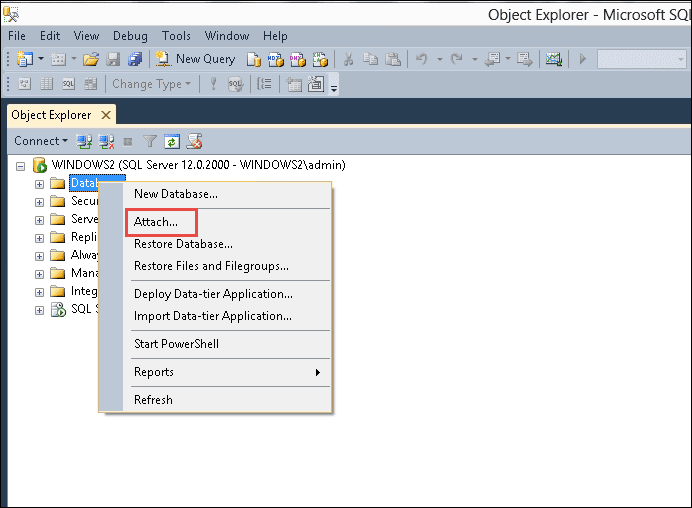
- After that, right-click the Databases under the Object Explorer.
- Then, select the Attach option from the drop-down list.
- Click on the Add button under the Attach Databases Windows.
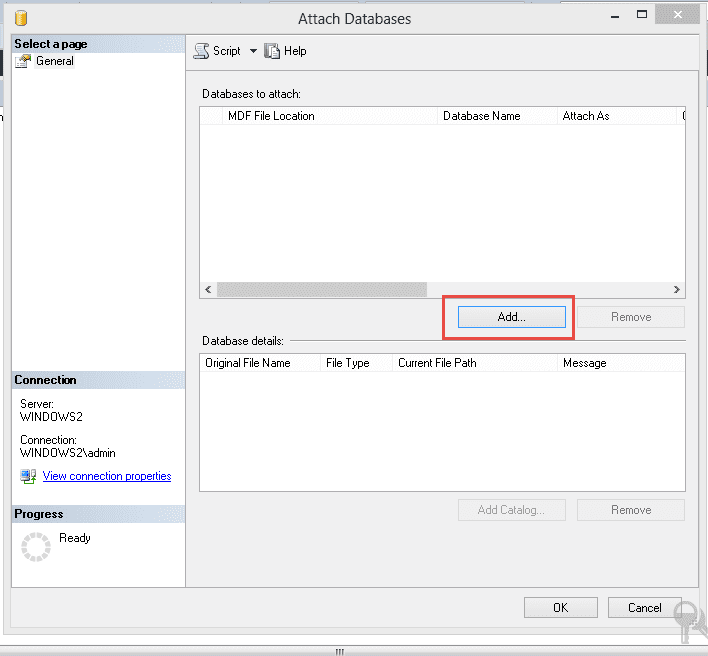
- Moving ahead, highlight the location of the desired MDF file.
- Afterwards, choose the file you want to attach and make sure to click on the OK button.
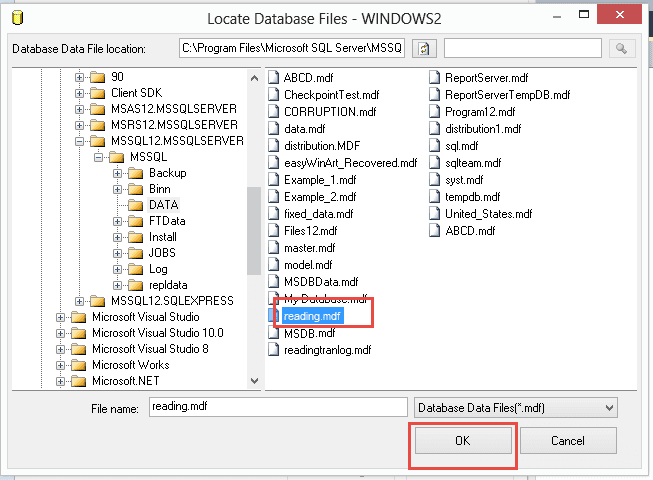
Now, you can see the details of the database in an Attach Database Windows. In addition, it displays that the Log/LDF file is not found.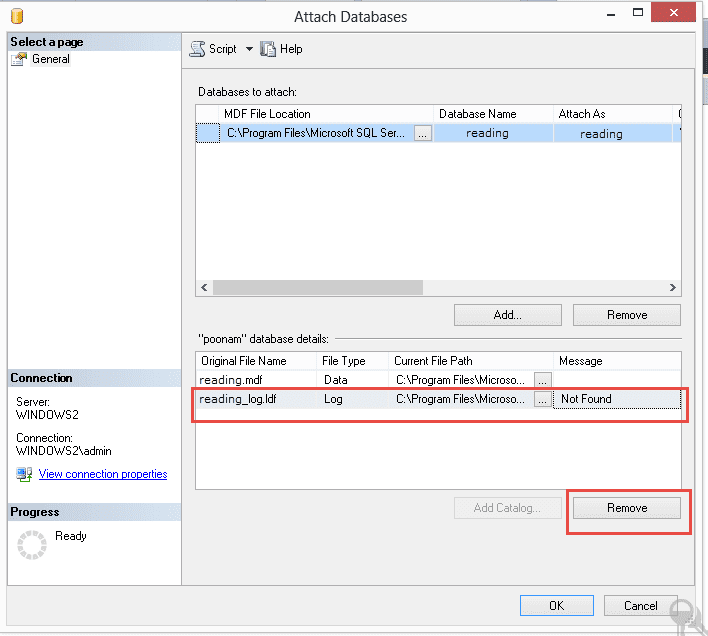
- Here, choose the LDF file and click the Remove button.
- In the end, click the OK button.
It will help to attach MDF without LDF File.
Method 2: Through T-SQL Script Method
Follow the below command to opt for the T-SQL script method:
USE Master
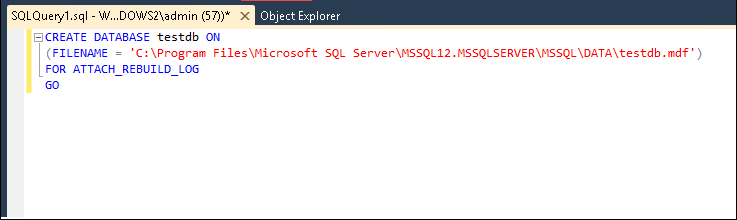
Here, we have mentioned all the possible methods for attaching SQL Server Database without Log File. You can check them out. But make sure to keep one point in your mind the above procedures will only work if the files are healthy. In simple words, files should not be damaged or corrupted. If you want to repair them, we have already mentioned a technique in the starting.
Time to Wrap Up!
Now, the time has come to conclude our complete technical guide. In addition, we hope that you got sufficient information. Moreover, we have mentioned two ways to attach MDF without LDF File in Microsoft SQL Server. You can follow any of the methods.
You May Also Read: Migrate SQL Server to New Server
About The Author:

Rohit Singh is a technology professional with 7+ years of experience specializing in email systems, Exchange Server, Office 365, MS Outlook, and data migration solutions. He creates clear, practical, and solution-oriented content to help users and IT professionals resolve complex technical challenges efficiently.
Related Post